

라즈베리파이 초음파 센서 ( HC-SR04 ) 제어
네오즈 · 2019-09-27 · 6
1. 초음파센서 테스트 회로 구성
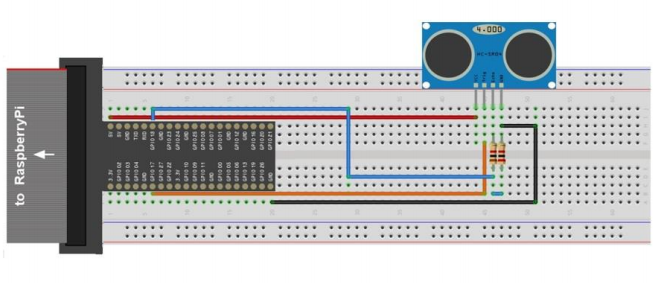
( HC-SR04 초음파 센서 1EA, , 1KΩ 저항 1EA Echo연결, 2KΩ 저항 1EA GND 연결 )
Trig: GPIO 17번 연결, Echo: GPIO 18번 연결
주의사항 : echo 핀에 High level 신호 발생시 5V를 전송 하게 된다. 그러나 라즈베리파이는 3.3V로
작동되므로 라즈베리파이 손상을 방지하기 위해 1KΩ, 2KΩ 저항으로 3.3V로 낮춰줘야 한다.
코드 작성 및 실행 방법은 " 라즈베리파이 GPIO 포트 ( LED, 버튼 ) 제어 " 가이드 참조
2. 초음파센서 테스트 Python 코드
초음파가 물체에 부딪쳐 반사되어 돌아오는데 까지 걸리는 시간을 측정하여 물체의 거리를 계산한다.
import RPi.GPIO as GPIO                    # RPi.GPIO에 정의된 기능을 GPIO라는 명칭으로 사용
import time                                # time 모듈

GPIO.setmode(GPIO.BCM)                     # GPIO 이름은 BCM 명칭 사용
GPIO.setup(17, GPIO.OUT)                   # Trig=17 초음파 신호 전송핀 번호 지정 및 출력지정
GPIO.setup(18, GPIO.IN)                    # Echo=18 초음파 수신하는 수신 핀 번호 지정 및 입력지정

print “Press SW or input Ctrl+C to quit”   # 메세지 화면 출력

try:
    while True:
            GPIO.output(17, False)
            time.sleep(0.5)

            GPIO.output(17, True)          # 10us 펄스를 내보낸다.
            time.sleep(0.00001)            # Python에서 이 펄스는 실제 100us 근처가 될 것이다
            GPIO.output(17, False)         # 하지만 HC-SR04 센서는 이 오차를 받아준다

            while GPIO.input(18) == 0:     # 18번 핀이 OFF 되는 시점을 시작 시간으로 잡는다
               start = time.time()

            while GPIO.input(18) == 1:     # 18번 핀이 다시 ON 되는 시점을 반사파 수신시간으로 잡는다
               stop = time.time()

            time_interval = stop ? start      # 초음파가 수신되는 시간으로 거리를 계산한다
            distance = time_interval * 17000
            distance = round(distance, 2)

            print “Distance => “, distance, “cm”

except KeyboardInterrupt:                  # Ctrl-C 입력 시
    GPIO.cleanup()                         # GPIO 관련설정 Clear
    Print "bye~"
3. 초음파센서 테스트 C코드
#include <stdio.h>                              // stdio.h 파일 포함( printf() 사용하기 위해 )
#include <wiringPi.h>                           // wiringPi.h 파일 포함

int main(void )
{
   Float distance, start, stop;

   wiringPiSetup();
                                                // wiringPi 기준으로 PIN 번호 매김
   pinMode(0, OUTPUT);                          // wiringPi GPIO 0번  = Python(BCM) 17번
   pinMode(1, INPUT);                           // wiringPi GPIO 1번  = Python(BCM) 18번

  while(1)
  {
      digitalWrite(0,0);                        // wiringPi 0번핀을 Low로 출력
      digitalWrite(0,1);                        // wiringPi 0번핀을 High로 출력
      delayMicroseconds(10);                    // 10마이크로초 동안 멈춘다
      digitalWrite(0,0);

      while(digitalRead(1) == 0)                // wiringPi 1번핀을 Low일 경우
         start = micros();                      // 마이크로초 저장
      while(digitalRead(1) == 1)                // wiringPi 1번핀을 High일 경우
         stop = micros();                       // 마이크로초 저장

      distance = (stop ? start) / 58;           // 시간의 차이를 이용하여 거리를 도출한다
      printf(“Distance=> %2f cm \n”,distance);
      delay(1000);
  }

  return 0;
}
6
댓글 0개
등록된 댓글이 없습니다.