[ Basics ] Arduino Practice - Motion Detection Sensor
주피터 · 2019-10-28 · 6
```json
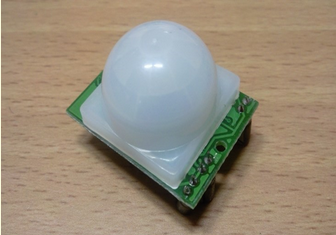
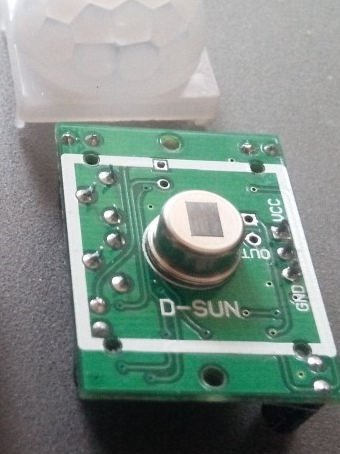
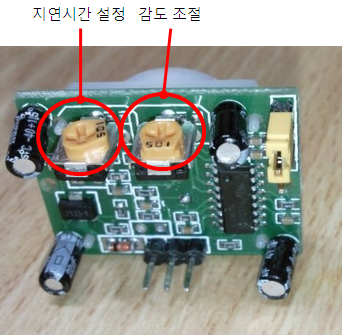
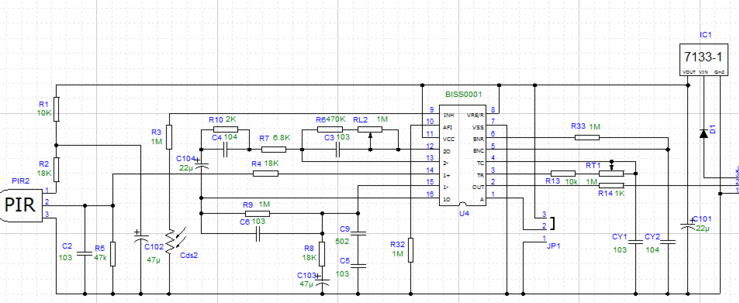
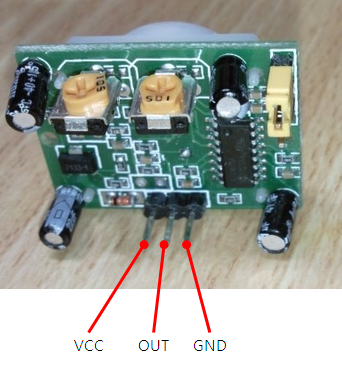
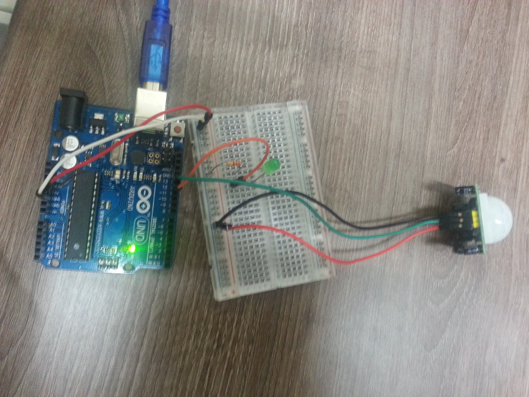
{"time":1717347198592,"blocks":[{"id":"sJi7Q44OiT","type":"paragraph","data":{"text":"Motion Detection Using Human Presence Sensors"}},{"id":"AcG05wGyjJ","type":"paragraph","data":{"text":"Using a Passive Infrared (PIR) sensor, motion can be detected by utilizing the characteristic that human bodies and animals reflect infrared radiation of specific wavelengths well."}},{"id":"KE-KEO4F8G","type":"paragraph","data":{"text":"Supply 5V to the VCC pin, and connect the GND pin to ground. When motion is detected, a pulse is output from the OUT pin."}},{"id":"u_F4gY2v3y","type":"paragraph","data":{"text":"Motion Detection Sensor Module"}},{"id":"MhIM5lVbym","type":"simpleImage","data":{"url":"http://192.168.10.9:3000/img_e4dsmake/ck/PM7UEA1T4DF5WY0PNROM.png","caption":"","withBorder":false,"withBackground":false,"stretched":false}},{"id":"VILr3b7atS","type":"paragraph","data":{"text":" ⓞ Motion Detection Sensor Module"}},{"id":"x8t0vwbVNl","type":"simpleImage","data":{"url":"http://192.168.10.9:3000/img_e4dsmake/ck/RXH8MF6WJ4VIN0SBVMCR.png","caption":"","withBorder":false,"withBackground":false,"stretched":false}},{"id":"CiTsXKCTRr","type":"paragraph","data":{"text":" ⓞ Internal View of Motion Detection Sensor"}},{"id":"p78xfnHPXh","type":"simpleImage","data":{"url":"http://192.168.10.9:3000/img_e4dsmake/ck/MKZC7VA7JCNWHR0DPDKU.png","caption":"","withBorder":false,"withBackground":false,"stretched":false}},{"id":"d2CvkF33tD","type":"paragraph","data":{"text":" ⓞ Variable Resistor for Delay Time and Sensitivity Adjustment"}},{"id":"I8su7KcyH-","type":"simpleImage","data":{"url":"http://192.168.10.9:3000/img_e4dsmake/ck/1UOT8AI1JTTXU4GHTHPX.png","caption":"","withBorder":false,"withBackground":false,"stretched":false}},{"id":"2JgApKHLUJ","type":"paragraph","data":{"text":" ⓞ Internal Circuit Configuration"}},{"id":"OeYa6aUGZc","type":"simpleImage","data":{"url":"http://192.168.10.9:3000/img_e4dsmake/ck/Z2VNJ7EMA3AFL5F8KCZG.png","caption":"","withBorder":false,"withBackground":false,"stretched":false}},{"id":"G_7vop4bJF","type":"paragraph","data":{"text":" ⓞ Pin Configuration"}},{"id":"Gx5dUU-92A","type":"paragraph","data":{"text":"Circuit Configuration"}},{"id":"rrzYAntIq9","type":"simpleImage","data":{"url":"http://192.168.10.9:3000/img_e4dsmake/ck/TS0B76JZLZGJH1A05TXS.png","caption":"","withBorder":false,"withBackground":false,"stretched":false}},{"id":"ZYOUXv1RGb","type":"paragraph","data":{"text":" ⓞ Circuit Configuration Photo"}},{"id":"MZWSpn8tvg","type":"paragraph","data":{"text":"Sketch Writing"}},{"id":"mAK3pfV45O","type":"code","data":{"code":"#define LED 12\n#define PIR 13\n\nvoid setup()\n{\n pinMode(LED, OUTPUT);\n pinMode(PIR, INPUT);\n}\n\nvoid loop()\n{\n int value = digitalRead(PIR);\n\n if(value == HIGH){\n digitalWrite(LED, HIGH);\n delay(500);\n digitalWrite(LED, LOW);\n }\n}"}}],"version":"2.30.5"}
```
6
댓글 3개
- 주피터스스로의 글도 포함인가
- 주피터어쨌든 댓글
- 주피터어쨌든 댓글2