

[로봇팔 제어 프로젝트 2] 디지털 입력을 이용한 PWM 서보모터 제어
· 2019-11-13 · 6
본 실습을 통해 디지털 입력과 서보모터의 동작의 관계를 이해한다.
준비물 : Arduino, 서브모터 1개, 버튼 2개 내용 : Arduino Uno를 이용하여 서브모터를 버튼 2개로 제어한다. 전원을 연결하게 되면 서브 모터는 90도에 맞춰 움직인 후 입력을 기다리는 상태가 된다. 동작은 다음과 같다. -1번 버튼 입력 => +15도 회전 -2번 버튼 입력 => -15도
회로 연결은 다음과 같다.
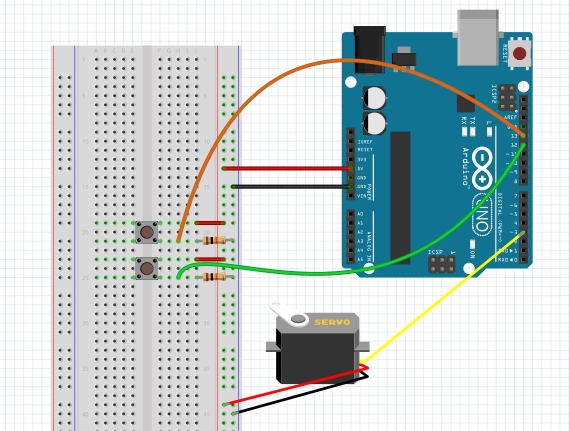
실제 사용한 버튼은 3핀(VCC, GND, PIN)으로 구성되어 있으나, fritzing에는 3핀 형식의 버튼이 없어 일반적으로 사용하는 버튼을 이용하여 회로를 구성하였다. 2개의 버튼을 12, 13번 입출력핀에 연결하였고, 서보모터의 입출력핀은 3번핀에 연결하였다.
일반적인 버튼을 사용할 경우 풀 다운 저항을 사용하여 버튼의 플로팅 상태를 방지할 수 있다. 보통 10K 저항을 사용하여 입출력핀과 서보모터가 연결되어 있는 지점에 저항을 이용하여 GND로 연결해 준다.
*플로팅 상태 : 버튼의 입력 전압이 빠져나가지 못하고 붕 떠있는 상태
#include <Servo.h> //헤어파일 포함
Servo myservo; //myservo 변수 선언
int pos = 90; //초기 각도값 설정

void setup() {
  myservo.attach(3); //서보모터의 입출력핀을 3번 핀으로 지정
  pinMode(12,INPUT); //1번 버튼의 디지털 입력으로 사용
  pinMode(13,INPUT); //2번 버튼의 디지털 입력으로 사용
  myservo.write(90); //전원이 연결되면 서보모터 90도에 맞춰 입력 대기
  delay(500);
  Serial.begin(9600); //시리얼 모니터 사용
}

void loop() {
  if(digitalRead(12) == HIGH) //1번 버튼을 누를 경우
  {
  pos = pos + 15; //+15도 회전
  Serial.println("HIGH12"); //시리얼 모니터에 HIGH12를 출력
 delay(50);
  }
  if(digitalRead(13) == HIGH) //2번 버튼을 누를 경우
  {
 pos = pos - 15; //-15도 회전
  Serial.println("HIGH13"); //시리얼 모니터에 HIGH13를 출력
  delay(50);
  }

  if(pos < 0) //서보모터의 각도가 0도 보다 작아질 경우
  pos = 0; //서보모터 0도 고정
  if(pos > 180) //서보모터의 각도가 180도 보다 커질 경우
  pos = 180; //서보모터 180도 고정
  myservo.write(pos); //pos값에 맞춰 서보모터 회전
  delay(15);
}
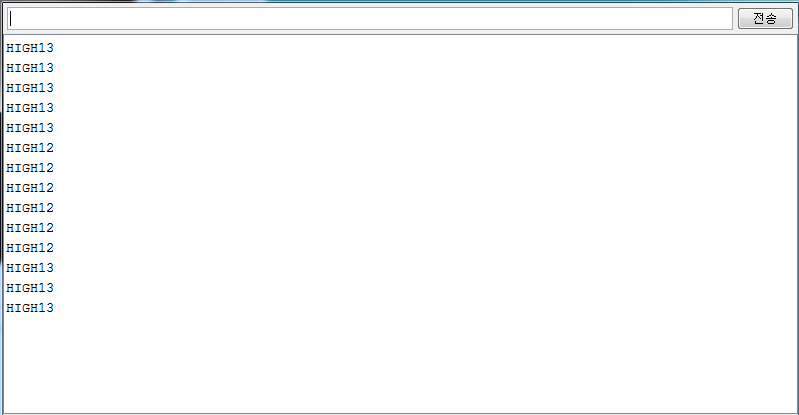
버튼의 입력을 모니터로 확인하기 위해 시리얼 모니터에 버튼의 입력에 따른 표시를 'HIGH12', 'HIGH13'으로 출력하였다.
시리얼 모니터 결과는 다음과 같다.
동작영상은 다음과 같다.
6
댓글 0개
등록된 댓글이 없습니다.