Raspberry Pi LINUX Basics
네오즈 · 2019-09-26 · 4
```json
{
"time": 1717347260732,
"blocks": [
{
"id": "WM4Ql3wNKX",
"type": "headerAlign",
"data": {
"text": "1. Linux Command Basics",
"level": 3,
"alignment": "left"
}
},
{
"id": "W4x-hoyqH8",
"type": "paragraph",
"data": {
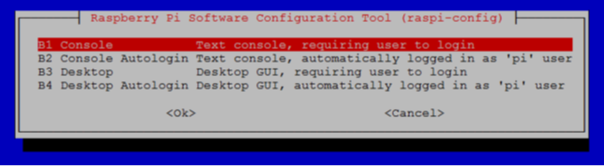
"text": "To understand the concepts and conduct practical exercises, connect a keyboard and monitor to the Raspberry Pi and power it on. Once booting is complete, open a terminal and run raspi-config to select the Boot Option as the first option, 'B1. Console Text console, requiring user to login', exit the configuration, and then reboot the Raspberry Pi."
}
},
{
"id": "gri6d3Epek",
"type": "simpleImage",
"data": {
"url": "http://192.168.10.9:3000/img_e4dsmake/ck/VU8O7TEVK9W4RVNFIYUZ.png",
"caption": "",
"withBorder": false,
"withBackground": false,
"stretched": false
}
},
{
"id": "HbAIg-KWCF",
"type": "headerAlign",
"data": {
"text": "1.0 Virtual Terminal",
"level": 3,
"alignment": "left"
}
},
{
"id": "iSogVY9XX6",
"type": "paragraph",
"data": {
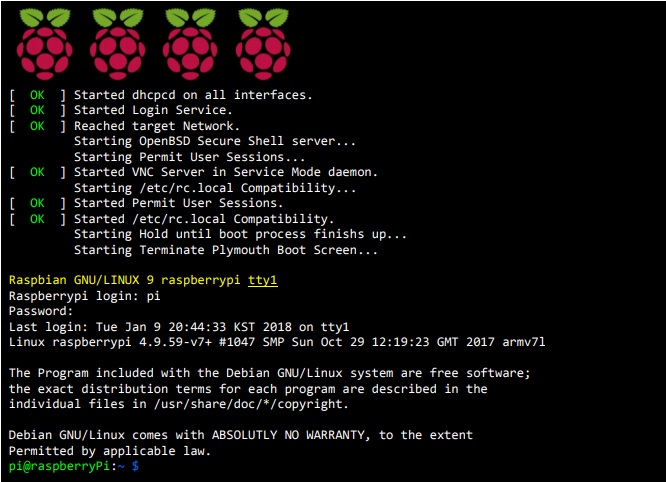
"text": "The following shows the content displayed on the Raspberry Pi screen immediately after booting in CLI (Command Line Interface) mode."
}
},
{
"id": "Kk0Kg_NLed",
"type": "simpleImage",
"data": {
"url": "http://192.168.10.9:3000/img_e4dsmake/ck/0QO07YXSJ4Z3DNQ3RHC6.jpg",
"caption": "",
"withBorder": false,
"withBackground": false,
"stretched": false
}
},
{
"id": "Jb_UHIzNx6",
"type": "paragraph",
"data": {
"text": "Looking at the text string highlighted in yellow:"
}
},
{
"id": "eXgPsz3Hpg",
"type": "paragraph",
"data": {
"text": "\"Raspbian GNU/LINUX 9\" indicates the type and version of Linux currently running, and \"raspberrypi tty1\" represents the corresponding terminal. ( tty: teletypewriter )"
}
},
{
"id": "0kBUfz2wHM",
"type": "paragraph",
"data": {
"text": "In essence, this means that \"Raspbian GNU/LINUX 9 (Raspbian Stretch 9)\" Linux is running on the \"raspberrypi tty1\" terminal, and the line below shows the process of logging into the Raspberry Pi by entering the login account and password on that terminal. As indicated by the appearance of the prompt on the final line, the login was successful."
}
},
{
"id": "9Ub2vLqTqc",
"type": "paragraph",
"data": {
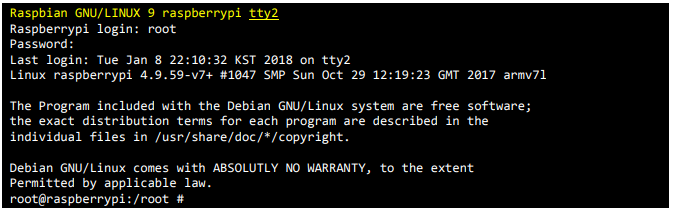
"text": "To log into the Raspberry Pi through another terminal from the current state, press \"Alt + F2\" on the keyboard and the following screen will appear."
}
},
{
"id": "2boRdNww3g",
"type": "simpleImage",
"data": {
"url": "http://192.168.10.9:3000/img_e4dsmake/ck/XPLQMVH1VWIZB1WKG572.png",
"caption": "",
"withBorder": false,
"withBackground": false,
"stretched": false
}
},
{
"id": "m7ZozGgZTS",
"type": "paragraph",
"data": {
"text": "Again, looking at the text string highlighted in yellow, you can see that this time \"Raspbian GNU/LINUX 9\" Linux is running on the \"raspberrypi tty2\" terminal."
}
},
{
"id": "YnALAe7tdT",
"type": "paragraph",
"data": {
"text": "To return to the \"raspberrypi tty1\" terminal where you logged in first, press \"Alt + F1\"."
}
},
{
"id": "8zaP6IA_TE",
"type": "paragraph",
"data": {
"text": "There are a total of 5 virtual terminals that can be opened without any additional work, and you can open the ttyn virtual terminal with \"Alt + Fn\"."
}
},
{
"id": "7Igq9sJJNW",
"type": "paragraph",
"data": {
"text": "( n = 2, 3, 4, 5, 6 )"
}
},
{
"id": "VerG4MqYuf",
"type": "paragraph",
"data": {
"text": "The tty1 terminal is not a virtual terminal. The directly connected keyboard and monitor console becomes the tty1 terminal."
}
},
{
"id": "kmL0GKNfH5",
"type": "headerAlign",
"data": {
"text": "1.1 User Account-Related Commands",
"level": 3,
"alignment": "left"
}
},
{
"id": "eWkwU3i4Ya",
"type": "paragraph",
"data": {
"text": "A user account in Unix or Linux systems refers to a Login Name for user authentication issued by an administrator to use the computer, along with the working space on disk that is created simultaneously."
}
},
{
"id": "XNmBlcAvxD",
"type": "paragraph",
"data": {
"text": "Since it is a Multi-User Network Operating System (Network OS), this account is a very important concept. Accounts can be broadly divided into regular user accounts and administrator accounts. In the case of \"Raspberry Pi,\" it comes with a basic user account 'pi' and an administrator account 'root' pre-created."
}
},
{
"id": "XS2q175AoC",
"type": "headerAlign",
"data": {
"text": "who",
"level": 4,
"alignment": "left"
}
},
{
"id": "7X-puaiEqQ",
"type": "paragraph",
"data": {
"text": "Displays information about users logged into the host."
}
},
{
"id": "MGQhff10Jd",
"type": "simpleImage",
"data": {
"url": "http://192.168.10.9:3000/img_e4dsmake/ck/KM7O4AMHWNMI4HY9R4OI.png",
"caption": "",
"withBorder": false,
"withBackground": false,
"stretched": false
}
},
{
"id": "CGCtrHixPh",
"type": "paragraph",
"data": {
"text": "Currently, only two users, \"pi\" and \"root,\" are logged onto this system. \"pi\" logged on from the tty1 terminal, and \"root\" logged on from the tty2 terminal."
}
},
{
"id": "RjnhqnxQL9",
"type": "headerAlign",
"data": {
"text": "whoami",
"level": 4,
"alignment": "left"
}
},
{
"id": "CXPHvenArb",
"type": "paragraph",
"data": {
"text": "Displays the currently logged-in user ID."
}
},
{
"id": "LdkFsfXehy",
"type": "simpleImage",
"data": {
"url": "http://192.168.10.9:3000/img_e4dsmake/ck/HPC1TRDRLYMRNZ2YO6WL.png",
"caption": "",
"withBorder": false,
"withBackground": false,
"stretched": false
}
},
{
"id": "E2xnPAIWv1",
"type": "paragraph",
"data": {
"text": "Press \"Alt + F2\" on the keyboard to switch to the tty2 virtual terminal screen, then execute the \"whoami\" command."
}
},
{
"id": "IapZDX1Tg6",
"type": "simpleImage",
"data": {
"url": "http://192.168.10.9:3000/img_e4dsmake/ck/X0NGLKPMIQHHGMVCZWXU.png",
"caption": "",
"withBorder": false,
"withBackground": false,
"stretched": false
}
},
{
"id": "YxA3WEV9FM",
"type": "paragraph",
"data": {
"text": "The following shows the process of changing the root account password."
}
},
{
"id": "TNbyaXFSlz",
"type": "simpleImage",
"data": {
"url": "http://192.168.10.9:3000/img_e4dsmake/ck/RSHITM58JX1CAYL88FHO.png",
"caption": "",
"withBorder": false,
"withBackground": false,
"stretched": false
}
},
{
"id": "i8MIDJY8Ds",
"type": "paragraph",
"data": {
"text": "First, let's look at the prompt (a character string displayed before the line indicating readiness to accept commands, which displays simple information)."
}
},
{
"id": "lp0AAh6ae0",
"type": "simpleImage",
"data": {
"url": "http://192.168.10.9:3000/img_e4dsmake/ck/QP4AAVMDOYYVX3ROY2ZW.png",
"caption": "",
"withBorder": false,
"withBackground": false,
"stretched": false
}
},
{
"id": "vgk9f99XZu",
"type": "paragraph",
"data": {
"text": "The information displayed by this prompt is:"
}
},
{
"id": "bXfV8E66Nx",
"type": "list",
"data": {
"style": "ordered",
"items": [
"Logged in with the user name (username) \"pi\",",
"The name of the logged-in computer (hostname) is \"raspberryPi\"."
]
}
},
{
"id": "vpGHgXMqTa",
"type": "paragraph",
"data": {
"text": "You can also infer that \"pi\" is a regular user account, since the administrator account name of every LINUX or UNIX computer is \"root\". Let's change the password for the \"root\" account using the password change command \"passwd\"."
}
},
{
"id": "AJNyxQ6v3j",
"type": "simpleImage",
"data": {
"url": "http://192.168.10.9:3000/img_e4dsmake/ck/CRBRTDMM4XTSNLCPJ7X3.png",
"caption": "",
"withBorder": false,
"withBackground": false,
"stretched": false
}
},
{
"id": "_HovZiW8FH",
"type": "paragraph",
"data": {
"text": "A permission error occurred with the message \"You cannot view or change the password information for the 'root' account.\" One way to solve this problem is to use the \"sudo\" command."
}
},
{
"id": "ScfORUjiCP",
"type": "headerAlign",
"data": {
"text": "sudo",
"level": 4,
"alignment": "left"
}
},
{
"id": "bj0rRvR4Qd",
"type": "paragraph",
"data": {
"text": "sudo (substitution do): Execute on behalf of (an administrator)."
}
},
{
"id": "lU0D-Whzcd",
"type": "paragraph",
"data": {
"text": "'sudo' is not a command executed on its own. It is used by prefixing it to a command when administrator (root) privileges are required to execute that command. (The account must belong to the sudo group to use it.)"
}
},
{
"id": "XJL5nt_QYP",
"type": "simpleImage",
"data": {
"url": "http://192.168.10.9:3000/img_e4dsmake/ck/6K84DRKOFS0RWBRT6K6G.png",
"caption": "",
"withBorder": false,
"withBackground": false,
"stretched": false
}
},
{
"id": "PFaeCS8Mc8",
"type": "paragraph",
"data": {
"text": "Instead of an error message, a message asking you to enter a new password appears. When you enter the password to change and press the Enter key:"
}
},
{
"id": "L0pvkPh4jS",
"type": "simpleImage",
"data": {
"url": "http://192.168.10.9:3000/img_e4dsmake/ck/TTU4YG26NTTQ1V9X14UA.png",
"caption": "",
"withBorder": false,
"withBackground": false,
"stretched": false
}
},
{
"id": "co3gllfJbH",
"type": "paragraph",
"data": {
"text": "A message asking you to enter the password to change once more appears. When you enter the new password to use and press Enter again, a message indicating that the password update (change) was successful is displayed, and the prompt appears."
}
},
{
"id": "CvmdgUQQ2V",
"type": "simpleImage",
"data": {
"url": "http://192.168.10.9:3000/img_e4dsmake/ck/PA6ZTFEKHESOOKDV7SJ1.png",
"caption": "",
"withBorder": false,
"withBackground": false,
"stretched": false
}
},
{
"id": "apOb5jGz8r",
"type": "headerAlign",
"data": {
"text": "su",
"level": 4,
"alignment": "left"
}
},
{
"id": "b4N7wxH667",
"type": "paragraph",
"data": {
"text": "Another way to change the root account password is to use the \"su\" command. With the \"su\" command, you can log in as a regular user and temporarily execute superuser (Super User - root) commands without logging out. Now let's change the root account password."
}
},
{
"id": "kMag20dgKh",
"type": "paragraph",
"data": {
"text": "When executed, it will prompt for password entry (root account password) as follows."
}
},
{
"id": "jXY-MvlFLk",
"type": "simpleImage",
"data": {
"url": "http://192.168.10.9:3000/img_e4dsmake/ck/N9NBMNWK12P4MTC0UPAI.png",
"caption": "",
"withBorder": false,
"withBackground": false,
"stretched": false
}
},
{
"id": "tq68iYpptc",
"type": "paragraph",
"data": {
"text": "When you enter the root password and press Enter, a prompt for logging in as root appears as shown below."
}
},
{
"id": "NgXbmKV4MF",
"type": "simpleImage",
"data": {
"url": "http://192.168.10.9:3000/img_e4dsmake/ck/1TXL6MYLDTF5ZFE0A248.png",
"caption": "",
"withBorder": false,
"withBackground": false,
"stretched": false
}
},
{
"id": "r-xPI8asVj",
"type": "paragraph",
"data": {
"text": "When you enter \"passwd\" and press Enter, a message asking you to enter a new password appears as shown below. Enter the new password and press Enter."
}
},
{
"id": "KSsDg7Oc5L",
"type": "simpleImage",
"data": {
"url": "http://192.168.10.9:3000/img_e4dsmake/ck/JJYX1LFSV0ITCDITGT0W.png",
"caption": "",
"withBorder": false,
"withBackground": false,
"stretched": false
}
},
{
"id": "qRhRosm8vo",
"type": "paragraph",
"data": {
"text": "When you enter the password and press the Enter key, a message asking you to enter the password to change once more appears."
}
},
{
"id": "_KwMHFfSCX",
"type": "simpleImage",
"data": {
"url": "http://192.168.10.9:3000/img_e4dsmake/ck/1HWQMQACQVROR1R7U30M.png",
"caption": "",
"withBorder": false,
"withBackground": false,
"stretched": false
}
},
{
"id": "lGoytgSwZJ",
"type": "paragraph",
"data": {
"text": "When you enter the root password and press Enter once again, a prompt for logging in as root appears as shown below."
}
},
{
"id": "wOhKGn8hMx",
"type": "simpleImage",
"data": {
"url": "http://192.168.10.9:3000/img_e4dsmake/ck/5OQ1FDCIFBSF5W4EDZQ9.png",
"caption": "",
"withBorder": false,
"withBackground": false,
"stretched": false
}
},
{
"id": "Prt0SBDpY4",
"type": "paragraph",
"data": {
"text": "To return to the state before executing the \"su\" command where the user \"pi\" is logged in, enter the \"exit\" command and press Enter."
}
},
{
"id": "UxUtzdno5S",
"type": "simpleImage",
"data": {
"url": "http://192.168.10.9:3000/img_e4dsmake/ck/0A7QYS4ZD8VPHD8F9L7W.png",
"caption": "",
"withBorder": false,
"withBackground": false,
"stretched": false
}
},
{
"id": "Zah8fHBuN9",
"type": "paragraph",
"data": {
"text": "The \"exit\" message is displayed, and the prompt showing you are logged in as \"pi\" appears."
}
},
{
"id": "SqBTqI9NCP",
"type": "simpleImage",
"data": {
"url": "http://192.168.10.9:3000/img_e4dsmake/ck/B68PY1JAUKIWTOI5FT7Y.png",
"caption": "",
"withBorder": false,
"withBackground": false,
"stretched": false
}
},
{
"id": "KNF0DW65MF",
"type": "headerAlign",
"data": {
"text": "passwd",
"level": 4,
"alignment": "left"
}
},
{
"id": "vTQbEBd-v3",
"type": "paragraph",
"data": {
"text": "A command to change a user's login password. When used alone as follows, it changes the password of the currently logged-in user."
}
},
{
"id": "D6qPdGdzFy",
"type": "simpleImage",
"data": {
"url": "http://192.168.10.9:3000/img_e4dsmake/ck/Y6BZD0YVNL1C841W8DN8.png",
"caption": "",
"withBorder": false,
"withBackground": false,
"stretched": false
}
},
{
"id": "mFj_yC8EVf",
"type": "paragraph",
"data": {
"text": "A message indicating that the password for \"pi\" is being changed appears, along with a prompt to enter the currently used password. Here, when you enter the new password to use and press Enter, the following prompt for entering the new password to use appears:"
}
},
{
"id": "Xp27od0h_n",
"type": "simpleImage",
"data": {
"url": "http://192.168.10.9:3000/img_e4dsmake/ck/052VD3DQOOEDRN4QC8Q1.png",
"caption": "",
"withBorder": false,
"withBackground": false,
"stretched": false
}
},
{
"id": "3PUteCnnXN",
"type": "paragraph",
"data": {
"text": "When you enter the new password and press Enter, a message asking for re-entry of the new password appears."
}
},
{
"id": "Z35DYIXKAO",
"type": "simpleImage",
"data": {
"url": "http://192.168.10.9:3000/img_e4dsmake/ck/O2KDR203SP7HYQY07I9I.png",
"caption": "",
"withBorder": false,
"withBackground": false,
"stretched": false
}
},
{
"id": "PTFMDKupkn",
"type": "paragraph",
"data": {
"text": "When you enter the new password you entered and press Enter once more, a message indicating that the password update (change) was successful is displayed, and the prompt appears again."
}
},
{
"id": "tR_35XjUfT",
"type": "simpleImage",
"data": {
"url": "http://192.168.10.9:3000/img_e4dsmake/ck/32UXYZOO4IFPJZ5L1966.png",
"caption": "",
"withBorder": false,
"withBackground": false,
"stretched": false
}
},
{
"id": "b4W_vtLW_d",
"type": "headerAlign",
"data": {
"text": "logout",
"level": 4,
"alignment": "left"
}
},
{
"id": "awnKM3Px3t",
"type": "paragraph",
"data": {
"text": "In Unix or Linux, which are network operating systems, you must go through a login process to use the computer. The logout command is used to exit from this login process. (For remote login via putty, use exit instead of logout.)"
}
},
{
"id": "EICW5hUF4T",
"type": "paragraph",
"data": {
"text": "1.2 File and Directory-Related Commands"
}
},
{
"id": "llmCYG6_tA",
"type": "paragraph",
"data": {
"text": "A directory is a concept identical to a folder in MS-Windows and refers to a logical space in the file system where files are organized according to certain criteria."
}
},
{
"id": "On2N6F9mdF",
"type": "headerAlign",
"data": {
"text": "pwd (print working directory)",
"level": 4,
"alignment": "left"
}
},
{
"id": "JhRVRKNSEo",
"type": "paragraph",
"data": {
"text": "Displays the current user's path."
}
},
{
"id": "F8LjQGYl5L",
"type": "simpleImage",
"data": {
"url": "http://192.168.10.9:3000/img_e4dsmake/ck/YBGVXPP4D4IOYV5K5R42.png",
"caption": "",
"withBorder": false,
"withBackground": false,
"stretched": false
}
},
{
"id": "76CtpHhaer",
"type": "headerAlign",
"data": {
"text": "ls",
"level": 4,
"alignment": "left"
}
},
{
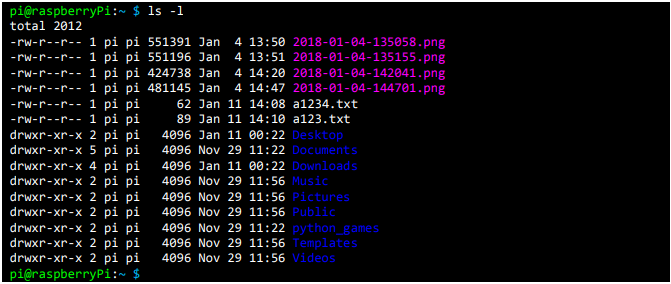
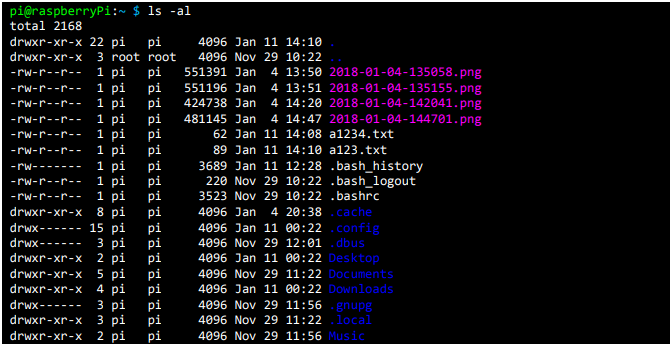
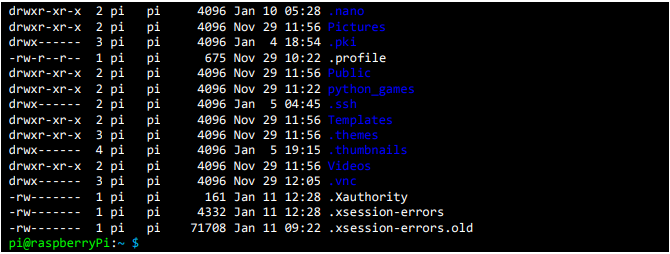
"id": "JUJ-QBcGfC",
"type": "headerAlign",
"data": {
"text": "When used alone, displays a list of files and directories at the current location on the screen. When a specific directory location is specified after the command, displays a list of files and directories in that directory on the screen.",
"level": 4,
"alignment": "left"
}
},
{
"id": "7s0HlJjkgi",
"type": "simpleImage",
"data": {
"url": "http://192.168.10.9:3000/img_e4dsmake/ck/B15FGLKWZIOBQGFMFQZ2.png",
"caption": "",
"withBorder": false,
"withBackground": false,
"stretched": false
}
},
{
"id": "avdJSHQ1GT",
"type": "paragraph",
"data": {
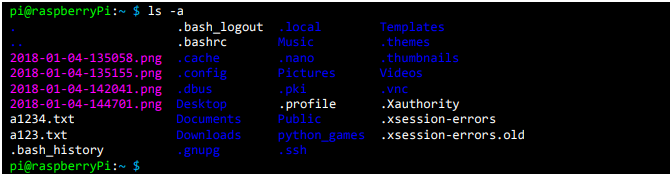
"text": "With -a option applied:"
}
},
{
"id": "1XApkpqu5b",
"type": "simpleImage",
"data": {
"url": "http://192.168.10.9:3000/img_e4dsmake/ck/JAG7XN1PVSXAMBFT6D4D.png",
"caption": "",
"withBorder": false,
"withBackground": false,
"stretched": false
}
},
{
"id": "4drli-RvTW",
"type": "paragraph",
"data": {
"text": "With -l option applied:"
}
},
{
"id": "oJTs-l0aVv",
"type": "simpleImage",
"data": {
"url": "http://192.168.10.9:3000/img_e4dsmake/ck/KZ2935IG66ZIT85AW0WX.png",
"caption": "",
"withBorder": false,
"withBackground": false,
"stretched": false
}
},
{
"id": "Iq5L_lvbl8",
"type": "paragraph",
"data": {
"text": "With -al option applied:"
}
},
{
"id": "dis9_t4uob",
"type": "simpleImage",
"data": {
"url": "http://192.168.10.9:3000/img_e4dsmake/ck/P0ODY0L3HO7T2WT7B654.png",
"caption": "",
"withBorder": false,
"withBackground": false,
"stretched": false
}
},
{
"id": "INTiSBCXhR",
"type": "simpleImage",
"data": {
"url": "http://192.168.10.9:3000/img_e4dsmake/ck/XWHKGAHA6LCHOBRSEHO7.png",
"caption": "",
"withBorder": false,
"withBackground": false,
"stretched": false
}
},
{
"id": "VWfKFhmrjQ",
"type": "headerAlign",
"data": {
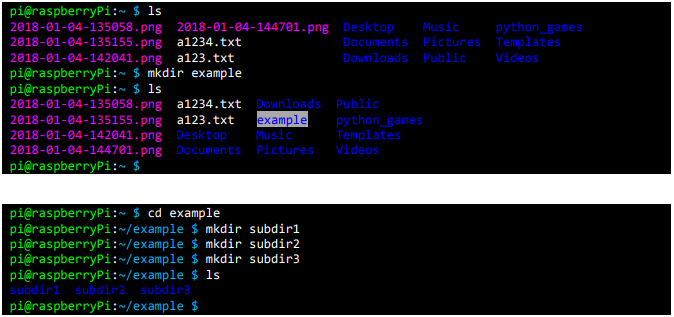
"text": "mkdir (make directory)",
"level": 4,
"alignment": "left"
}
},
{
"id": "WyPEXjgge0",
"type": "headerAlign",
"data": {
"text": "Create a directory",
"level": 4,
"alignment": "left"
}
},
{
"id": "M5Wkzt4EDU",
"type": "simpleImage",
"data": {
"url": "http://192.168.10.9:3000/img_e4dsmake/ck/L1FKZ7DSHFRM9IDJDR7D.png",
"caption": "",
"withBorder": false,
"withBackground": false,
"stretched": false
}
},
{
"id": "diS42givoY",
"type": "headerAlign",
"data": {
"text": "rmdir (remove directory)",
"level": 4,
"alignment": "left"
}
},
{
"id": "D1aN_pt52I",
"type": "paragraph",
"data": {
"text": "Delete a directory."
}
},
{
"id": "vRi0EHyR-G",
"type": "simpleImage",
"data": {
"url": "http://192.168.10.9:3000/img_e4dsmake/ck/K0YQ804ZHRO350J1W0W2.png",
"caption": "",
"withBorder": false,
"withBackground": false,
"stretched": false
}
},
{
"id": "flD0EAHs7-",
"type": "headerAlign",
"data": {
"text": "cp (copy)",
"level": 4,
"alignment": "left"
}
},
{
"id": "1VXfXVGfnu",
"type": "paragraph",
"data": {
"text": "Copy a file."
}
},
{
"id": "yLMRcPNqmg",
"type": "simpleImage",
"data": {
"url": "http://192.168.10.9:3000/img_e4dsmake/ck/7SCC8TFTPSCVKFZGH1LR.png",
"caption": "",
"withBorder": false,
"withBackground": false,
"stretched": false
}
},
{
"id": "lqK2wd4W4K",
"type": "simpleImage",
"data": {
"url": "http://192.168.10.9:3000/img_e4dsmake/ck/8H08VW5RGUD3PMX921AK.png",
"caption": "",
"withBorder": false,
"withBackground": false,
"stretched": false
}
},
{
"id": "WaSviQRXQE",
"type": "headerAlign",
"data": {
"text": "mv (move)",
"level": 4,
"alignment": "left"
}
},
{
"id": "U0o5Wmr8V_",
"type": "paragraph",
"data": {
"text": "Move a file."
}
},
{
"id": "0qZ_YM2G-a",
"type": "simpleImage",
"data": {
"url": "http://192.168.10.9:3000/img_e4dsmake/ck/TSYNQUQTXGG5Q10R8LI4.png",
"caption": "",
"withBorder": false,
"withBackground": false,
"stretched": false
}
},
{
"id": "NlEM-tOvef",
"type": "headerAlign",
"data": {
"text": "rm (remove)",
"level": 4,
"alignment": "left"
}
},
{
"id": "vjVP3WGbjW",
"type": "paragraph",
"data": {
"text": "Delete a file."
}
},
{
"id": "SZPevzvJDK",
"type": "headerAlign",
"data": {
"text": "chmod (change mode)",
"level": 4,
"alignment": "left"
}
},
{
"id": "_FZ1WVYQrU",
"type": "paragraph",
"data": {
"text": "Change file attributes."
}
},
{
"id": "G2tkPF7_cq",
"type": "headerAlign",
"data": {
"text": "touch",
"level": 4,
"alignment": "left"
}
},
{
"id": "nc0E8YobE1",
"type": "paragraph",
"data": {
"text": "Create a file with zero size. If a file exists, the file's modification date is changed to the time the command was executed."
}
},
{
"id": "XCrkGoUxAx",
"type": "headerAlign",
"data": {
"text": "cat",
"level": 4,
"alignment": "left"
}
},
{
"id": "396tpQGj9x",
"type": "paragraph",
"data": {
"text": "Output the contents of a text file to the standard output device (typically the screen)."
}
},
{
"id": "NT5bZVwZWn",
"type": "paragraph",
"data": {
"text": "1.3 System Shutdown Commands"
}
},
{
"id": "yPw1bXOaOQ",
"type": "paragraph",
"data": {
"text": "A directory is a concept identical to a folder in MS-Windows and refers to a logical space in the file system where files are organized according to certain criteria. What is called a folder in MS-Windows is called a directory in Unix or Linux, and you can think of this as 100% accurate."
}
},
{
"id": "-EbJ07rMPa",
"type": "headerAlign",
"data": {
"text": "shutdown",
"level": 4,
"alignment": "left"
}
},
{
"id": "vSpqiR_Rty",
"type": "paragraph",
"data": {
"text": "sudo shutdown -h [minute]"
}
},
{
"id": "cFW_Mg2GKR",
"type": "headerAlign",
"data": {
"text": "halt",
"level": 4,
"alignment": "left"
}
},
{
"id": "05nUtjwFfH",
"type": "paragraph",
"data": {
"text": "sudo halt (sudo shutdown -h now or sudo shutdown -h 0)"
}
},
{
"id": "cDy7F34ERn",
"type": "headerAlign",
"data": {
"text": "reboot",
"level": 4,
"alignment": "left"
}
},
{
"id": "_3wGkYznLf",
"type": "paragraph",
"data": {
"text": "sudo reboot (sudo shutdown -r now or sudo shutdown -r 0)"
}
}
],
"version": "2.30.5"
}
```
4
댓글 0개
등록된 댓글이 없습니다.