


Seamless WiFi Coverage Throughout Buildings with 'AiMesh'
 Published2018.03.05 11:34
AiMesh Feature Control Available via PC and Smartphone Applications
ASUS has introduced the 'AiMesh' feature that enables users to receive router WiFi signals seamlessly from anywhere within a building.
ASUS routers have demonstrated technological capabilities in delivering WiFi signals over long distances without interruption. The AiMesh feature presented this time is a technology that resolves WiFi signal coverage issues based on ASUS routers, which are affected by building structure, building materials, and even furniture arrangement.
The AiMesh feature is designed based on multiple ASUS routers to monitor signal strength between routers and enable smooth handoff when users move and transition into WiFi coverage areas managed by different routers. This automatically connects users to the router providing the optimal signal when moving with wireless connection devices such as smartphones and mobile devices, providing WiFi signal. Rather than individual SSID access depending on location or movement, users maintain continuity through a single SSID, offering convenience.
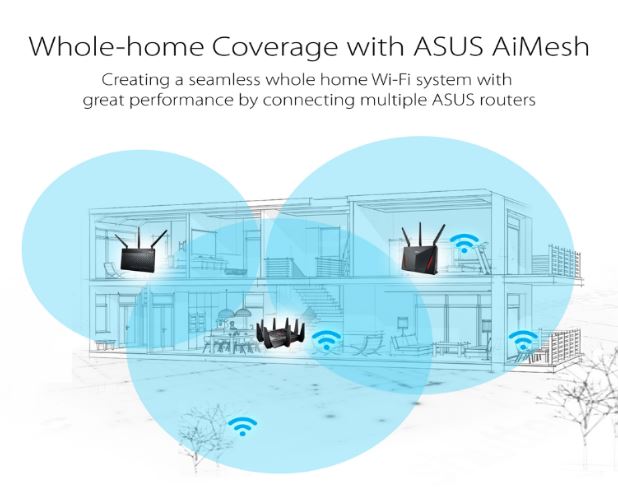
Additionally, depending on location, the system intelligently selects the optimal frequency band between 5GHz and 2.4GHz. And when three or more devices are connected, a self-healing function replaces malfunctioning routers with normally operating devices to ensure WiFi connectivity.
Competing Mesh products require purchasing multi-hub packages and hardware division of roles between routers. In contrast, ASUS AiMesh can utilize enhanced AiMesh features through software upgrades of existing ASUS router products, and while competing Mesh WiFi speeds are only 1200~3000Mbps, AiMesh achieves speeds up to 5300Mbps.
Additionally, AiMesh and router settings can be configured through PC and mobile phone applications. AiMesh can be used by installing the latest firmware on all ASUS routers, connecting the highest-spec router to the main external internet connection, and then finding other ASUS routers through the app and connecting them to the AiMesh WiFi.
Comments
Related news

ASUS Launches ROG Gladius II Origin
Republic of Gamers (ROG) has announced the official launch of ROG Gladius II Origin, the third model in the popular Gladius gaming mouse series. ASUS ROG Gladius II Origin Box Contents ROG Gladius II Origin is a mouse that delivers a gaming environment to users by adopting an ergonomic design and Omron switches, providing enhanced convenience by enabling quick DPI adjustment. While maintaining the ergonomic design of the existing Gladius series models, the repositioned DPI button offers a satisfying grip feel to gamers and allows real-time DPI adjustment tailored to in-game situations through immediate modification. Additionally, the side rubber panels featuring a Maya pattern design mounted on both sides of the mouse enable easy click control.
2018.02.12by 김학준 기자

ASUS Officially Supports AMD's 'Raven Ridge' Processor
ASUS announced that it officially supports AMD's new Ryzen Raven Ridge processors, 'RYZEN™ 5 2400G' and 'RYZEN™ 3 2200G'. The 'RYZEN™ 5 2400G' and 'RYZEN™ 3 2200G' are APU series that combine AMD's GPU 'VEGA' architecture with the existing ZEN architecture-based RYZEN processors, delivering improved clock speeds and integrated graphics performance compared to the previous generation.
2018.02.13by 김학준 기자

ASUS Korea Sponsored 'SafeDisk' Overclocking Ranks 1st in Korea
ASUS-sponsored domestic overclocker 'SafeDisk' has achieved the top domestic ranking in PiFast on 'HWBot', an overclocking site. This result was achieved using a combination of the Intel® 8th Gen Core™ i7-8700K processor and ASUS ROG MAXIMUS X APEX motherboard, reaching a maximum clock speed of 7,233MHz through liquid nitrogen cooling. The user recorded 'PiFast' 8.690 seconds, 'CineBench R11.5' 25.16 points, and XTU 3,787 marks. Through this achievement, the user attained 4th place globally in HWBot's PiFast rankings and 2nd place in the 8700K category. Additionally, using the same combination in 'CineBench R11.5' rankings and 'XTU' rankings, the user also achieved 3rd place in global rankings.
2018.02.28by 김학준 기자
European Patent Applications Surpass 200,000 for the First Time… South Korea Maintains 5th Place, Led by Batteries and Telecommunications
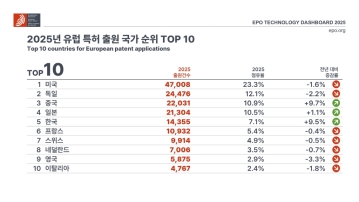
According to the European Patent Office (EPO)'s 'Technology Dashboard 2025', European patent applications last year reached 201,974, surpassing 200,000 for the first time. Korean companies and inventors filed 14,355 applications, representing a 9.5% increase from the previous year and maintaining 5th place by country. Battery, digital communication, and semiconductor technologies led the growth, with Samsung ranking as the top EPO applicant for the second consecutive year and LG reaching 3rd place. The presence of major domestic cities such as Seoul, Suwon, and Yongin was also confirmed. It was also revealed that Korea's European patent strategy is expanding beyond individual technologies to span the entire industry.
2026.03.24by 명세환 기자

SK Telecom First Applies AI-Based Network Operations at Gwanghwamun K-Pop Concert
SK Telecom announced that it applied an AI-based network operation system for the first time at a large-scale K-pop concert held in the Gwanghwamun area of Seoul on March 21st, managing communication quality throughout the event. Mobile data usage during the three hours before and after the concert reached 12.15TB, approximately doubling compared to the same time slot the previous weekend. SK Telecom monitored traffic using the AI system 'A-One' in five-minute and 50-meter units to respond to potential overload situations, while also operating temporary communication facilities and on-site personnel in parallel. This case is interpreted as confirmation of the practical applicability of AI-based autonomous network operation in an environment where demand from dense events and foreign users increases simultaneously.
2026.03.23by 명세환 기자











