



Back up important data to a physical storage device before going on vacation.
 Published2016.07.07 13:14
Acronis (Country Manager Ho-ik Seo, http://www.acronis.co.kr/) announced the '7 Commandments for Data Backup and Security for Vacation Season' to help office workers safely manage their data while away from their desks for extended periods during the summer vacation season.
Acronis, which has been providing secure data and system backup solutions for individuals and businesses, announced guidelines for secure data management for all PCs and laptops used for work, as well as all devices capable of accessing servers from outside the company, in time for the summer vacation season in July and August.

The '7 Commandments for Data Backup and Security for the Vacation Season' announced by Acronis are as follows.
1. Before leaving for vacation, back up important data to multiple physical storage devices.
Before leaving your desk, back up important documents stored on your PC to external storage devices in various locations, such as the PC itself or removable storage devices. Doing so ensures that your data remains safe even if the hard drive in use is damaged.
2. Use a cloud backup service to back up data from PCs, mobile devices, and other devices.
In addition to physical backups such as those to a PC or external hard drive, backing up device data to cloud storage via applications provides a double layer of data protection. Recently, telecommunications companies and portals have also been providing about 10 gigabytes of free cloud space as a basic standard, which is useful for backing up documents that are deemed suitable for cloud storage.
3. Always check the safety of a new program before installing it.
Before installing new programs, updates, or drivers, you must check their safety and complete a full backup to prevent data loss in advance. Doing so allows you to restore the system to its original state without data loss, even if problems arise due to unstable program operation.
4. Back up the entire system of the main computer and server, and automate backup tasks to perform them regularly.
There is no better countermeasure than 'system backup' for sudden system failures. If you rely solely on simple data backups, it may be difficult to fully restore your existing computing environment in the event of a malware infection, computer shutdown due to a physical disaster, or application damage. Therefore, if you back up the entire system once initially and then automatically configure incremental or differential backups to periodically back up only changes thereafter, you can conveniently save only updated content, resulting in faster backup speeds and saved disk space.
5. Utilize data management and security solutions that enhance access rights to corporate servers and data.
As smart work environments expand, there is a high demand for high-level IT infrastructure security and control solutions that enable secure data access. Employees can freely access corporate data via personal devices both inside and outside the office, while working in a safer environment by utilizing 'dual security solutions' that include monitoring and authentication functions. In addition, if you update antivirus software for work-critical PCs and devices to the latest version and conduct regular security scans, you can prevent recurring and foreseeable damage.
6. Check the technical support status of the security and backup solutions currently in use.
Even companies that have implemented security and backup solutions should continuously check for technical support, such as updates, bug fixes, and patches. In particular, it is crucial for corporate IT personnel to verify accurate information regarding solutions and technical support services during the holidays in advance, and to keep contingency plans in mind for any unforeseen incidents.
7. Thoroughly verify and plan the data recovery plan.
Even if data loss or system failure occurs, the system can be restored quickly if a disaster recovery solution is properly established. To this end, it is necessary to thoroughly check whether the existing backup products are functioning correctly and whether continuous updates and technical support are being provided.
Seo Ho-ik, CEO of Acronis Korea, stated, “Today, data exists everywhere, much like air. While digital devices can be replaced at any time with technological advancements, data cannot be replaced by anything. From the perspective of a data management solution provider, the holiday and vacation season is the time when corporate customers are most concerned about data protection.” He added, “To manage corporate data during the holidays, companies must actively protect their digital assets by establishing and executing thorough contingency plans and recovery plans in the event of an incident. Acronis will support corporate customers in 'preventing' the worst-case scenario of data loss in advance.”

Comments
Related news
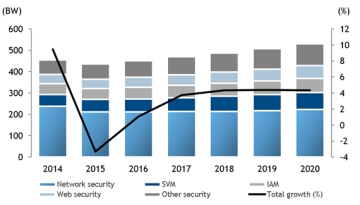
The domestic IT security market contracted by 4.1% last year compared to the previous year, but the future outlook is bright.
According to a recent domestic IT security product market outlook report published by Korea IDC (CEO Hong Yu-suk), the domestic IT security product market last year was tallied at 437 billion won, a 4.1% decrease compared to the previous year. The network security segment, which includes firewalls and UTM equipment, is analyzed to have led the overall IT security product market decline, falling approximately 10% year-over-year due to market saturation. The domestic IT security product market is projected to grow at a compound annual growth rate (CAGR) of 3.2% over the next five years, exceeding 500 billion won by 2019 and reaching a scale of 530 billion won in 2020.
2016.04.07by 신윤오 기자
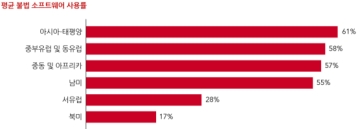
35% Illegal Software Usage Rate in Korea, High Cybersecurity Risks
The Business Software Alliance (BSA) announced that the illegal software usage rate among computer users in Korea reached 35%, despite the high correlation between unlicensed software and cyberattacks. This finding was revealed through the BSA Global Software Survey: Seizing Opportunity Through License Compliance, recently published by the Business Software Alliance. While this represents a 3 percentage point decrease compared to the same survey conducted in 2013, it still indicates that numerous domestic systems remain exposed to cyberattacks.
2016.05.25by 명세환 기자
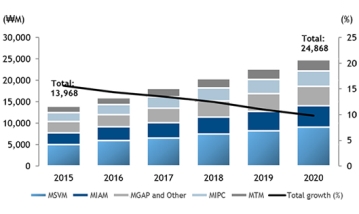
Mobile Security Industry Growth Outlook: Will Adoption of Cloud-Based EMM Solutions Increase?
According to the "Domestic Enterprise Mobile Security Software Outlook Report 2016-2020" recently published by Korea IDC (CEO Hong Yu-suk), the domestic enterprise mobile security software market last year was estimated at approximately 14 billion won. Furthermore, this market is projected to grow at an average annual rate of 12.2% over the next five years, forming a market scale of 25 billion won by 2020. The report predicts that as smart work environments become more commonplace, enterprises will review various mobile security solutions to support company-wide mobile operations based on stronger security policies. With smart devices extending beyond PCs, smartphones, and tablets to include recently emerging wearable devices such as smartwatches, the range of smart device control has expanded, and the areas requiring management are growing accordingly. This situation calls for enterprise-level device management. Consequently, interest in the adoption and implementation of cloud-based EMM solutions is expected to increase progressively.
2016.06.14by 김수지 기자
.jpg)
SalePoint Signs Multi-Year Partnership Agreement with AWS… Promoting Identity Security that Integrates Even AI Agents
Sailpoint has entered into a multi-year strategic partnership agreement with AWS and is moving forward with establishing an integrated governance system that manages both human and non-human identities together. The plan is to consistently manage access permissions in an environment where AI agents are increasing as work execution entities, while applying the principle of least privilege and automated policy enforcement. The two companies plan to jointly expand capabilities to manage the identities of various entities, including AI agents, within a single layer in the AWS environment. This collaboration is interpreted as a move to design security and governance together in corporate environments where AI adoption is expanding.
2026.03.26by 배종인 기자
.png)
Databricks Unveils Open AI Security Monitoring 'Lakewatch'
Databricks entered the security market on March 24 by unveiling LakeWatch, an open-source agentic SIEM. The core functionality of this product is to integrate and analyze security, IT, and business data in a single environment to support AI-based threat detection and investigation. The company explained that it reduces the limitations of existing security operations centers, which have had to forgo some data due to high cost structures, and enables large-scale data analysis and automation based on open formats and ecosystems. LakeWatch is currently offered as a private preview, with Adobe and Dropbox mentioned as early customers. Databricks also announced an expanded partnership with Anthropic as well as the acquisition of Antimatter and SiftD.ai.
2026.03.26by 배종인 기자











