


Access over 30 tools for Windows and Mac with a single click on your Mac.
 Published2017.08.29 14:56
Take advantage of the unique features of both Windows and Mac operating systems, including the MacBook Touch Bar and Windows Cortana.
Parallels Desktop, which lets you easily use Windows and Windows programs on your Mac, is back and better than ever.
Parallels announced Parallels Desktop 13, a Windows virtualization solution that supports both the Mac operating system High Sierra and the features of the upcoming Windows 10.
Parallels Desktop, which allows you to run Windows and Windows programs on a Mac, is a virtualization solution that allows you to simultaneously utilize the unique strengths of both Mac and Windows operating systems. The recently released Parallels Desktop 13 allows you to easily add Windows applications to the MacBook Pro Touch Bar and use the Touch Bar within Windows programs.
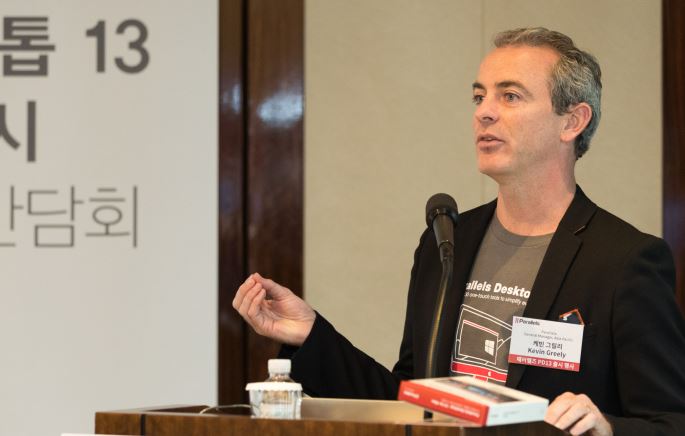
Additionally, Parallels Desktop 13 is the first solution to enable the upcoming Windows 10 People Bar feature on Mac, and also supports integration with the Mac's Dock and Spotlight, the company said. A Parallels representative said, "The new Parallels Desktop 13 version provides innovative and useful new features and tools to help users get more done, faster and more efficiently." "Parallels Installation Assistant allows users to automatically install Windows 10 as a virtual machine with just one click, and allows them to purchase Windows 10 later without losing their data or installed programs, providing a simpler user experience than ever before."
Parallels Desktop 13 specifically supports purchasing Windows 10 directly from the Microsoft website and automatically installing it, adding a copy of an existing Windows installation, or migrating an existing PC to a Mac. From the outset, users can customize the environment to their liking, such as setting Windows to full screen to make it appear as if they're using it on a PC, hiding Windows in Coherence mode, or launching Windows programs from the Mac's Dock, Launchpad, or Windows Start menu.
Significantly improved performance, including up to 47% faster Windows file speed
Also new is the innovative 'Picture-in-Picture View' feature, which creates a window of another active VM that stays pinned on top, even when the Mac application is running in full-screen mode. You can easily monitor and work with multiple operating systems and applications running on each operating system simultaneously on a single screen, and you can switch between Mac OS Spaces and applications even while watching a video.
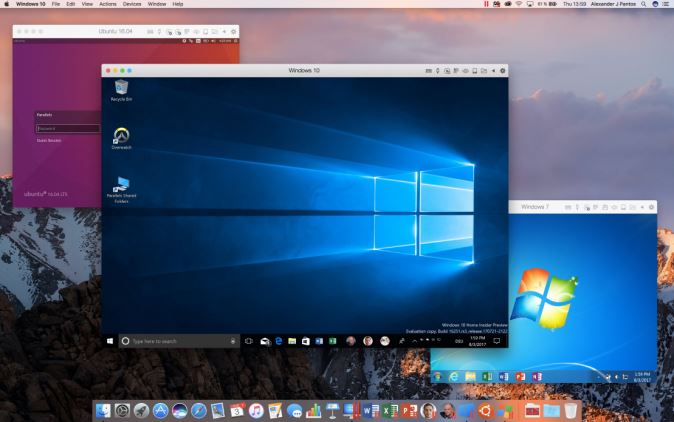
The latest Parallels Desktop features a variety of visual and display enhancements for improved translation and resolution scaling. Users with high-resolution Retina displays will enjoy sharper text and graphics, even in scaled settings.
Parallels Desktop 13 offers Mac Touch Bar integration with Office tools like Microsoft Outlook, Word, Excel, and PowerPoint, as well as various browsers like Internet Explorer (IE), Microsoft Edge, Google Chrome, Mozilla Firefox, and Opera. It also supports Cortana, Task View, Touch Bar settings, and even pinned taskbar elements when using the Windows Start menu or desktop. If the default function key set isn't enough, you can quickly customize thousands of Windows programs running in Parallels Desktop using frequently used Touch Bar gestures.
Comments
Related news

VMware Announces IoT Infrastructure Management Solution
VMware announced VMware Pulse IoT Center, an enterprise-grade IoT infrastructure management solution, at EMC World 2017 held in Las Vegas, USA. VMware Pulse IoT Center is VMware's first IoT infrastructure management solution, flexibly connecting edge systems and connected devices required for IoT infrastructure. VMware's integrated endpoint management solution AirWatch and device management capabilities leverage monitoring and troubleshooting functions to connect, manage, monitor, and protect edge systems and connected devices and applications based on different hardware, operating systems, and communication protocols. According to a sophisticated and flexible rules engine, when connected devices are updated or changed, the current status is immediately reported to IT administrators and tracked.
2017.05.12by 김자영 기자
Public Institutions 'Moving Away from Windows to Open Source OS'
The Military Manpower Administration (MMA) collaborated with the National IT Industry Promotion Agency (NIPA) to introduce an open-source operating system (OS). As a result, they were able to reduce license purchase costs and improve PC stability. This was necessary because the military was still using an OS with discontinued technical support, which presented security vulnerabilities when handling military fitness assessment results, psychological tests, and military administrative data. As the first public institution to adopt an open-source OS, the MMA analyzed open-source operating systems suitable for psychological testing. The Ministry of Science and ICT and NIPA developed evaluation criteria in consultation with assessment agencies to conduct security reviews. As a result, they selected Ubuntu, which is based on Debian Linux. The selection was based on highly favorable evaluations of stable distribution releases, user convenience, and stable operation in low-specification environments.
2017.08.24by 김자영 기자
VMware Releases Latest Software Updates to Support Operating Systems
VMware has released the latest updates to Fusion and Workstation, software that enables users to operate or use multiple operating systems (OS) on desktop. 'VMware Fusion 10 Pro' for Mac OS users supports development and testing work on multiple operating systems including Windows and Linux, and enables integration of development work across DevOps and Agile methodologies. Additionally, it runs virtual machines compatible with data centers on Mac OS, supporting design and testing work required for data centers, related networks, or applications. Fusion 10 Pro supports REST API to enable remote virtual machine (VM) management. Enterprises and developers can handle VM operations including inventory management and networking through Fusion in up-to-date development and testing environments.
2017.08.24by 김지혜 기자
.jpg)
SalePoint Signs Multi-Year Partnership Agreement with AWS… Promoting Identity Security that Integrates Even AI Agents
Sailpoint has entered into a multi-year strategic partnership agreement with AWS and is moving forward with establishing an integrated governance system that manages both human and non-human identities together. The plan is to consistently manage access permissions in an environment where AI agents are increasing as work execution entities, while applying the principle of least privilege and automated policy enforcement. The two companies plan to jointly expand capabilities to manage the identities of various entities, including AI agents, within a single layer in the AWS environment. This collaboration is interpreted as a move to design security and governance together in corporate environments where AI adoption is expanding.
2026.03.26by 배종인 기자
.png)
Databricks Unveils Open AI Security Monitoring 'Lakewatch'
Databricks entered the security market on March 24 by unveiling LakeWatch, an open-source agentic SIEM. The core functionality of this product is to integrate and analyze security, IT, and business data in a single environment to support AI-based threat detection and investigation. The company explained that it reduces the limitations of existing security operations centers, which have had to forgo some data due to high cost structures, and enables large-scale data analysis and automation based on open formats and ecosystems. LakeWatch is currently offered as a private preview, with Adobe and Dropbox mentioned as early customers. Databricks also announced an expanded partnership with Anthropic as well as the acquisition of Antimatter and SiftD.ai.
2026.03.26by 배종인 기자











