


Graphic Solution TouchGFX, STM32 Optimized
 Published2022.03.10 15:16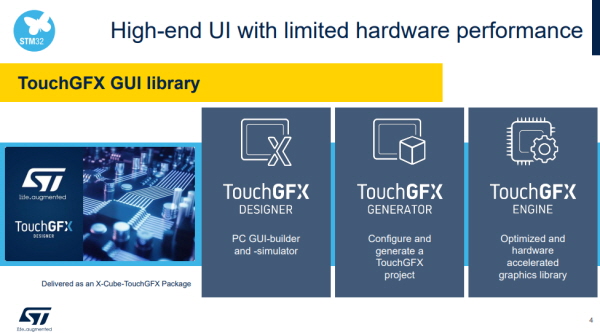
Animation Support for Swipe, 3D, etc.
GUI Creation Possible Without Coding
ST Microelectronics announced the features of TouchGFX, a free graphic framework optimized for STM32 microcontrollers, at the e4ds webinar on the 10th.
The TouchGFX solution is a graphic solution composed of three elements: Designer, Generator, and Engine.
TouchGFX Designer is used to design GUI. The GUI software uses a WYSIWYG (What You See Is What You Get) approach, making it possible to generate GUI without coding. The Designer generates code according to the UI created within the software. By running the simulator, you can check how the UI looks before downloading the code to the target board, and you can create widgets and interactions as desired by the user. The GUI code is written in C++ programming language suitable for embedded graphics.
TouchGFX Generator configures settings for UI projects such as the display device interface, Color Depth, number of frame buffers, and location. It also allows you to configure the frame buffer, display resolution, Color Depth, non-mapped memory, and preferred IDE, and can be configured even when using an operating system such as FreeRTOS.
The TouchGFX Engine is a library that drives UI display. The TouchGFX Engine is optimized for MCUs to achieve high-level GUI performance. MCU load and memory footprint have been minimized through hardware accelerator usage and computational memory optimization. It also includes an advanced rendering algorithm that minimizes the number of pixels to be drawn on the display. Thanks to memory-efficient widgets, smooth GUI can be created even on low-performance hardware.
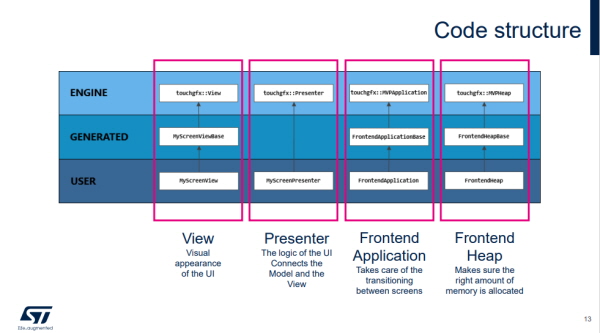
This diagram is an overview of the code structure inside a TouchGFX project.
The Engine Layer corresponds to standard classes provided by TouchGFX. It has the characteristic that header files can be viewed but source files cannot. The Generated Layer corresponds to files that are regenerated each time the TouchGFX Designer generates code, so classes and files should not be manually edited. Manual changes will be overwritten when the code generator is run later.
Classes in the User Layer are classes for user code. Users can freely insert code into this layer. If it does not exist, a user class is created, but it is not modified by the TouchGFX Designer.
The first Column is the View that manages the appearance of the UI.
The Presenter connects the Model and View and is responsible for the UI logic.
The Frontend Application that creates screen transitions can modify how pixels are drawn to the frame buffer, and using the constructor of the Frontend Application, fonts can be installed at runtime or some cache memory for dynamic bitmaps can be initialized.
The Frontend Heap that handles all recordings ensures that an appropriate amount of memory is allocated. By searching in the Map file, you can find the amount of memory needed in the Frontend Heap for the largest screen.
The TouchGFX Abstract Layer collects input such as touch coordinates and buttons, updates scenes according to input and UI state, and renders to the frame buffer. Additionally, it handles display-MCU synchronization, transmission to the display, frame buffer control and access, and monitors the rendering process if desired by the user.
Depending on the selected display interface, code is generated partially or entirely by TouchGFX. If generated partially, direct coding is required to properly connect TouchGFX to the display system.
Meanwhile, regarding the question of whether RTOS is necessary, ST stated that it recommends using RTOS when possible in cases where the MCU not only drives GUI applications but also needs to drive other tasks.
Comments
Related news
ST Launches 0.5-Megapixel Depth Image Sensor
STMicroelectronics (hereinafter ST), a global semiconductor company supporting diverse electronic applications and customers, has launched the industry's first 0.5-megapixel depth image sensor that revolutionizes digital vision.
2022.02.25by 배종인 기자
ST Launches Software Defined MCU
STMicroelectronics, a global semiconductor company supporting diverse electronic applications and customers, has launched a new microcontroller (MCU) that supports software-defined electric vehicles, achieving simplified high-efficiency power modules for electric vehicles.
2022.03.04by 배종인 기자
[Series] ST Engineer Yuji Kawano ⑮ – “MCUs with Built-in Oscillators, Device Characteristic Matching Is Essential”
MCUs are unfamiliar compared to CPUs or GPUs, yet they are among the most widely used semiconductors. Let's hear from Yuki Kawano, Manager at ST System Solution Lab, about how vast the practical applications and potential of MCUs truly are.
2022.03.08by 명세환 기자
Intel Unveils Next-Generation 'Core Ultra Series 3' and vPro Platform for Enterprise PCs
Intel has officially unveiled the "Intel Core Ultra Series 3" for next-generation enterprise PCs and the latest vPro platform, addressing a wide range of demands from enterprise notebooks to high-performance workstations.
2026.03.26by 배종인 기자
ROHM Launches ESD Protection Diode Compatible with High-Speed Interfaces of 10Gbps or Higher
Semiconductor specialist ROHM has developed the 'RESDxVx series' of ESD (electrostatic discharge) protection diodes capable of responding to next-generation high-speed data communication environments exceeding 10Gbps, simultaneously enhancing both signal quality maintenance required in high-speed interfaces and IC protection performance.
2026.03.26by 배종인 기자











