



Devguru, Turn your iPad into a Digitizer with EasyCanvas App
 Published2017.07.06 10:37
Devguru has released EasyCanvas, an app that allows the iPad to be used as a portable digitizer, on the Apple App Store.
A digitizer is a device that converts analog information into digital format. When you input data using a pen on a tablet, the input data is displayed on the PC. It is mainly used in design work, and recently, it has received a lot of attention when webtoon artists used it on a broadcast.
EasyCanvas is an application that allows you to use your iPad as a liquid crystal display digitizer by duplicating your PC screen onto your iPad. It allows you to use the functions of expensive digitizers on your iPad at a reasonable price.
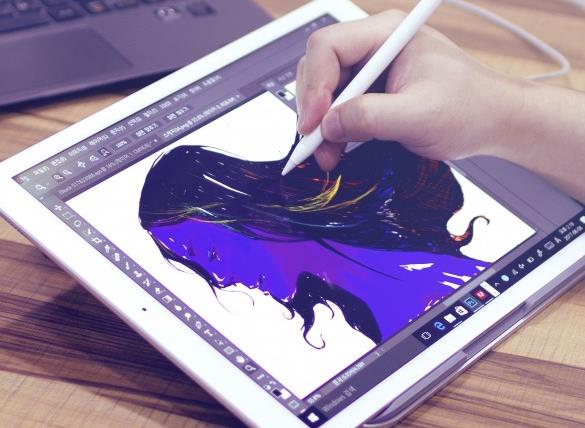
Key features include a screen duplication function that allows you to view your PC's screen on your iPad, support for various styluses such as Apple and Wacom, and a touch function using your fingers. Users can also run design programs on their PCs and use the pressure, tilt, and palm rejection functions (a function that recognizes touch only along the pen's movement path) supported by each program.
Easy Canvas can be used not only for various design work using Photoshop and Illustrator programs, but also in areas where the stylus function can be fully utilized, such as calligraphy. It can also be used effectively in lectures, as it allows you to show the content you are currently working on to the other person in real time.
Comments
Related news
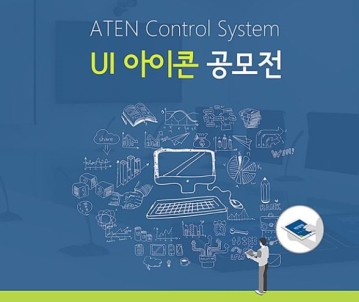
ATEN Korea Hosts UI Icon Design Contest
ATEN Korea announced that it is holding a UI icon competition for the ATEN Control System. The second ATEN UI Design Icon Competition is an event aimed at building a more convenient user environment, and the winning entries selected from the submissions will be updated as official UI designs for ATEN products. Additionally, when the selected UI works align with the national sentiment of each country where ATEN operates, they will be applied broadly to products released in ATEN headquarters and other countries as well, serving the purpose of enhancing product value and improving operability. In particular, in 2017, in line with ATEN Korea's strategy aimed at advancing as a professional A/V specialist company, emphasis is being placed on securing creative UI designs that are effective in increasing accessibility to the control system application. The competition will run for a total of seven weeks from June 19 to July 31, and comprehensive evaluation of participation applications and submitted works will take place, with final results to be announced by the end of August.
2017.06.23by 김자영 기자

KT, Use Customer Center App as Chatbot
KT announced on the 23rd that the number of users for "Talk Search," an artificial intelligence (AI)-based function that KT introduced first among domestic telecommunications companies in October of last year through its customer service app, has increased more than twofold, surpassing 700,000 monthly users. "Talk Search" is a chatbot function with Korean language processing technology that KT independently developed and holds domestic patents for. Combined with KT's big data analysis techniques and extensive knowledge database, it can accurately understand and process customer intentions. Through the KT customer service app, customers can receive guidance via chatbot conversations for tasks such as viewing billing statements, checking usage, and changing account ownership. For example, users can receive consultations using everyday sentences or phrases such as "What should I do if I have difficulty using my mobile phone due to military enlistment?" or "When does my mobile phone contract period end?"
2017.06.23by 김자영 기자
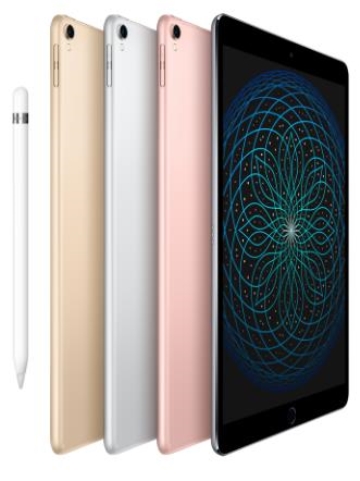
LG Uplus Introduces New iPad Pro
LG Uplus has announced the introduction of the new 10.5-inch 'iPad Pro' and 12.9-inch 'iPad Pro'. These products feature a display with 'ProMotion' technology and are equipped with the 'A10X Fusion' chip. In particular, the 10.5-inch model has reduced bezels by nearly 40% to fit the ultra-compact package, and weighs less than 500g. Additionally, through new iPad features supported by iOS 11, which will be released this fall—including a completely redesigned 'Files' app, customizable Dock, enhanced multitasking, and more seamless Apple Pencil integration—users will be able to work in more productive and creative ways than before. Meanwhile, the iPad Pro's impressive Retina display incorporates the new ProMotion technology that delivers up to 120Hz refresh rates for smooth scrolling, enhanced responsiveness, and fluid video content.
2017.07.06by 김지혜 기자
ESP32 Development Environment Selection and GPS Application Implementation
The ESP32 is a microcontroller that integrates Wi-Fi, Bluetooth, 12-bit ADC, capacitive touch, PWM, DAC, and UART in a single SoC. However, the abundance of features does not by itself solve the designer's problems. The real challenges lie in selecting the appropriate development environment, determining which pins can be used and which must be avoided, and converting raw data from modules into usable information. This document addresses ESP32 peripheral constraints (ADC2 and Wi-Fi coexistence limitation, UART1 occupancy, ADC non-linear regions), the trade-offs between Arduino IDE and ESP-IDF, and the process from connecting NEO-6M/NEO-M8N GPS modules to UART2, parsing NMEA sentences, and visualizing routes in Google Earth, all organized based on documented references.
2026.10.12by 편집부
MIPI CSI-2, DSI-2, C-PHY, D-PHY Test Solution Technical White Paper
The MIPI interface adopts a burst mode that transitions between low-power (LP) and high-speed (HS) states for low-power consumption, and in return, strict timing rules are imposed on state transitions. Additionally, the high-speed section operates as a packet-based protocol with headers, ECC, and CRC, so verification engineers must handle waveforms and protocols simultaneously. Traditional configurations combining general-purpose oscilloscopes and AWGs reveal limitations in setup complexity, measurement uncertainty, and lack of reproducibility when faced with these requirements. This white paper, based on webinar materials, organizes the structure of this problem and describes how the SV5C-DPTXCPTX generator for receiver testing and SV5C-DPRXCPRX analyzer for transmitter testing integrate state transition testing, stressed eye testing, and protocol analysis into a single bench, along with their application boundaries.
2026.10.12by 편집부











