



Support for building an integrated public cloud with Nutanix and Google Cloud
 Published2017.07.10 16:08
Nutanix has entered into a strategic partnership with Google Cloud.
Through this partnership, the two companies will combine the Nutanix environment with Google Cloud Platform™ (GCP). By doing so, they plan to support their customers in deploying and managing all applications on an integrated public cloud, regardless of their deployment model.
Nutanix and Google proposed a solution to address the challenges faced by companies by combining their respective solutions.
It is a single control plane for managing applications located in GCP and Nutanix cloud environments. You can provision both existing and cloud applications with a single click in either GCP or Nutanix cloud environments, and seamlessly migrate between them. In the Nutanix Calm environment, you can model applications into simple and iterative application blueprints with a single click, and easily migrate them across Nutanix and GCP environments.
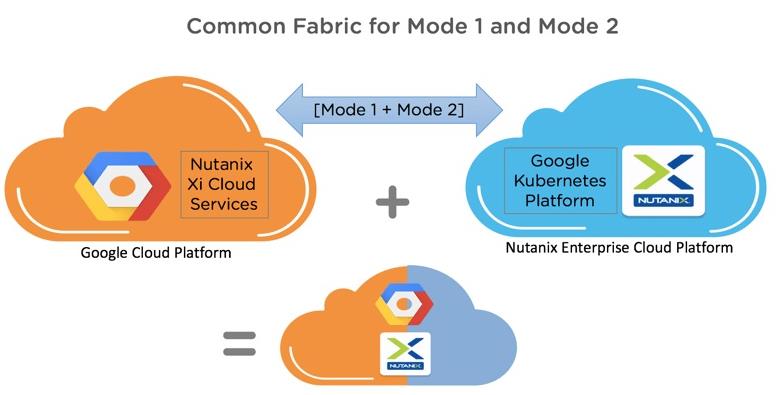
Nutanix customers can extend their data center environments to GCP and, through an integrated fabric, freely operate existing Mode 1 and modern Mode 2 applications in both private and public clouds (lift-and-shift operations). For example, when using Xi Cloud Service Disaster Recovery (DR) on a GCP environment as an enterprise cloud, applying BigQuery Analytics to the entire application dataset eliminates the need for expensive, repetitive data migrations.
You can install, manage, and scale container-based applications in a Nutanix enterprise cloud environment. By combining Kubernetes, Google Container Engine (GCE), and Acropolis Container Services, you can provide an enterprise-grade environment for containers and ensure scalable and continuous storage services for always-on applications. Cloud administrators can rapidly self-provision Kubernetes using pre-defined application blueprints in Nutanix Calm and instantiate containerized applications in Google Cloud or Nutanix-based environments.
Comments
Related news

Nutanix Expands Cloud Platform Software Support
Nutanix announced that it has expanded software support for its Enterprise Cloud Platform™ to include HPE ProLiant® rack-mount servers and Cisco UCS® B-series blade servers. With the addition of hardware options on which Enterprise Cloud Platform software can run, Nutanix's own appliances and global partners such as Dell and Lenovo, as well as HPE ProLiant and Cisco UCS servers already in use in numerous enterprise and cloud data centers, are expected to enable Nutanix to expand its presence. Nutanix software is currently available on platforms from 3 of the 4 leading x86 server vendors. Nutanix is considering extending software support to enterprise server vendors that account for more than 52% of the global server market by shipment volume and sold over 5 million servers in 2016.
2017.05.22by 김지혜 기자
Nutanix-IBM Global Partnership and Hyper-Converged Strategy Announced
Nutanix has established a multi-year global partnership with IBM in the hyper-converged infrastructure field. The two companies plan to combine Nutanix's enterprise cloud platform software with IBM's Power Systems to deliver a turnkey hyper-converged solution that supports critical workloads for large enterprises. The approach is to provide a full stack with built-in AHV virtualization, delivering a more streamlined experience in the data center. Today, enterprises are focusing on combining technologies such as analytics, insights, and machine learning to rapidly aggregate large volumes of data, quickly process it, and anticipate the next steps. An "insight economy" era has begun. To realize this, stable storage, fast networking, and scalability are required. This is based on powerful computing, which is difficult to implement with private data centers. This is because both the technology and architectural design philosophy of private data centers are not suited for this purpose.
2017.05.29by 김자영 기자
Nutanix Unveils OS Supporting Multi-Platform Cloud Environments
Nutanix showcased Nutanix Enterprise Cloud OS at its annual conference '.NEXT 2017' held in the United States, supporting public, private, and hybrid cloud as well as diverse multi-platform cloud environments. Along with this, Nutanix unveiled Nutanix Calm™ and Nutanix Xi™ Cloud Services. Nutanix Calm performs application automation and lifecycle management functions across various cloud environments including private cloud based on Nutanix as well as public cloud. Nutanix Xi Cloud Services, a proprietary expansion solution of the Nutanix Enterprise Cloud Platform, operates on an open platform approach. Through this, it provides a convenient cloud experience regardless of application type and deployment model.
2017.07.06by 김지혜 기자
.jpg)
SalePoint Signs Multi-Year Partnership Agreement with AWS… Promoting Identity Security that Integrates Even AI Agents
Sailpoint has entered into a multi-year strategic partnership agreement with AWS and is moving forward with establishing an integrated governance system that manages both human and non-human identities together. The plan is to consistently manage access permissions in an environment where AI agents are increasing as work execution entities, while applying the principle of least privilege and automated policy enforcement. The two companies plan to jointly expand capabilities to manage the identities of various entities, including AI agents, within a single layer in the AWS environment. This collaboration is interpreted as a move to design security and governance together in corporate environments where AI adoption is expanding.
2026.03.26by 배종인 기자
.png)
Databricks Unveils Open AI Security Monitoring 'Lakewatch'
Databricks entered the security market on March 24 by unveiling LakeWatch, an open-source agentic SIEM. The core functionality of this product is to integrate and analyze security, IT, and business data in a single environment to support AI-based threat detection and investigation. The company explained that it reduces the limitations of existing security operations centers, which have had to forgo some data due to high cost structures, and enables large-scale data analysis and automation based on open formats and ecosystems. LakeWatch is currently offered as a private preview, with Adobe and Dropbox mentioned as early customers. Databricks also announced an expanded partnership with Anthropic as well as the acquisition of Antimatter and SiftD.ai.
2026.03.26by 배종인 기자











