


Palo Alto Networks, Prepare for Holiday Phishing Attacks
 Published2017.12.28 14:16
Comments
Related news
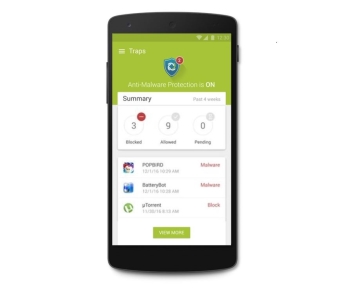
Palo Alto Networks Launches Intelligent Endpoint Security Solution Supporting Multiple Security Layers
Palo Alto Networks announced today the release of a new version of its intelligent next-generation endpoint security solution 'Traps'. Through the newly released Traps 4.0, Palo Alto Networks strengthens malware and exploit blocking capabilities while supporting various operating systems including macOS and Android. Traps uses multiple security policies that block both known and unknown malware as well as exploits that have attacked endpoints, enabling enterprises that must comply with HIPAA (Health Insurance Portability and Accountability Act) and PCI DSS (Payment Card Industry Data Security Standard) to safely utilize it as an alternative to antivirus (AV) products. Legacy AV products and next-generation AV point solutions merely replace ineffective malware detection techniques with different technologies, but lack intelligent technologies to identify and block exploits and unknown malware.
2017.05.25by 김자영 기자
Palo Alto Networks Announces Ransomware Response Strategy
Palo Alto Networks announced ransomware prevention and response measures and introduced 'Traps 4.0,' an intelligent endpoint security solution that supports multi-layered security. Ransomware has expanded its attack scope beyond Microsoft Windows to Android, Linux, and Mac OS, making all internet-connected computers and devices targets. If connected via IoT, it can spread to internet-connected devices such as wearable devices and smart homes. Palo Alto Networks supports automatic prevention of vulnerability profiles and blocks technique-based exploit attacks while preventing operating system kernel exploitation. The recently launched Traps 4.0 operates big data based on file hashes to block known malware attacks, and for unknown attacks, it automatically generates signatures that can be quickly blocked within five minutes and deploys them to Traps. Additionally, by leveraging machine learning, it detects ransomware identified on external security platforms, reflects it locally, and immediately blocks malicious behavior.
2017.07.20by 김자영 기자
.jpg)
SalePoint Signs Multi-Year Partnership Agreement with AWS… Promoting Identity Security that Integrates Even AI Agents
Sailpoint has entered into a multi-year strategic partnership agreement with AWS and is moving forward with establishing an integrated governance system that manages both human and non-human identities together. The plan is to consistently manage access permissions in an environment where AI agents are increasing as work execution entities, while applying the principle of least privilege and automated policy enforcement. The two companies plan to jointly expand capabilities to manage the identities of various entities, including AI agents, within a single layer in the AWS environment. This collaboration is interpreted as a move to design security and governance together in corporate environments where AI adoption is expanding.
2026.03.26by 배종인 기자
.png)
Databricks Unveils Open AI Security Monitoring 'Lakewatch'
Databricks entered the security market on March 24 by unveiling LakeWatch, an open-source agentic SIEM. The core functionality of this product is to integrate and analyze security, IT, and business data in a single environment to support AI-based threat detection and investigation. The company explained that it reduces the limitations of existing security operations centers, which have had to forgo some data due to high cost structures, and enables large-scale data analysis and automation based on open formats and ecosystems. LakeWatch is currently offered as a private preview, with Adobe and Dropbox mentioned as early customers. Databricks also announced an expanded partnership with Anthropic as well as the acquisition of Antimatter and SiftD.ai.
2026.03.26by 배종인 기자
Ecolab Expands AI Data Center Cooling Business Through Acquisition of CoolIT
Ecolab has agreed to acquire CoolIT Systems, a liquid cooling company for AI data centers, for approximately $4.75 billion. The transaction is expected to close by Q3 2026, subject to regulatory approvals. CoolIT has been supplying direct-to-chip cooling-based coolant distribution units, cold plates, and manifolds, serving hyperscale data centers and colocation operators as customers. This acquisition is a measure to address the high-heat and high-density server environments created by AI proliferation. Ecolab plans to combine its water management and digital monitoring capabilities with CoolIT's hardware technology to expand its data center cooling business.
2026.03.26by 명세환 기자











