


Samsung Electronics Launches Galaxy Device Location Service
 Published2020.10.30 09:59
Transmit location signals to nearby devices even when offline,
Transmitted and received data is 100% encrypted, preventing the possibility of leakage of location information and more.
Samsung Electronics launched 'SmartThings Find' worldwide on the 30th, a service that helps Galaxy users find their devices easily and quickly by utilizing BLE (Bluetooth Low Energy) and UWB (Ultra-WideBand) technologies.
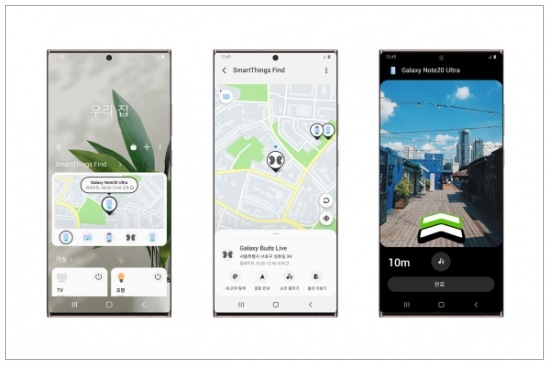
'SmartThings Find' can be used immediately by accessing the 'SmartThings' app and completing a simple registration process. Devices whose location can be tracked via 'SmartThings Find' include Galaxy smartphones and tablets, smartwatches, and earbuds (left and right separately). Currently, this applies to smartphones and tablets running Android 8 or higher, smartwatches running Tizen 5.5 or higher, and the 'Galaxy Buds Plus' and 'Galaxy Buds Live' earbuds.
SmartThings Find users can check the location of their registered devices even when offline, when the network or Bluetooth connection is lost. This is because if a device registered in 'SmartThings Find' is offline for more than 30 minutes, it automatically generates a BLE signal, which is then automatically transmitted to nearby SmartThings user devices that have gone through the consent process. When a 'SmartThings Find' user reports a lost device via the SmartThings app, devices near the reported device transmit location information to the SmartThings server.
The data used in the location verification process is securely processed through a 100% encryption process via preset settings, so the location information of the device to be found is not shared with anyone other than the reporter.
Location information for devices registered in 'SmartThings Find' is updated in real time. If a registered device is lost, opening the SmartThings app and selecting the device to be found displays its location on a map. An alert sound can also be triggered when the user approaches the lost device, allowing them to locate it by listening to the sound. Users of devices equipped with UWB technology can also utilize the augmented reality (AR)-based 'Search Nearby' feature to view the location of the lost device in color graphics.
The new SmartThings app software, which enables the use of 'SmartThings Find,' is scheduled to be updated starting on the 30th for Galaxy smartphone and tablet users running Android 8 or higher. After updating the app, simply click the 'SmartThings Find' banner at the top of the home screen and complete the service sign-up process.
Comments
Related news
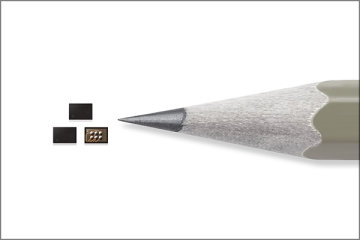
Samsung Electronics equips Galaxy S20 with 2mm digital personal safe
Recent increases in personal authentication, financial transactions, and cloud service usage through mobile devices have made protection of sensitive personal information increasingly important. Samsung Electronics has introduced an integrated security solution for mobile devices comprising a hardware security chip and software. Unlike the existing approach where sensitive information such as passwords and fingerprints were stored in general memory like eUFS, this new solution stores information in a separate security chip protected by optimized software, thereby enhancing security.
2020.02.26by 이수민 기자
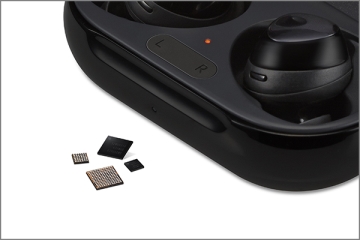
Samsung Electronics Unveils Two PMICs That Reduce the Size of Wireless Earphones
Samsung Electronics has introduced a PMIC optimized for fully wireless earbuds (TWS) design. The MUA01 and MUB01 integrate approximately 10 and 5 different chips respectively into a single package, enabling a wider battery design space. Both chips are incorporated in the Galaxy Buds+.
2020.03.24by 이수민 기자

Samsung Electronics Unveils 5 New Products with First Non-Face-to-Face Galaxy Unpack
Samsung Electronics held its first-ever online Galaxy Unpacked event and unveiled five new products. The announced products include the smartphone Galaxy Note20 series, foldable phone Galaxy Z Fold2, tablet Galaxy Tab S7 series, smartwatch Galaxy Watch 3, and wireless earbuds Galaxy Buds Live.
2020.08.06by 이수민 기자
ESP32 Development Environment Selection and GPS Application Implementation
The ESP32 is a microcontroller that integrates Wi-Fi, Bluetooth, 12-bit ADC, capacitive touch, PWM, DAC, and UART in a single SoC. However, the abundance of features does not by itself solve the designer's problems. The real challenges lie in selecting the appropriate development environment, determining which pins can be used and which must be avoided, and converting raw data from modules into usable information. This document addresses ESP32 peripheral constraints (ADC2 and Wi-Fi coexistence limitation, UART1 occupancy, ADC non-linear regions), the trade-offs between Arduino IDE and ESP-IDF, and the process from connecting NEO-6M/NEO-M8N GPS modules to UART2, parsing NMEA sentences, and visualizing routes in Google Earth, all organized based on documented references.
2026.10.12by 편집부

MIPI CSI-2, DSI-2, C-PHY, D-PHY Test Solution Technical White Paper
The MIPI interface adopts a burst mode that transitions between low-power (LP) and high-speed (HS) states for low-power consumption, and in return, strict timing rules are imposed on state transitions. Additionally, the high-speed section operates as a packet-based protocol with headers, ECC, and CRC, so verification engineers must handle waveforms and protocols simultaneously. Traditional configurations combining general-purpose oscilloscopes and AWGs reveal limitations in setup complexity, measurement uncertainty, and lack of reproducibility when faced with these requirements. This white paper, based on webinar materials, organizes the structure of this problem and describes how the SV5C-DPTXCPTX generator for receiver testing and SV5C-DPRXCPRX analyzer for transmitter testing integrate state transition testing, stressed eye testing, and protocol analysis into a single bench, along with their application boundaries.
2026.10.12by 편집부











