


[Technical Contribution] Jaejun Oh, Manager, IAR Systems - Software Development Environment for RISC-V
 Published2022.04.20 18:24
C-SPY 직관적·효율적·다기능 디버깅 시간 효율적 단축
C-STAT 컴파일 하는 것과 동일 쉽고 빠르게 분석가능
■ RISC-V를 위해 IAR 개발 환경을 선택해야 하는 이유
1) 기능 안전 인증(Functional Safety Certified)
2) 다양하고 효율적인 디버깅 솔루션
3) 정적 분석 도구(C-STAT)
4) CI/CD 프로세스(빌드 서버)
IAR Embedded Workbench for RISC-V는 최초로 기능 안전 인증을 획득했다. 이것은 기능 안전 프로젝트를 준비 및 진행하시는 고객 분들을 위해 최적의 솔루션을 제공한다.
인증의 범위는 국제표준(IEC 61508), 차량(ISO 26262), 의료(IEC 62304), 철도(EN 50128/50657), 가전(IEC 60730), 기계 제어(ISO 13849/IEC 62061), 산업용 표준(IEC 61511), 농업 및 임업(ISO 25119)을 모두 포괄한다.
해당 인증서는 IAR로부터 제공되며 인증이 필요한 기관 및 업체에 제출이 가능하다.
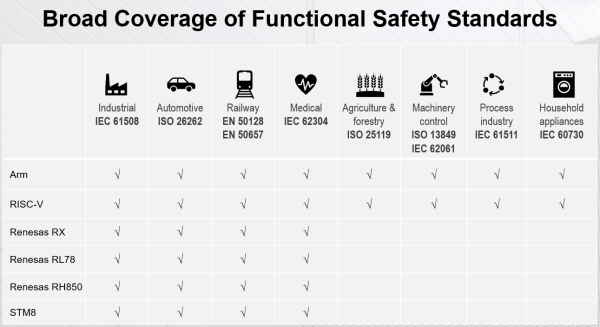
▲그림 1 : IAR이 제공하는 기능 안전 표준의 범위
IAR 디버깅 기능인 C-SPY는 직관적이고 효율적이며 다양한 기능을 통해 디버깅 시간을 효율적으로 단축시킬 수 있다.
이것은 다른 개발 도구와의 차등점이며, 브레이크 포인트(break point)를 삽입하고 출력 함수(printf)로 변수 및 상태를 모니터링(monitoring)하는 디버깅 방법에서 벗어나 다양한 브레이크 포인트의 활용법, 시리얼(serial) 통신과 같은 외부 장치 없이 출력 및 모니터링이 가능하고, 트레이스(trace) 기능을 이용한 버그(bug)의 역추적 기능, 동적 스택(stack) 사용량 확인, 콜 스택 그래프(call stack graph) 제공, 함수 프로파일(profile) 기능을 사용한 리소스(resource) 점유율 확인, 코드 커버리지(coverage) 기능을 통한 구문의 수행 여부 확인, 타임라인 윈도우(timeline window)를 통한 가시적인 모니터링(monitoring) 기능 등을 제공한다.
보다 자세한 내용은 다음 장에 설명한다.
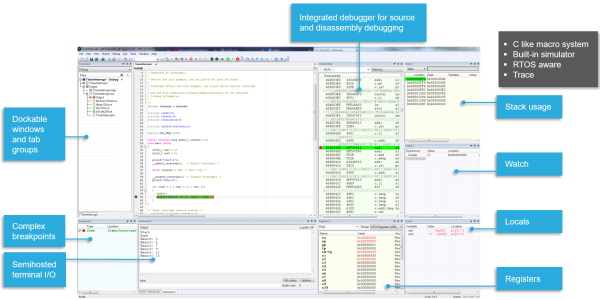
▲그림 2 : 직관적이고 다양한 디버깅 기능
정적 분석 도구(C-STAT)는 복잡한 환경 설정에서 벗어나 컴파일(compiler)하는 것과 동일한 수준으로 쉽고 빠르게 각 규칙에 대해 분석이 가능하다.
또한 도움말 기능을 통해 위반 항목에 대해 쉽게 이해할 수 있으며 예제까지 제공한다.
CWE, CERT-C, MISRA-C 모두 각 항목별로 분석이 가능하며 최종적으로 리포트(report) 생성 기능도 가지고 있다.
CI/CD 프로세스(process)는 이제 그 의미와 기능이 널리 알려진 상태이다. CI는 지속적인 통합, CD는 지속적인 배포를 의미한다. 여러분이 사용하고 계신 소프트웨어 형상 관리 도구를 생각 해 보았을 때 이제 그 기능은 없어서는 안 될 것이 됐다.
CI/CD도 마찬가지이다. 지금은 산업적인 특성이나 프로젝트의 규모 등을 고려하여 CI/CD 도입 여부를 결정하고 있으나 근 미래에 형상 관리 도구와 같이 없어서는 안 될 프로세스가 될 것은 자명하다. IAR은 BXRISC-V라는 이름으로 CI/CD 프로세스를 위한 빌드 서버용 버전을 제공하고 있다.
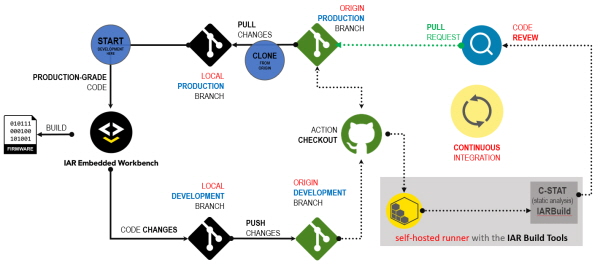
▲그림 3 : IAR 빌드 도구와 C-STAT 정적 분석 도구를 CI/CD 프로세스에 적용할 경우
■ 기능 안전 인증
○ 기능 안전이란?
우선 안전과 기능 안전의 의미를 구분 해 볼 필요가 있다. 안전이란 위험 요소로부터 자유로운, 즉 위험 요소를 미연에 방지할 수 있는 시스템을 설계하는 규격이다. 기능 안전은 잠재적 위험 요건을 탐지해 낼 수 있는 규격으로 위험 요소로 인한 심각한 결과를 줄이는 것을 그 목표로 하고 있다.
이러한 기능 안전 규격을 적용한다면 제품의 법적 책임, 제품 리콜(recall), 소프트웨어 업데이트 횟수를 줄일 수 있다. 이로 인해 회사의 평판이 좋아지고 국제 표준에 부합할 수 있다.
○ 기능 안전 규격
앞서 설명한 것과 같이 기능 안전 규격에는 국제표준(IEC 61508), 차량(ISO 26262), 의료(IEC 62304), 철도(EN 50128/50657), 가전(IEC 60730), 기계 제어(ISO 13849/IEC 62061), 산업용 표준(IEC 61511), 농업 및 임업(ISO 25119)이 있다. IAR RISC-V용 임베디드 워크벤치는 이 모든 규격을 포괄한다.
○ 인증된 제품을 위한 솔루션
우선 일반 버전이 아닌, 기능 안전 프로세스 및 테스트를 완료한 빌드 도구를 인증서와 함께 제공한다. 이 인증은 튜브 슈드(TUV SUD)라는 인증기관을 통해 진행되었으며, 튜브 슈드는 글로벌(global) 기술 서비스 기업으로 사람, 환경, 재산의 안전 보호를 위해 시험, 인증, 검사, 교육 등 종합적인 기술 서비스를 제공하는 기업이다. 이 기관을 통해 테스트 리포트(report) 및 안전 가이드(safety guide)를 제공받는다.
■ 다양하고 효율적인 디버깅 솔루션
○ 외부 장치 없이 printf 사용하기
일반적으로 시리얼 통신(UART와 같은)을 이용하여 터미널(terminal) 프로그램을 이용해 디버깅에 사용하는 경우가 많다. 세미호스팅(semi hosting) 기능을 이용하면 이러한 외부 장치 및 터미널 없이 printf함수를 이용하여 내부 변수 및 상태를 모니터링 할 수 있다.
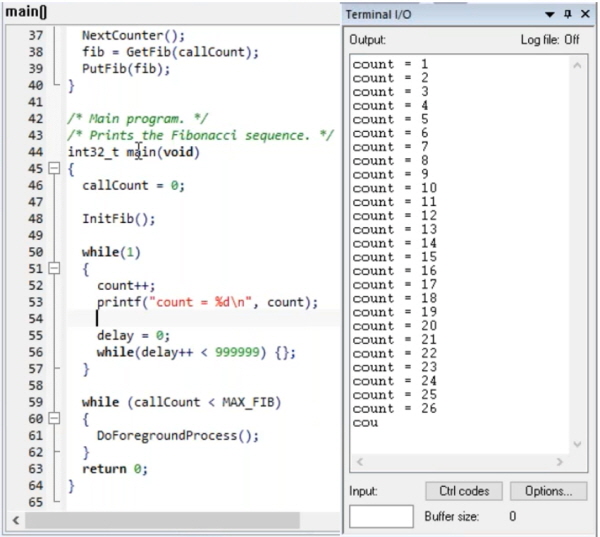
▲그림 4 : 세미호스팅을 이용한 printf 함수 사용방법
○ 다양한 브레이크 포인트 활용법
일반적인 코드(code) 브레이크 포인트 외에 플래시(flash)와 로그(log) 브레이크 포인트를 추가로 제고한다.
코드 브레이크 포인트는 시스템에 따라 브레이크 포인트 개수가 제한되어 있는 반면, 플래시 브레이크 포인트는 그 개수에 제한이 없어 더욱 편리하게 사용할 수 있다.
브레이크 포인트 사용 중 개수 제한으로 더 이상 브레이크 포인트를 추가할 수 없을 때 플래시 브레이크 포인트를 사용해 보길 바란다.
로그 브레이크 포인트는 브레이크 포인트를 지나갈 때 프로그램 동작이 멈추지 않고 로그만을 남기고 계속 수행된다.
이 때 브레이크 포인트 위치의 해당 변수 값도 동시에 출력할 수 있다. 이것은 인터럽트 루틴 내에서 자주 사용된다.
프로그램 전체적인 동작이 인터럽트 루틴에서 멈춘다면 전체 동작 로직(logic)이 디버깅 시 원하는 로직이 아닐 수 있다.
그러므로 로그 브레이크 포인트를 이용하여 프로그램 전체 동작이 유지된 상태에서 인터럽트 루틴 내의 변수 값을 모니터링 할 수 있다.
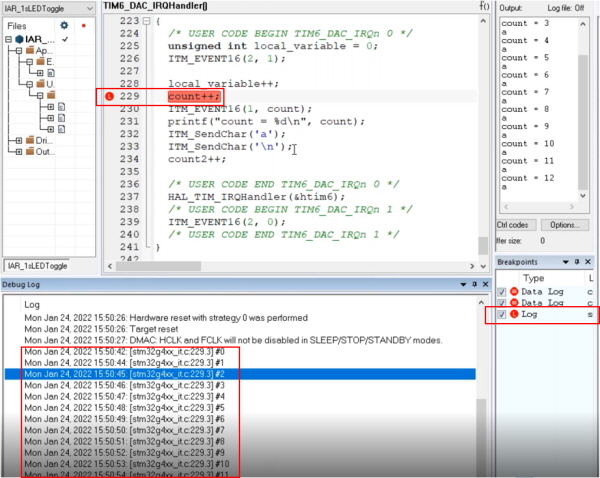
▲그림 5 : 로그 브레이크 포인트 사용의 예
○ 동적 스택(stack) 사용량 확인
디버깅 기능을 이용해 스택 사용량을 확인할 수 있다. 이것은 프로그램 동작 중 브레이크 포인트가 삽입된 위치에서의 스택 사용량을 보여주는 것으로 매우 유용하다.
또한 최대 스택 사용량도 보여주기 때문에 스택 오버플로(overflow)나 설정된 스택 크기대비 사용량을 확인할 수 있다.
아래 Stack 1 창에서 초록색 선은 현재(브레이크 포인트 삽입 위치)의 스택 사용량이고 회색 바(bar)는 최대로 사용한 스택 크기이다. 설정된 스택 크기 대비 5%(224bytes)를 최대로 사용된 것으로 확인된다.
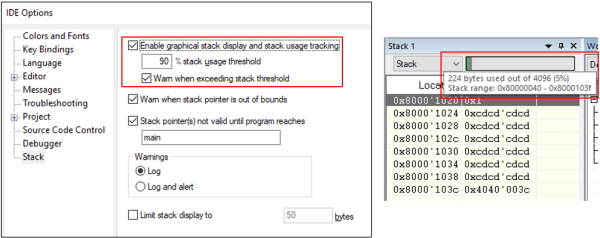
▲그림 6 : 동적 스택 사용량 확인 방법

○ 타임라인 윈도우(timeline window)를 통한 가시적인 모니터링(monitoring) 기능
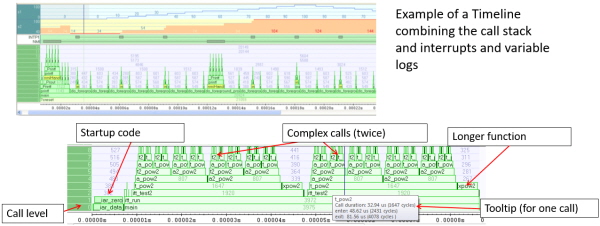
타임라인 윈도우는 강력한 기능을 가지고 있습니다. 가시적(graphically)으로 원하는 데이터를 표시해 줍니다. 아래 그림은 변수 값 변화, 콜스택을 확인할 수 있다. 또한 함수 프로파일러와 함께 분석하면 각 함수별 리소소(resource) 사용량을 확인 가능하다.
○ 함수 프로파일(profile) 기능을 이용한 함수 수행 시간 확인
함수 프로파일 기능을 이용하여 함수 수행 시간 확인이 가능하다. 개발자가 설계한 함수가 어느 정도 시간이 걸리는 지는 모든 개발자의 관심 대상이다. IAR의 함수 프로파일 기능을 이용하면 손쉽게 해당 시간을 확인할 수 있다.
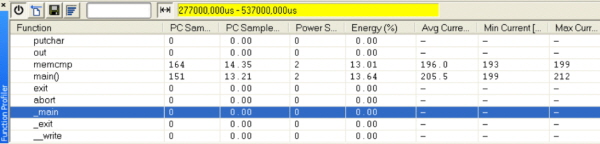
▲그림 8 : 함수 프로파일 기능을 이용한 수행 시간 측정 방법
○ 트레이스(trace) 기능을 이용한 버그(bug) 역추적 기능
트레이스의 뜻과 같이 추적 기능이다. 이 기능은 프로그램 수행 정보를 인스트럭션(instruction) 단위로 저장하기 때문에 버그 발생 위치부터 역추적을 하여 문제 발생 위치를 정확히 찾아낼 수 있다. 보다 자세한 내용은 IAR 홈페이지의 지난 웨비나 보기에서 디버깅 방법에 대해 찾아보거나 IAR 한국지사에 문의를 바란다.
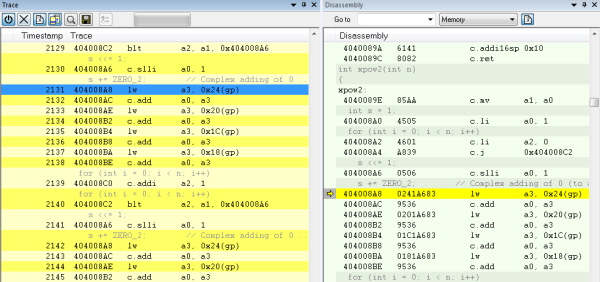
▲그림 9 : 트레이스 기능을 사용한 버그 역추적 방법
○ 코드 커버리지(coverage) 기능을 통한 구문의 수행 여부 확인
IAR에서 제공하는 코드 커버리지 기능은 구문 커버리지다. 이것은 실제 프로그램이 동작하면서 수행된 라인과 수행되지 않은 라인을 표시해 준다. 이 수행 결과를 바탕으로 자신이 설계한 프로그램이 의도대로 동작되고 있는 지 확인할 수 있다. 아래 그림에서 초록색은 수행이 되었다는 뜻이고, 빨간색 영역은 수행되지 않은 라인이다.
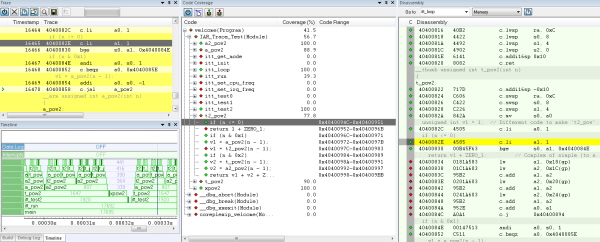
▲그림 10 : 코드 커버리지 기능을 이용한 구문의 수행 여부 확인
■ 정적 분석 도구(C-STAT)
정적 분석 도구(C-STAT)는 복잡한 환경 설정에서 벗어나 컴파일(compiler)하는 것과 동일한 수준으로 쉽고 빠르게 각 규칙에 대해 분석이 가능하다.
또한 도움말 기능을 통해 위반 항목에 대해 쉽게 이해할 수 있으며 예제까지 제공한다. CWE, CERT-C, MISRA-C 모두 각 항목별로 분석이 가능하며 최종적으로 리포트(report) 생성 기능도 가지고 있다.
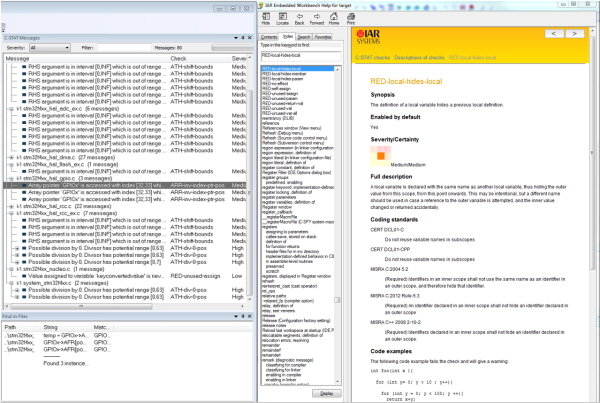
▲그림 11 : 정적 분석 결과 및 각 위반 항목에 대한 도움말 기능
■ CI/CD 프로세스(빌드 서버)
○ CI/CD 프로세스가 필요한 이유
소프트웨어 배포 전날 개발실은 분위기는 정신없이 흘러간다. 자신의 할당량을 채우기 위해 컴퓨터 앞에서 집중하는 사람, 동료와 버전 충돌에 대해 서로 상대방을 지목하며 고치라고 열띤 토론을 하는 현장, 자신의 할당량을 마친 후 동료가 끝날 때까지 대기하는 사람, 검증팀에 소프트웨어 레벨 검증 결과를 빨리 회신 해 달라는 사람 등 다양하다. 이러한 분위기를 개선하기 위해 자동화된 빌드 서버, CI/CD 프로세스를 적용시키면 어떨까?
앞서 설명 드린 것과 같이 CI/CD 프로세스(process)는 이제 그 의미와 기능이 널리 알려진 상태이다. CI는 지속적인 통합, CD는 지속적인 배포를 의미한다. 여러분이 사용하고 계신 소프트웨어 형상 관리 도구를 생각 해 보았을 때 이제 그 기능은 없어서는 안 될 것이 됐다.
CI/CD도 마찬가지이다. 지금은 산업적인 특성이나 프로젝트의 규모 등을 고려하여 CI/CD 도입 여부를 결정하고 있으나 근 미래에 형상 관리 도구와 같이 없어서는 안 될 프로세스가 될 것은 자명하다. IAR은 BXRISC-V라는 이름으로 CI/CD 프로세스를 위한 빌드 서버용 버전을 제공하고 있다.
○ CI/CD 프로세스란?
CI란 팀원들 사이에서 지속적으로 변경이 발생하는 내용들, 즉 변경점이 서버로 업데이트 되는 과정에서 버전 관리를 위해 코드를 빌드하고 테스트하기 위한 자동화된 프로세스이다. 기존에 수작업으로 진행되었던 이러한 프로세스는 CI 프로세스에 의해 많은 부수적인 일들을 줄임으로써 보다 빠른 업무 프로세스를 제공한다. 또한 소프트웨어 버전 관리 서버를 사용하는 다수의 개발자들 사이에서 발생하는 충돌을 미연에 방지할 수 있다. 소프트웨어 개발을 마치고 테스트 팀으로 배포하는 과정에서 각자 자신이 완료한 코드를 서버에 업로드(commit/push)하면서 서로간 발생하는 충돌을 경험해 본 개발자라면 CI 프로세스의 필요성을 공감할 것이다.
CD란 CI의 확장된 개념으로, 변경된 소프트웨어의 빠른 배포를 위한 프로세스이다. 개발자들이 작업한 변경 사항이 버그 테스트를 거쳐 서버에 자동으로 업로드 되는 것을 뜻하며 이것은 최소한의 노력으로 새로운 소프트웨어를 배포하는 것을 목표로 한다. 이 또한 테스트 팀에서 수동으로 해오던 일련의 작업들이 자동화되며, 빠른 프로세스를 제공한다.
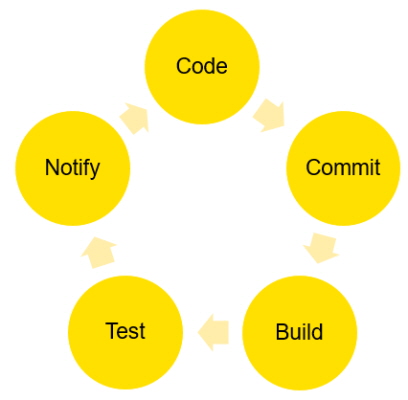
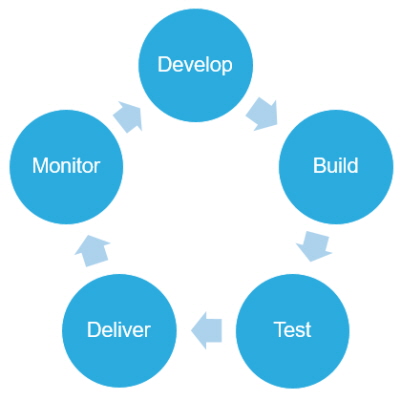
▲그림 12 : CI / CD의 개념도
그림 12의 왼쪽은 CI, 오른쪽은 CD의 개념을 나타낸다. 코드(Code) - 개발(Develop), 커밋(Commit) -빌드(Build), 빌드(Build) - 테스트(Test), 테스트(Test) - 전달(Deliver), 보고(Notify) - 모니터(Monitor) 단계의 쌍으로 존재한다. 코드를 개발하고 형상 관리 툴에 업로드한 후 빌드를 진행하고 이것이 배포되어 테스트 팀에서 테스트를 진행한 후 문제점을 보고한 후 개발자는 다시 이것을 모니터링 하여 문제점을 수정하는 절차가 지금까지는 수동으로 이루어져 왔다. 하지만 CI/CD 프로세스, 즉 자동화된 프로세스에 따르면 이러한 절차는 각 단계에 속하는 툴이 그것을 대신하여 자동화된다.
○ IAR CI/CD 빌드 도구를 적용한다면?
그림 13은 CI/CD가 적용된 개발 프로세스로서, 점선(\---)은 CI/CD기반 자동화된 프로세스이다.
개발자는 개발이 완료된 코드를 Gillab에 업로드(commit)한다. 이 때 업로드 되는 브랜치(branch)는 배포용 프로덕트 브랜치(product branch)가 아닌, 디벨롭먼트 브랜치(development branch)이며 이 의미는 CI/CD 개발흐름에 맞춰 프로젝트 매니저가 승인한 코드만 프로덕트 브랜치로 업로드 될 수 있음을 의미한다.
기존에는 각자 개발이 완료된 코드를 하나의 브랜치에 올려놓고 테스트 팀에 배포를 했을 것이다.
하지만 CI/CD 프로세스에서는 컴파일 결과가 문제없고 각 개발자간의 충돌이 없으며 회사나 고객사가 정한 정적 분석을 통해 코딩룰의 위반이 없을 경우만 배포가 될 수 있다.
이렇게 디벨롭먼트 브랜치에 변경 사항이 업로드 되면 그 즉시 프로젝트 매니저에게 보고(notify)됨과 동시에 빌드 서버에서 IAR 빌드 툴(BXRISC-V)에 의해서 컴파일 되고 그 결과는 다시 프로젝트 매너저에게 보고된다.
이 때 다수의 개발자들에 의해 코드가 업로드될 경우, 지속적으로 통합이 이루어져 컴파일된 결과에는 문제가 없는지, 다수의 개발자들에 의해 수정된 코드 간에 충돌은 없는 지 자동적으로 빌드 및 검사가 이루어진다. 빌드 후에 IAR의 정적 검사 툴인 C-STAT을 연계하면, 코드가 Gitlab에 업로드 되기 전에 기본적인 코드의 결합을 찾고 품질을 높일 수 있다.
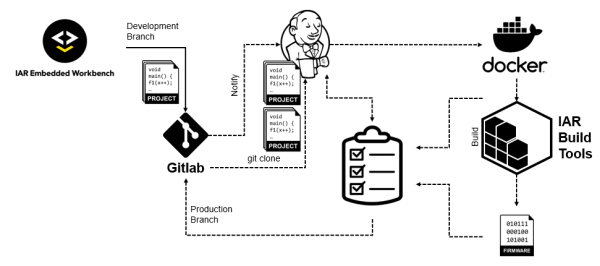
▲그림 13 : CI/CD가 적용된 개발 과정
■ 맺음말
IAR은 RISC-V 소프트웨어 개발 환경의 선두주자이며, 여러분이 필요한 대부분의 기능을 개발해 놓고 있다. 지금까지 설명 드린 내용이 RISC-V를 적용하려고 하시는 여러분께 도움이 됐길 바라며, 기고의 내용이나 그 외에 기술지원이 필요하시면 IAR로 연락주시기 바란다.
감사합니다.
기고 관련 영상 및 상세 내용 보기: https://register.gotowebinar.com/recording/7851496407429895952

Comments
Related news
IAR Supports Arm Cortex-M55 in 'Embedded Workbench'
IAR Embedded Workbench supports the latest Arm Cortex-M55 processor, ensuring future innovation in embedded applications.
2021.11.22by 배종인 기자
IAR Workbench Supports Codaship L30 and L50 Processors
IAR Systems®, a global provider of software tools and services for embedded development, and Codasip®, a leading provider of customized RISC-V processor IP, have joined forces to build low-power RISC-V-based applications. IAR Embedded Workbench® for RISC-V version 2.11 now supports Codasip's L30 and L50 processors.
2022.01.07by 강정규 기자
IAR Supports 64-bit RISC-V
IAR Systems®, a global provider of software tools and services for embedded development, delivers high-performance, proven technology for companies adopting new RISC-V 64-bit cores in their future development projects.
2022.03.15by 배종인 기자
Intel Unveils Next-Generation 'Core Ultra Series 3' and vPro Platform for Enterprise PCs
Intel has officially unveiled the "Intel Core Ultra Series 3" for next-generation enterprise PCs and the latest vPro platform, addressing a wide range of demands from enterprise notebooks to high-performance workstations.
2026.03.26by 배종인 기자
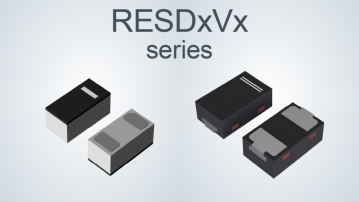
ROHM Launches ESD Protection Diode Compatible with High-Speed Interfaces of 10Gbps or Higher
Semiconductor specialist ROHM has developed the 'RESDxVx series' of ESD (electrostatic discharge) protection diodes capable of responding to next-generation high-speed data communication environments exceeding 10Gbps, simultaneously enhancing both signal quality maintenance required in high-speed interfaces and IC protection performance.
2026.03.26by 배종인 기자











