



ST FlightSense multi-zone ToF sensor supports gesture recognition and theft warning.
 Published2022.07.08 11:06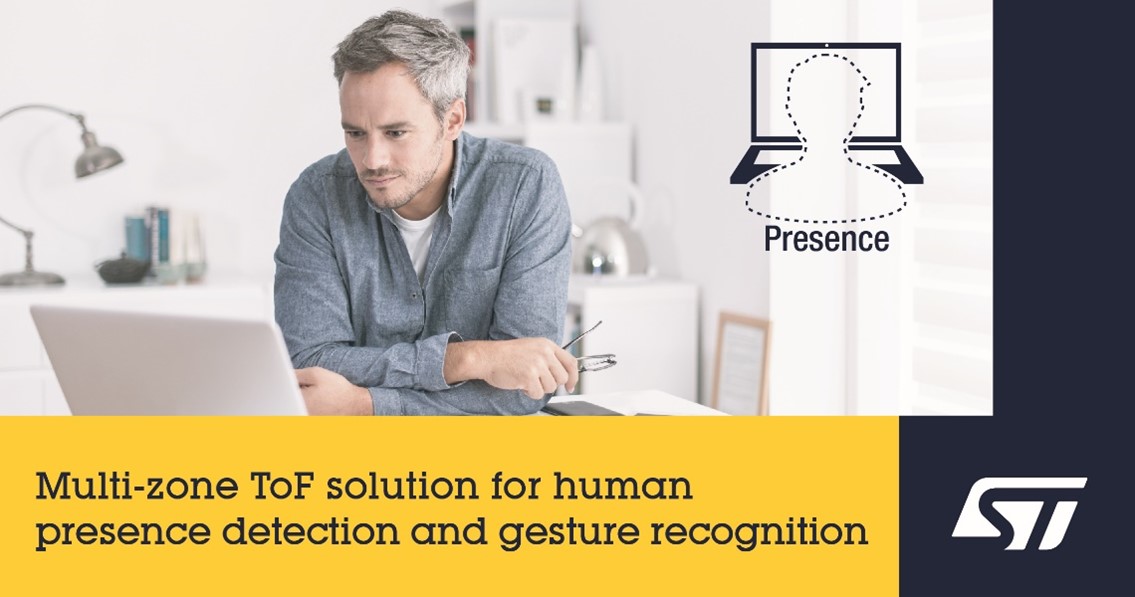
▲ST FlightSense multi-zone ToF sensor (Image - ST)
A product has been launched that enhances security and improves performance and efficiency through a non-vision-based ToF sensor.
STMicroelectronics (NYSE: STM), a global semiconductor leader serving customers across the spectrum of electronics applications, today announced its latest FlightSense™ Time-of-Flight (ToF) multi-zone sensor. The product is offered as a turnkey solution specifically designed for the PC market for user detection, gesture recognition, and tampering alerts, along with a suite of software algorithms.
ST's FlightSense multi-zone sensor continuously scans its field of view to map a scene and gather intelligence without using a camera or recording images. Using ToF technology, the sensor can quickly calculate X, Y, and Z coordinates and motion, enabling it to detect and track multiple targets.
Conventional infrared sensors do not measure distances and are affected by the color and reflectivity of the detected object. Ultrasonic waves are sensitive to noisy environments and can affect the hearing of pets. Radar not only consumes a lot of power for signal processing, but also requires very complex software development.
The latest VL53L5CP FlightSense multi-zone sensor detects multiple targets across 64 (8x8) zones over a 61-degree field of view. It comes with ST's third-generation Presence Premium PLUS algorithm, specifically designed for PC applications. This turnkey solution, capable of natively interacting with PC hardware and operating systems, has been certified by Intel.
The VL53L5CP and Presence Premium Plus software are optimized for PC applications and are supported on Windows 11. ST emphasized that the presence solution, which implements features such as smart power management, enhanced security, and contactless user interaction, and supports automatic wake-on-approach and walk-away lock functions, minimizes battery energy consumption while realizing a seamless 'always-on' user experience.
The Multi-Human Detection (MHD) feature detects others within the field of view and analyzes their location and movements to assess security risks, such as "Shoulder Surfers." If a dangerous situation arises, the system alerts the user.
The device features non-contact gesture detection, allowing users to control PC applications without touching the screen, keyboard, or mouse. The sensor can detect swiping directions, taps, and level adjustments. Developers can access this information to implement commands such as next or previous slides, music, and videos, play/pause, and volume control.
Lenovo is integrating ST's presence solution into some of its laptops. “Today’s flexible, mobile work style requires ease of use and privacy features that maximize productivity,” said Zhaochun Ma, Vice President of SMB Notebook Development Center. “That’s why we integrated ST’s presence solution, based on camera-less ToF sensing technology, into Lenovo PCs.”
“It detects human presence and offers smart features ranging from hands-free logging in and locking the device to swiping content using hand gestures,” he said.
The VL53L5CP achieves this functionality using non-vision-based ToF technology, rather than a PC webcam. Because there's no image, there are no privacy concerns. The sensor is located behind the bezel, enabling constant operation and is unaffected by the webcam shutter position.
Additionally, while cameras require dedicated, power-hungry LEDs to illuminate the scene, ST claims this product incorporates a 940nm VCSEL infrared emitter, invisible to the human eye, ensuring full performance even in low-light conditions.
“ST’s latest ToF sensor, now in its fourth generation, enables PCs to understand their users, delivering stronger connections and a more satisfying ownership experience,” said Eric Oseda, STMicroelectronics’ senior vice president.

Comments
Related news
ST Launches Latest Industry Standard Certified 5G M2M Embedded SIM
An embedded SIM certified to the latest industry standards has been released and is expected to be utilized in IoT applications and equipment.
2022.06.21by 명세환 기자
ST Launches High-Density SPI Memory with Page Erase Capability
STMicroelectronics (hereinafter ST) has launched high-density SPI memory with page erase capability, enabling firmware management and flexible data storage combinations that were previously impossible to handle with a single device.
2022.06.27by 배종인 기자
STMicroelectronics Launches Energy-Saving, Low-EMI 40V STripFET F8 MOSFETs
A new MOSFET utilizing oxide-filled trench technology has been launched. It is expected to be utilized in fields such as power conversion and motor control through characteristics including power efficiency and low EMI emissions.
2022.06.28by 명세환 기자
Intel Unveils Next-Generation 'Core Ultra Series 3' and vPro Platform for Enterprise PCs
Intel has officially unveiled the "Intel Core Ultra Series 3" for next-generation enterprise PCs and the latest vPro platform, addressing a wide range of demands from enterprise notebooks to high-performance workstations.
2026.03.26by 배종인 기자
ROHM Launches ESD Protection Diode Compatible with High-Speed Interfaces of 10Gbps or Higher
Semiconductor specialist ROHM has developed the 'RESDxVx series' of ESD (electrostatic discharge) protection diodes capable of responding to next-generation high-speed data communication environments exceeding 10Gbps, simultaneously enhancing both signal quality maintenance required in high-speed interfaces and IC protection performance.
2026.03.26by 배종인 기자











