



Huawei Unveils 2-in-1 Laptop, a Mobile Productivity Tool
 Published2016.02.22 16:38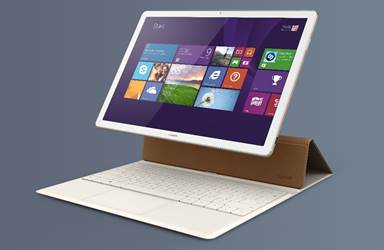
High portability thanks to the ergonomic keyboard
Huawei (www.huawei.com/kr) unveiled the Huawei MateBook, a 2-in-1 laptop designed to meet the evolving needs of today's business users, at the Mobile World Congress (MWC) 2016, the world's largest mobile communications exhibition, which opened in Barcelona, Spain.
The Huawei MateBook, which effectively combines the mobility of a smartphone with the productivity of a laptop, is a product optimized for consumers who prefer the flexibility of a convertible device. It is a premium laptop that perfectly balances mobility, internet connectivity, productivity, and high efficiency with a stylish design.
Characterized by a minimalist design and a sleek exterior, the Huawei MateBook is crafted from high-quality aluminum, boasting elegance and sophistication. Designed for users who need to carry it at all times, it offers excellent portability as an ultra-lightweight product weighing only 640g, despite featuring strong durability against external impacts. Furthermore, it features a 12-inch IPS multi-touch screen with an ultra-slim frame, an 84% screen-to-body ratio, a resolution of 2160x1440, and a 160-degree wide angle, providing a more immersive and vivid user experience, while reproducing lifelike colors with a color gamut reaching an impressive 85%. The Huawei MateBook comes in two color options: gold and silver.
Minimizing typing errors through ergonomic design
The keyboard minimizes typing errors by maximizing key surface area through a 1.5mm key stroke, ergonomic suspension, and chiclet keycap design. Additionally, the built-in touchpad provides high convenience and usability by utilizing multi-touch technology that accurately detects finger movements. The keyboard case is crafted from eco-friendly yet soft polyurethane leather, delivering style, functionality, and durability simultaneously.
To ensure the Huawei MateBook delivers optimal performance as a mobile device, Huawei devoted the most effort to battery life and power efficiency during the design process. The Huawei MateBook is equipped with a 33.7Wh high-density lithium battery capable of 9 hours of work or continuous internet use, or 29 hours of continuous music playback, and also incorporates Huawei's proprietary power-saving technology for business users. The battery can be fully charged in two and a half hours and reaches 60% capacity in just one hour.
The Huawei MateBook, running on the Windows 10 operating system, supports fast processing speeds through the 6th generation Intel Core M processor and provides key productivity tools, including the latest browser Microsoft Edge and the digital personal assistant Cortana, both provided by Microsoft. It is equipped with up to 8GB of LPDDR3 memory and a 512GB SSD, and utilizes a unique stacking hardware process to implement a fanless design, resulting in no noise during use.
'Mate Pen' that detects various movements by distinguishing 2,048 levels of pressure
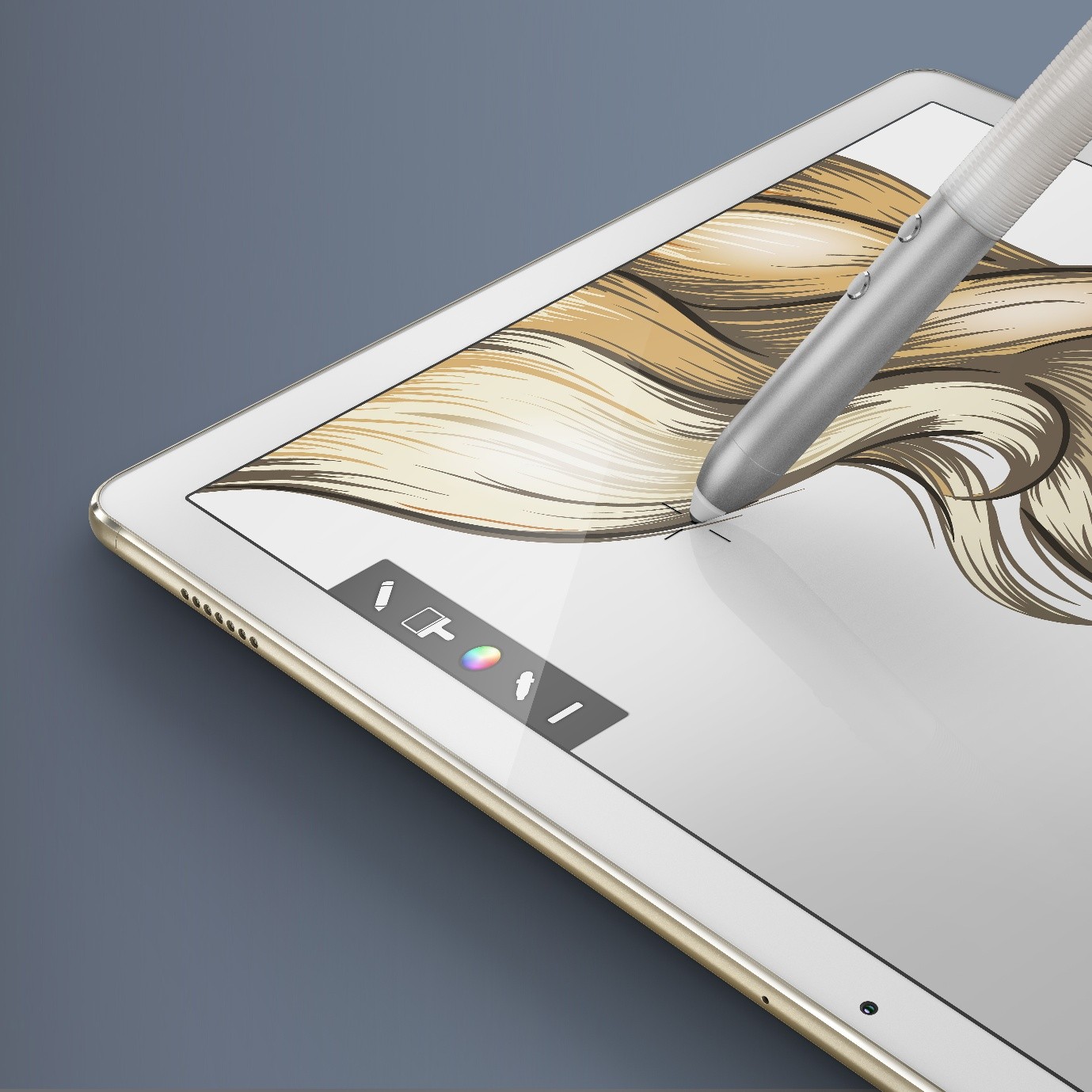
The 'MatePen' stylus, included with the Huawei MateBook, distinguishes 2,048 levels of pressure sensitivity, detecting subtle and diverse hand movements without lag during writing. Supporting advanced business functions, the MatePen offers graphic and mathematical capabilities and can also be used as a laser pointer during presentations. Furthermore, fingerprint recognition is available from any 360-degree angle simply by touching the device, providing both convenience and high security. With industry-leading fingerprint recognition speeds, unlocking is possible with a single touch.
The Huawei MateBook allows users to maintain a connection via a Wi-Fi mobile hotspot even in situations where internet connectivity is difficult. In addition, it supports seamless data transfer and provides a more efficient mobile experience by enabling the exchange of documents with Android smartphones using drag-and-drop.

Comments
Related news
Huawei's 2015 Business Performance in 7 Numbers
Huawei solidified its position as the third-largest company in the global smartphone market in 2015. According to a report released by market research firm GFK, Huawei maintained its third-place ranking with a 9.7% market share in the global smartphone market in 2015. Additionally, according to market research firm TrendForce, Huawei ranked first among the five major Chinese smartphone manufacturers with a 20% market share, significantly outpacing its competitors.
2016.01.21by 명세환 기자
Huawei Surpasses 10 Million Units in Global Shipments!
Huawei's budget-friendly smartphone 'Huawei P8 lite', which was launched in Europe last April, surpassed 10 million units shipped within nine months of its release. With this milestone, the total shipments of the Huawei P8 flagship product series have exceeded 16 million units.
2016.02.04by
ESP32 Development Environment Selection and GPS Application Implementation
The ESP32 is a microcontroller that integrates Wi-Fi, Bluetooth, 12-bit ADC, capacitive touch, PWM, DAC, and UART in a single SoC. However, the abundance of features does not by itself solve the designer's problems. The real challenges lie in selecting the appropriate development environment, determining which pins can be used and which must be avoided, and converting raw data from modules into usable information. This document addresses ESP32 peripheral constraints (ADC2 and Wi-Fi coexistence limitation, UART1 occupancy, ADC non-linear regions), the trade-offs between Arduino IDE and ESP-IDF, and the process from connecting NEO-6M/NEO-M8N GPS modules to UART2, parsing NMEA sentences, and visualizing routes in Google Earth, all organized based on documented references.
2026.10.12by 편집부
MIPI CSI-2, DSI-2, C-PHY, D-PHY Test Solution Technical White Paper
The MIPI interface adopts a burst mode that transitions between low-power (LP) and high-speed (HS) states for low-power consumption, and in return, strict timing rules are imposed on state transitions. Additionally, the high-speed section operates as a packet-based protocol with headers, ECC, and CRC, so verification engineers must handle waveforms and protocols simultaneously. Traditional configurations combining general-purpose oscilloscopes and AWGs reveal limitations in setup complexity, measurement uncertainty, and lack of reproducibility when faced with these requirements. This white paper, based on webinar materials, organizes the structure of this problem and describes how the SV5C-DPTXCPTX generator for receiver testing and SV5C-DPRXCPRX analyzer for transmitter testing integrate state transition testing, stressed eye testing, and protocol analysis into a single bench, along with their application boundaries.
2026.10.12by 편집부
NVIDIA to Invest $1 Billion in U.S. Science Over Next Five Years
NVIDIA has announced plans to invest $1 billion over the next five years to strengthen U.S. scientific and technological competitiveness. The company will enhance cutting-edge artificial intelligence research and development capabilities in key areas including quantum computing, healthcare, and energy security, while expanding support for higher education research institutions and cloud service providers. NVIDIA is participating as a major industry partner in the White House Office of Science and Technology Policy's Genesis Mission, and is promoting supercomputer construction in collaboration with national laboratories including Argonne and Los Alamos.
2026.10.12by 배종인 기자











