


LG V30 Adds Major Convenience Features, Including Knock Code (Tap to Unlock) and Facial Recognition
 Published2017.08.14 11:52
If you select a professional's photo, it automatically adjusts the camera settings to match.
LG Electronics has unveiled a User Experience (UX) designed to allow people of all ages to easily and comfortably enjoy the powerful multimedia features of the LG V30.
The LG V30 features intuitively designed multimedia functions, such as a different dimension of OLED FullVision display and a professional-grade high-performance camera, making it easy to get used to even for first-time users.
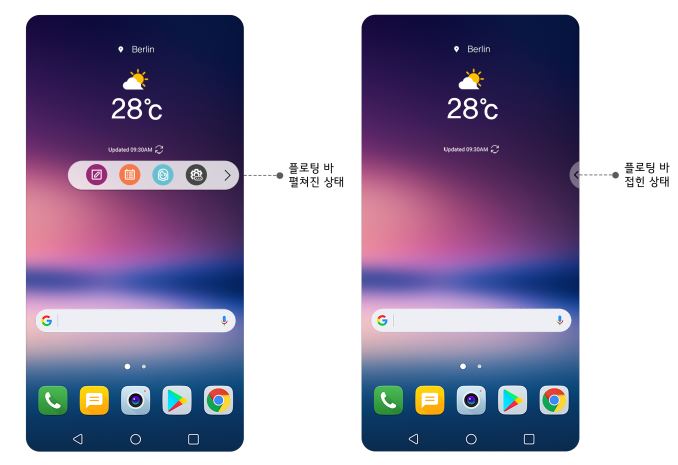
LG Electronics has equipped the 6-inch large screen 'OLED FullVision,' realized with unparalleled OLED technology, with a host of fun and convenience features.
The convenience of the Second Screen introduced in the previous V series has been carried over by the 'Floating Bar'. The Floating Bar, which replaces the Second Screen, normally appears as small semi-circular icons, but clicking it expands up to five frequently used apps horizontally. You can adjust its position by moving it up or down to the left or right of the screen, and you can also hide it from view and bring it out when needed.
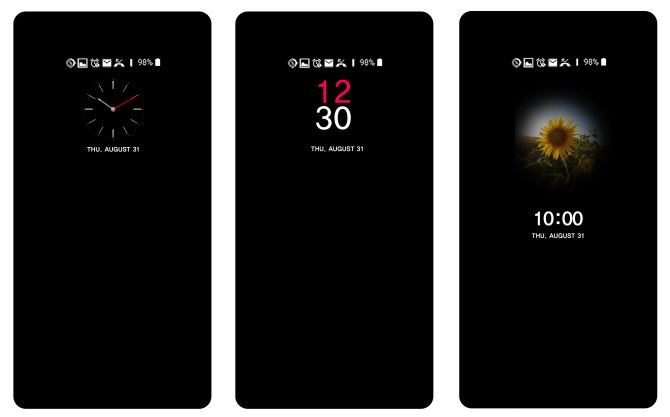
'Always-On,' which keeps the screen always on with minimal power consumption, is convenient as it allows you to use frequently used functions without opening the screen. You can stop the music you are listening to or listen to the next song, and control a total of six functions, including Bluetooth, Wi-Fi, taking photos, capturing the screen, and flashlight, while the screen is off.
LG’s signature powerful camera features have evolved even further. The V30 is equipped with an F1.6 aperture, the highest level for a smartphone, and adopts glass lenses used in high-end cameras such as DSLRs. Despite its top-tier camera performance, it is intuitive and easy to use. In 'Expert Mode,' if you select one of the pre-installed professional photos, camera settings such as aperture, white balance, and shutter speed are automatically set to match the selected photo.
LG Electronics has incorporated a user-centric UX philosophy into the LG V30 through various emotional features. A prime example is the Keyword Unlock feature, which unlocks the screen by speaking a personalized keyword. For instance, even when the screen is off, saying a pre-set keyword like "Happy Life!" allows the smartphone to analyze both the voice and the keyword to unlock the screen. It is also convenient because the smartphone turns on simply by speaking the keyword, like chanting a spell, without touching the device, even in dark environments where facial recognition is difficult. In addition, the lock screen can be unlocked in various ways depending on the situation, including fingerprint recognition for authentication, Knock Code which requires tapping a pre-set pattern, and facial recognition, which unlocks the device simply by lifting the smartphone and showing your face.
The LG V30's phone customization features also offer a new level of fun. Users can not only choose from a variety of sizes and shapes for the clock that is always displayed when the screen is off, but they can also select photos stored on the smartphone to keep them displayed like a picture frame. It is also possible to freely adjust the screen's color tone, ranging from warm to cool, by changing the display's Red, Green, and Blue (RGB) values.
LG Electronics MC Business Division President Cho Jun-ho emphasized, “We have enabled users to intuitively experience the unparalleled visual experience of OLED FullVision and professional-grade camera performance,” adding, “We will provide convenience and expertise so that people of all ages can easily and conveniently enjoy the LG V30’s unique high-performance multimedia features.”
Comments
Related news
LG Electronics Launches Stability-Focused Strategic Smartphone
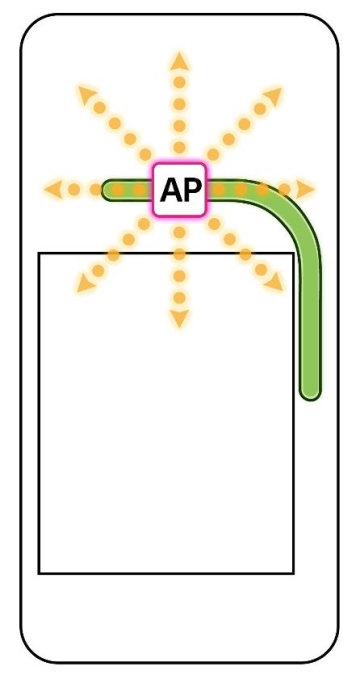
LG Electronics will apply dual-layer best-in-class safety design and testing to its strategic smartphone launching this year. Following the 'LG V20,' which received high praise for its excellent durability, LG Electronics plans to showcase a product focused on safety at MWC in February, featuring ▲significantly improved thermal management performance through heat pipe adoption and others, and ▲'combined environmental testing' that simultaneously applies international standard battery testing and extreme condition testing.
2017.01.16by 김지혜 기자
LG Electronics Unveils Next Smartphone 'LG V30' Worldwide
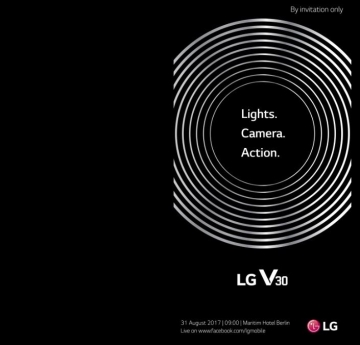
LG Electronics sent out invitations on the 8th to media representatives from around the world for the unveiling event of its next strategic smartphone, the 'LG V30'. LG Electronics will unveil the LG V30 at 9:00 a.m. local time on the 31st at the Maritim Hotel located in Berlin, Germany. The unveiling event will run for approximately 100 minutes, including product presentation and hands-on experience. Media representatives, business partners, and IT industry officials from around the world are expected to attend the event. The event will be livestreamed globally through SNS platforms including YouTube and Facebook.
2017.08.08by 김자영 기자
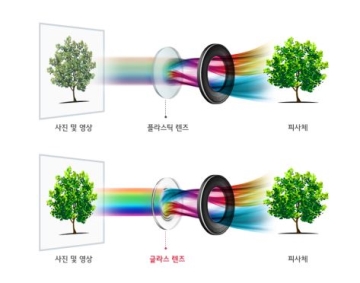
LG V30, 'Up to bright aperture F1.6'
LG Electronics will equip its next-generation strategic premium smartphone 'LG V30' with a next-generation dual camera that is brighter and sharper by applying an F1.6 aperture value, the highest level among smartphones, and a glass material lens. The standard lens of the LG V30 rear dual camera realizes a bright aperture value of F1.6, the highest level among smartphone cameras to date. This is approximately 25% brighter than the F1.8 standard lens of the previous generation V20.
2017.08.10by 김자영 기자
ESP32 Development Environment Selection and GPS Application Implementation
The ESP32 is a microcontroller that integrates Wi-Fi, Bluetooth, 12-bit ADC, capacitive touch, PWM, DAC, and UART in a single SoC. However, the abundance of features does not by itself solve the designer's problems. The real challenges lie in selecting the appropriate development environment, determining which pins can be used and which must be avoided, and converting raw data from modules into usable information. This document addresses ESP32 peripheral constraints (ADC2 and Wi-Fi coexistence limitation, UART1 occupancy, ADC non-linear regions), the trade-offs between Arduino IDE and ESP-IDF, and the process from connecting NEO-6M/NEO-M8N GPS modules to UART2, parsing NMEA sentences, and visualizing routes in Google Earth, all organized based on documented references.
2026.10.12by 편집부
MIPI CSI-2, DSI-2, C-PHY, D-PHY Test Solution Technical White Paper
The MIPI interface adopts a burst mode that transitions between low-power (LP) and high-speed (HS) states for low-power consumption, and in return, strict timing rules are imposed on state transitions. Additionally, the high-speed section operates as a packet-based protocol with headers, ECC, and CRC, so verification engineers must handle waveforms and protocols simultaneously. Traditional configurations combining general-purpose oscilloscopes and AWGs reveal limitations in setup complexity, measurement uncertainty, and lack of reproducibility when faced with these requirements. This white paper, based on webinar materials, organizes the structure of this problem and describes how the SV5C-DPTXCPTX generator for receiver testing and SV5C-DPRXCPRX analyzer for transmitter testing integrate state transition testing, stressed eye testing, and protocol analysis into a single bench, along with their application boundaries.
2026.10.12by 편집부











