


Hoho, now even iPhone filters out spam messages
 Published2017.12.12 14:22
Hoohoo & Company announced that it is providing a 'spam message filtering' function through its 'Hoohoo' application to reduce inconvenience caused by spam text messages on the iPhone.
The iPhone WhoWho's 'Spam Message Filtering' feature utilizes the newly released 'SMS Filtering' feature of iOS 11, and is a function that automatically classifies messages that WhoWho determines to have a high possibility of being spam into the 'Junk Message Inbox'.
If a user receives a text message from a number that he or she has blocked directly on WhoWho or a number that is in the top 5% of spam phone numbers reported on WhoWho, the text message is automatically classified into the 'Junk Message Box' and no arrival notifications are sent, so the user can experience the same effect as spam text message blocking. Additionally, blocked text messages can be checked through the ‘Junk Messages Inbox’.
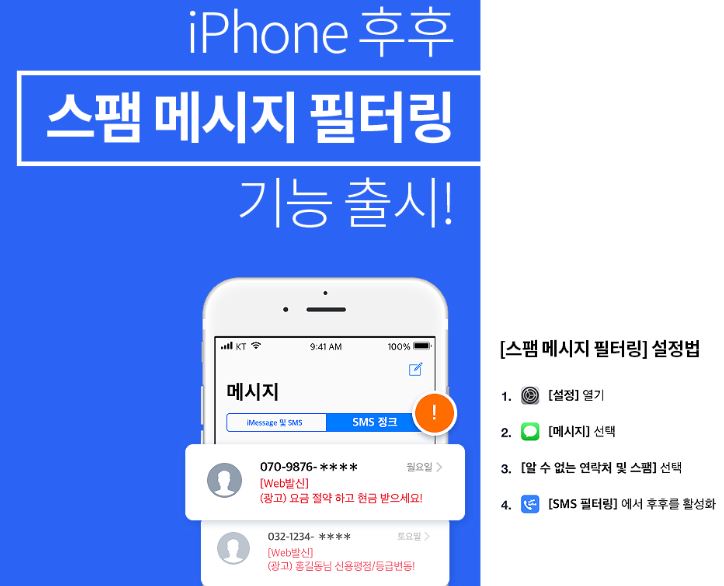
This is a significant improvement over the inconvenience of existing iPhone users having to select phone numbers one by one from their incoming call log to block spam text messages and set 'block caller' or not being able to separately check the contents of blocked text messages.
The iPhone Whoo Whoo 'Spam Message Filtering' feature can be used by going to 'Settings', 'Messages', selecting 'Unknown Contacts and Spam', and activating 'Whoo Whoo' after updating to iOS 11 in Whoo Whoo v2.4.1 or later.
Ryu Hyeong-geun, head of the service planning group at HooHoo & Company, said, “With this spam message filtering function, iPhone HooHoo users can now use the service more conveniently.” He added, “We will continue to strive to provide even more convenient services in line with changes in the OS environment.”
Comments
Related news
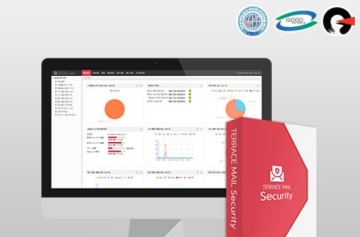
Daou Technology Unveils Integrated Email Security Solution to Defend Against Ransomware
Daou Technologies (CEO Kim Yun-deok) will participate in the "11th International Cyber Security Conference (Information Security Conference 2017, ISEC 2017)" held at COEX in Samseong-dong, Seoul on September 5-6, and introduce its integrated mail security solution "TERRACE MAIL Security." TERRACE MAIL Security is an integrated mail security solution that provides essential mail security functions for enterprises in one package, including not only blocking spam and virus emails but also defending against ransomware and APT attacks, preventing corporate information leakage, and securing outgoing mail. Generally, such functions are provided through separate equipment, but TERRACE MAIL Security is provided through a single device, which has the advantage of significantly reducing construction and management costs. Additionally, through organic linkage of functions and policy configuration, it helps establish an optimal protection system from the beginning to the end of email.
2017.08.28by 김지혜 기자
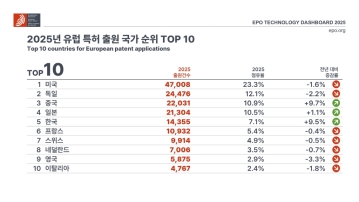
European Patent Applications Surpass 200,000 for the First Time… South Korea Maintains 5th Place, Led by Batteries and Telecommunications
According to the European Patent Office (EPO)'s 'Technology Dashboard 2025', European patent applications last year reached 201,974, surpassing 200,000 for the first time. Korean companies and inventors filed 14,355 applications, representing a 9.5% increase from the previous year and maintaining 5th place by country. Battery, digital communication, and semiconductor technologies led the growth, with Samsung ranking as the top EPO applicant for the second consecutive year and LG reaching 3rd place. The presence of major domestic cities such as Seoul, Suwon, and Yongin was also confirmed. It was also revealed that Korea's European patent strategy is expanding beyond individual technologies to span the entire industry.
2026.03.24by 명세환 기자

SK Telecom First Applies AI-Based Network Operations at Gwanghwamun K-Pop Concert
SK Telecom announced that it applied an AI-based network operation system for the first time at a large-scale K-pop concert held in the Gwanghwamun area of Seoul on March 21st, managing communication quality throughout the event. Mobile data usage during the three hours before and after the concert reached 12.15TB, approximately doubling compared to the same time slot the previous weekend. SK Telecom monitored traffic using the AI system 'A-One' in five-minute and 50-meter units to respond to potential overload situations, while also operating temporary communication facilities and on-site personnel in parallel. This case is interpreted as confirmation of the practical applicability of AI-based autonomous network operation in an environment where demand from dense events and foreign users increases simultaneously.
2026.03.23by 명세환 기자
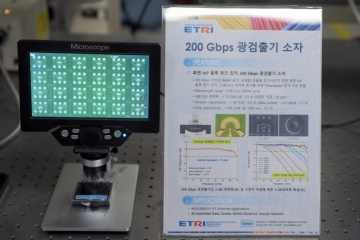
ETRI Develops 200Gbps Photodetector… Initiates Localization of Optical Receivers for AI Data Centers
The Electronics and Telecommunications Research Institute (ETRI) has developed a photodetector device that processes optical signals of approximately 200Gbps per channel for the first time in Korea. This device is a component that converts optical signals into electrical signals and determines the reception performance of AI data centers and 5G/6G communication networks. ETRI achieved bandwidth of 70GHz or higher and optical responsivity of 0.75A/W or higher, and integrated an indium phosphide lens on the rear of the chip to enhance optical reception efficiency and alignment convenience. The technology was presented at OECC 2025 and was recently published in the international academic journal 'Optics Express'.
2026.03.19by 명세환 기자
SKT and Ericsson Expand Joint Research on AI Networks… Preparing for 6G Beyond 5G Advancement
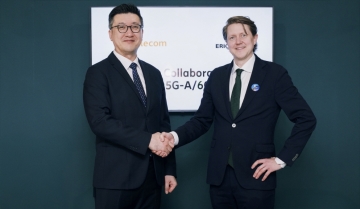
SK Telecom and Ericsson are expanding AI-based mobile network collaboration. On the 19th, the two companies signed a memorandum of understanding covering 5G advancement through 6G standardization, and agreed to undertake joint research and verification in the areas of AI-RAN, open and autonomous networks, security, and future communication technologies. This collaboration is interpreted as a move to enhance current 5G operational efficiency while preparing for a 6G environment where AI becomes embedded throughout the network. The scope also includes network operations automation, multi-vendor environment response, energy efficiency improvements, and review of communication-sensing fusion technology.
2026.03.19by 배종인 기자











