



[Series] ST Engineer Yuji Kawano ① - 'MCU', the Brain of Electronic Devices
 Published2021.09.02 15:58
MCU 기능 무궁무진, 다양한 크기·형태 제작
프로그래밍에 따라 다양하게 활용, PCB 필요
[편집자주]일반적으로 반도체라 하면 컴퓨터의 CPU와 메모리처럼 일반인에게 익숙한 반도체를 떠올리기 마련이다. 반면에 전자제품 구동을 위해서 핵심 반도체로 쓰이는 MCU(Micro Controller Unit)의 경우 일반적으로 우리가 쉽게 접하는 모든 전자제품에서 사용되고 있으면서도 일반인에게는 아직 낯선 반도체다. 이런 MCU가 최근 반도체 부족 사태로 인해 언론에 오르내리며, 일반인들에게 주목받기 시작했다. 이에 본지는 MCU 반도체 전문기업인 ST마이크로일렉트로닉스의 유지 카와노 매니저의 연재기고를 통해 MCU에 대해 전문적으로 알아보는 자리를 마련했다.
 ■ MCU, 전자 회로·전자기기 구성 기계 부품 기능 조정
MCU는 Micro Controller Unit의 약자이며 일반적으로 마이크로컨트롤러라 부른다. 다양한 전자 기기에 탑재되는 핵심 부품으로 프로그래밍을 통해 다양한 ‘제어’나 ‘연산 작업’이 가능하다. 사람의 두뇌가 인체를 조정하는 것과 같이 MCU는 전자 회로 혹은 전자 기기를 구성하는 기계 부품의 기능을 조정하는 역할을 한다.
MCU의 시작은 최초의 계산기에 탑재된 바 있는 집적회로(ICs: Integrated Circuits)였다. 이후 부품을 더 적게 사용하는 더 나은 계산기 개발이 시도되면서 MCU도 함께 발전하고 진화해왔다.
MCU의 활용 예
▷밥솥이나 TV 녹화 장치의 타이머 기능
▷리모컨의 적외선 신호 방출
▷휴대폰의 배터리 전압 측정 및 잔여 배터리 용량 표시
▷시계의 시간 표시
▷버튼을 누르면 기능 수행
▷USB를 통한 컴퓨터와의 데이터 교환(좀 더 높은 수준의 애플리케이션)
MCU가 특정한 기능을 구현하려면 프로그래밍 과정을 거쳐야 한다. 예약 기능을 갖춘 밥솥을 개발해 한 시간 안에 조리가 시작되도록 설정하려면 밥솥의 MCU가 이러한 일을 수행하도록 프로그램을 짜 넣어야 한다는 것. 오늘날 대부분의 전자 제품은 MCU를 탑재하고 있다.
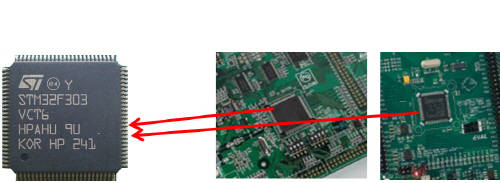
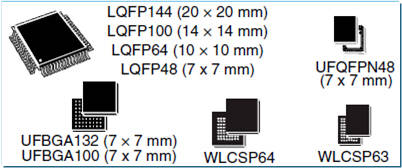
▲그림1.3 : 다양한 형태와 사이즈로 제조 가능한 MCU
전자 기기를 분해하는 것을 권하지는 않지만, 혹시 그럴 기회가 있다면 <그림1.2>와 같은 인쇄회로기판(PCB)위에 <그림1.1>과 같이 검정색 물체가 탑재된 것을 찾을 수 있을 것이다. 이 검정색 물체가 바로 MCU다. <그림1.3>에서 볼 수 있듯 MCU는 다양한 형태와 크기로 제조할 수 있다.
■ MCU는 무엇을 하나
한마디로 무궁무진하다. 전자제품에서 우리가 익숙하게 사용하는 대부분의 기능이 MCU로 구현된다고 해도 과언이 아니다.
○ 시각적 기능
시각적 기능은 사용자가 전자 기기의 동작 상태 정보를 확인할 수 있다는 점에서 매우 중요하다. 이 기능은 사용자가 동작 중인 기기의 상태를 확인하고 동작을 하지 않을 때에는 시간 확인의 용도로도 사용할 수 있다. 액정표시장치(LCD)나 발광다이오드(LEDs)상에 텍스트를 표시할 수 있다. 일부 가전제품에는 MCU가 단순히 LED빛을 켜거나 플래시 용도로 사용되기도 한다.
○ 청각적 기능
전자레인지, 화재 알람 등 많은 전자제품이 음성 기능(speech synthesis functionality)을 제공한다. 음악이나 알람 소리를 통해 사용자에게 기기의 동작 상태를 알리기도 한다. 청각적 기능은 온도계, 혈압계와 같은 건강 기기에서도 흔히 찾아볼 수 있다.
○ 모터/밸브 통제
MCU는 모터나 밸브를 제어하는 신호를 출력할 수 있다. 좀 더 구체적으로 말하면, 모터의 방향이나 속도를 변환하거나, 밸브를 열고 닫는 신호를 출력할 수 있다. TV 리모컨의 적외선 빔 신호 역시 MCU가 출력하는 것이다.
○ 전자 신호 측정 및 출력
MCU는 센서 부품의 전압을 직접 측정하는 기능을 가지고 있다. 예를 들어, 온도계와 같은 온도 센서와 직접 연결되면 MCU로 온도를 측정할 수 있다. 이와 마찬가지로, 빛(밝기) 센서와 연결되는 경우, MCU로 빛의 밝기 역시 측정할 수 있다. 배터리 전압을 측정해 교체시기를 알려주기도 한다. 동시에 MCU는 특정 전압을 출력할 수 있다. 일정한 전압 출력이 가능하기 때문에, 다른 전자 부품에 기준 전압을 제공하는 레귤레이터 역할 수행도 가능하다.
○ 통신
PC 사용이 증가함에 따라 USB(Universal Serial Bus)가 PC와 다른 디바이스를 연결하는 통신 인터페이스의 표준이 됐다. 이 때문에 MCU 역시 USB 연결 기능을 갖고 있다. MCU와 다른 MCU 사이의 간단한 데이터 교환도 가능하다. 자동차가 좋은 예다. 오늘날의 자동차는 ‘움직이는 통신 네트워크’다. 자동차 하나에는 수많은 MCU가 사용되는데, 이 많은 MCU가 CAN(계측 제어기 통신망 Controller area networks), LIN(로컬 상호 연결 네트워크 Local interconnect network)을 지원해 차량 전체가 하나의 시스템으로 작동하게 한다.
○ 계산
계산은 MCU가 만들어지게 된 본래 목적이다. 특정 작업을 처리하기 위해 MCU는 위에 언급한 여러 가지 기능을 통합하고 조율한다. 예를 들어 온도 센서에 의해 측정된 전압을 온도로 변환하여 표시하거나, 모터 사용량을 계산해 해당 모터의 성능을 조절하기도 한다. 하나의 작업을 처리하기 위해 필요한 여러 가지 기능을 통합하는 것이 MCU의 가장 중요한 기능 중 하나이다.
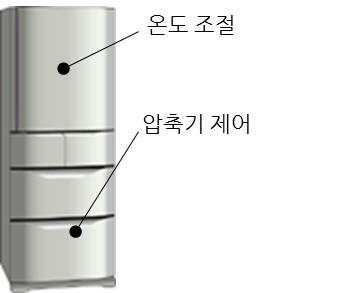
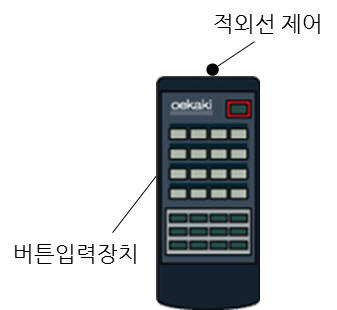
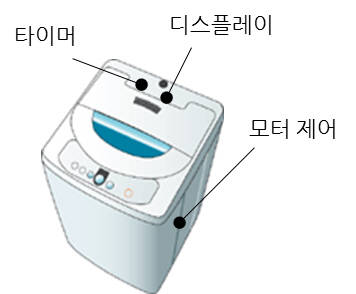
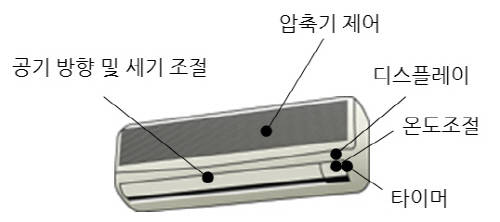
▲그림2.1 : MCU가 탑재된 일상 가전 도구
▲그림2.1 : MCU가 탑재된 일상 가전 도구
▲그림2.1 : MCU가 탑재된 일상 가전 도구
▲그림2.1 : MCU가 탑재된 일상 가전 도구
▲그림2.2 : MCU가 탑재된 일상 가전 도구
▲그림2.2 : MCU가 탑재된 일상 가전 도구
▲그림2.2 : MCU가 탑재된 일상 가전 도구
■ MCU의 활용 분야
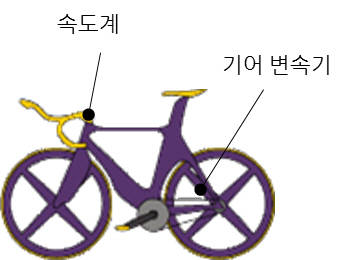
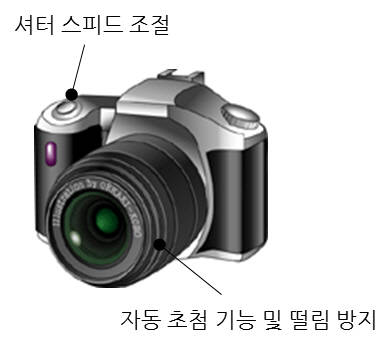
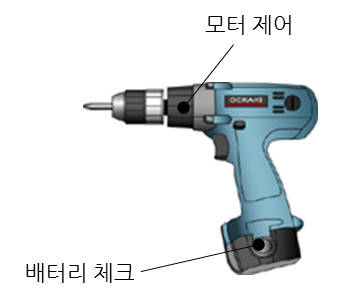
MCU의 활용 분야는 프로그래밍을 어떻게 하느냐에 따라 달라진다. 분명한 것은 그 범위가 매우 넓다는 것이다. <그림2.1>과 <그림2.2>는 MCU가 탑재된 일상 가전 도구의 예를 설명한 것이다.
MCU는 전자기기의 디스플레이, 타이머, 컴프레서 및 냉장고, 세탁기, 에어컨 등과 같은 주요 가전제품의 모터를 제어한다. 예를 들어 혈압기에 탑재된 MCU는 모터, 밸브, 디지털 디스플레이를 제어하고, 온도계의 MCU 는 온도 센서의 신호를 측정한다.
MCU가 가장 많이 사용되는 전자제품은 바로 리모컨일 것이다. 오늘날의 리모컨은 단순히 TV, 에어컨뿐 아니라, 전등, 선풍기의 동작까지도 제어한다. 또한 버튼의 누름을 탐지하고 리모컨이 전송하는 적외선 신호를 제어하는 것도 바로 MCU의 역할이다.
카메라 장비, 사이클링과 같은 취미 생활 도구에도 적용된다. 카메라에서 활용되는MCU는 자동 초점 기능, 셔터 스피드 및 떨림 방지 기능을 제어하며, 자전거는 속도계와 기어 변속기 부문에서 활용된다. 값이 비싼 자전거의 경우는 서스펜션까지도 MCU가 제어한다.
사무용 전자제품에서도 MCU 활용 사례를 쉽게 찾아 볼 수 있다. 산업 장비뿐만 아니라, 가정용 전동 드릴 역시 MCU를 사용해 모터 스피드와 배터리 잔량을 체크한다. MCU는 계산기용으로 처음 개발됐다. 그렇기 때문에 MCU의 본래 목적은 고급 계산 작업을 처리하는 것이었다. 비록 일상생활에서는 이러한 높은 수준의 계산은 크게 필요하지 않지만, 다양한 분야에서 활용이 가능하다.
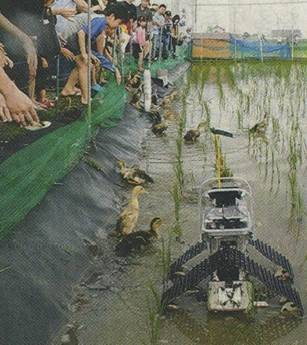
▲그림3 : 김매기에 특화된 아이가모 로봇(AIGAMO ROBOT)
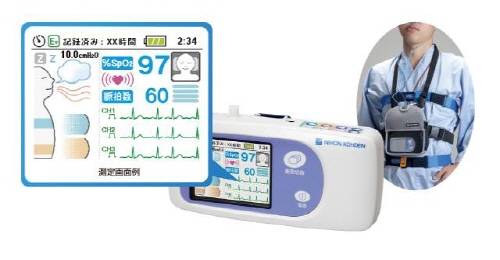
▲그림4.1 : 휴대용 수면 무호흡증 테스트 기기
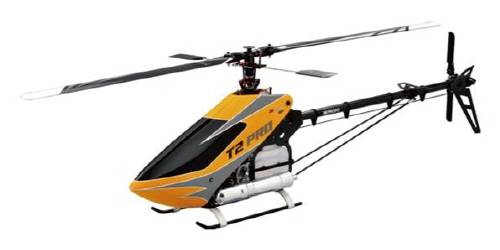
▲그림4.2 : 모델 헬리콥터
ST마이크로일렉트로닉스의 STM32 시리즈 MCU는 <그림3>에서 볼 수 있듯이, 아이가모 로봇(AIGAMO ROBOT)에 탑재됐다. 이 작은 로봇은 일본 경제통상산업부를 대신해 기후지역 정보기술 연구소(Gifu Prefectural Research Institute of Information Technology)가 개발한 김매기 로봇이다. 또한, 같은 MCU가 휴대용 수면 무호흡증 테스트 기기<그림4.1> 및 모형 헬리콥터<그림4.2>의 자이로센서(Gyro sensor)와 거버너센서(Governor sensor)로 사용됐다. 위와 같은 예를 볼 때, MCU는 프로그래밍에 따라 단순 기기부터 최첨단 기술까지 광범위하게 활용될 수 있음을 알 수 있다.
■ 가전제품 속 MCU의 역할
몇 가지 예를 통해 실제 생활 가전제품에서 MCU가 어떻게 활용되는지 좀 더 자세히 살펴보자.
○ 혈압 모니터기
혈압 모니터기 한 대에는 상당히 많은 MCU 기능들을 활용되고 있다. <그림5>는 혈압 모니터기에 들어 있는 전자회로를 예로 보여준다. 아래 혈압 모니터기의 MCU 처리 동작들은 실제 혈압 모니터기가 작동하고 있을 때 사용되는 기능들이다. 처리 순서 번호는 <그림5>의 MCU 회로 번호와 일치하다.
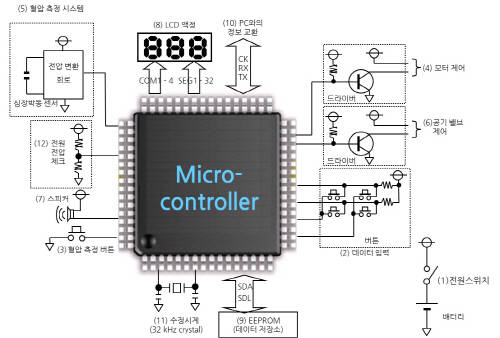
▲그림5 : 혈압 모니터기의 전자회로
▷사용자가 전원 스위치를 눌러 혈압 모니터를 작동시킨다.
▷사용자가 검사 받는 이에 대한 정보를 입력하기 위해 버튼을 누른다. 여기서 MCU는 어떤 버튼이 눌리는지를 식별한다.
▷사용자가 혈압 측정을 위해 시작 버튼을 누른다.
▷모터가 작동을 시작하며 혈압기 소매에 공기를 주입한다. MCU는 드라이버(트랜지스터)에 신호를 보내고 드라이버는 모터를 작동시킨다.
▷박동 수 체크 센서는 박동 수의 변화를 읽는다. 박동 수 센서가 읽은 신호는 전압으로 변환되고 MCU는 그 전압을 측정한다.
▷혈압기 공기 밸브는 박동수 센서의 데이터에 맞게 조절된다. MCU는 드라이버(트랜지스터)에 신호를 보내고 드라이버는 공기 밸브를 조절한다.
▷혈압기 모니터는 혈압 측정이 완료됨에 따라 알람을 울린다. MCU가 알람 작동 명령 신호를 보낸다.
▷LCD에 측정 결과가 표시된다. MCU 가 LCD를 켠다.
▷EEPROM(전기적 소거 및 프로그램이 가능한 읽기 전용 기억장치)이라 불리는 저장기기에 측정 결과가 저장된다. MCU는 통신 기능을 이용해 EEPROM에 데이터를 전송한다.
▷고급형 제품은 데이터 분석을 위해 PC에 측정 결과를 전송하는 기능을 가진다.
▷미작동 중일시 혈압기 모니터는 현재 시각을 LCD 화면에 표시한다. MCU 가 시간을 측정하고 표시한다.
▷혈압 측정과 직접적 연관은 없지만, 잔여 배터리 용량 역시 정기적으로 체크된다. MCU는 정기적으로 전력 공급 전압을 측정한다.
위의 항목을 통해 알 수 있듯이 한 개의 MCU는 수많은 역할을 수행한다.
○ 리모컨
<그림6>은 적외선 리모컨의 전자 회로다. 적외선 리모컨의 MCU가 처리하는 동작은 아래와 같다. 처리 순서 번호는 <그림6>의 MCU 회로 번호와 일치한다.
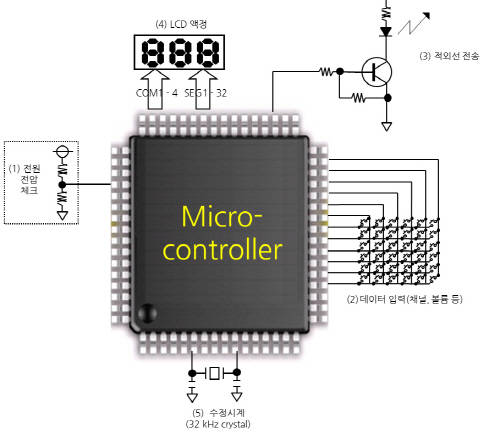
▲그림6 : 리모컨의 전자회로
▷리모컨은 전원 스위치가 없다. 배터리가 장착됨과 동시에 사용 가능하기 때문이다. 리모컨이 사용되지 않을 때, MCU는 대기 모드로 변환되며, 전원버튼이 눌릴 때까지 배터리 전력을 최대한 절약한다.
▷사용자가 버튼을 눌러 실행시킨다. MCU의 차단 기능은 어떤 버튼이 눌려졌는지를 식별하고, 대기 모드에서 벗어나 일반 동작 모드에 바뀐다. 이후 MCU는 눌린 버튼에 따라 동작을 수행한다.
▷입력된 실행정보에 따라 적외선 신호가 전송된다. MCU는 적외선 신호를 출력하여 적외선LED화면을 켠다.
▷LCD에 입력된 동작의 정보가 표시된다. MCU가 LCD를 동작 시킨다.
▷만약 리모컨이 시계 기능을 갖추고 있으면, LCD는 리모컨이 작동을 하지 않을 때 현재 시각을 표시한다. MCU가 시각을 측정하고 표시한다.
■ 프로그래밍
MCU는 어떻게 프로그래밍이 되었는가에 따라 다양하게 활용될 수 있다. 이는 프로그래밍 되어 있지 않는 MCU는 아무짝에도 쓸모없다는 뜻이기도 하다. 일반적으로 윈도 PC를 통해 MCU와 관련된 프로그램을 짠다. 특정한 MCU 프로그래밍이 필요한 애플리케이션은 인터넷에서 다운로드 받을 수 있다. 일부 애플리케이션은 무료로 사용 가능하지만, 어떤 애플리케이션은 프로그램 사이즈가 제한적이거나 정해진 기간 동안만 무료로 사용할 수 있는 것도 있다.
프로그래밍이 완료되면 실행을 위해 MCU에 프로그램을 써넣어야 하는데, 이 작업을 위해서 디버거 및 프로그래머가 필요하다. 또한 MCU의 종류에 따라 특화된 디버거 및 프로그래머가 필요하다.
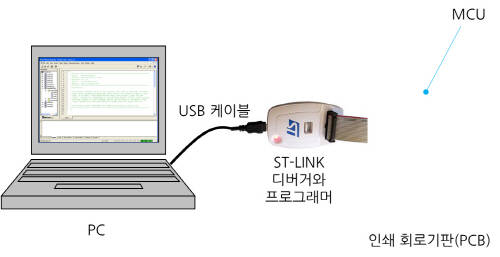
▲그림7 : ST-링크 디버거와 프로그래머 샘플
<그림7>은 ST마이크로일렉트로닉스 제품인 ‘ST-링크’ 디버거와 프로그래머의 샘플을 보여주고 있다. 위 그림에서 PC와 ST-링크는 USB 케이블을 통해 연결되고 ST-링크와 PCB의 MCU는 전용 케이블로 연결된다. 언뜻 PCB와 ST-링크를 연결하고 있는 케이블이 많아 보일 수는 있지만 실제 4개의 라인만이 연결돼 있다(전원 공급 모니터를 위한 2 개 라인, 1개의 리셋 라인과 1개의 통제 신호 라인). 사용자는 반드시 PCB를 제작해야 하는데 이는 실제 MCU를 프로그래밍하고 사용하는데 가장 필요한 것이 PCB이기도 하기 때문이다.
Comments 1
1 Comments:
Related news
Intel Unveils Next-Generation 'Core Ultra Series 3' and vPro Platform for Enterprise PCs
Intel has officially unveiled the "Intel Core Ultra Series 3" for next-generation enterprise PCs and the latest vPro platform, addressing a wide range of demands from enterprise notebooks to high-performance workstations.
2026.03.26by 배종인 기자
ROHM Launches ESD Protection Diode Compatible with High-Speed Interfaces of 10Gbps or Higher
Semiconductor specialist ROHM has developed the 'RESDxVx series' of ESD (electrostatic discharge) protection diodes capable of responding to next-generation high-speed data communication environments exceeding 10Gbps, simultaneously enhancing both signal quality maintenance required in high-speed interfaces and IC protection performance.
2026.03.26by 배종인 기자
ST Launches 75V Drive IC Targeting 48V Industrial Motor Driving
ST Microelectronics has unveiled the 'STSPIN9P' series of 75V motor drive ICs tailored for 48V-class industrial drive system design. The new product family is characterized by half-bridge and full-bridge configurations that enable design scalability according to motor type and output conditions. Power supply circuits, protection functions, and current sensing circuits are integrated on-chip to simplify system configuration, and the devices are designed to support applications up to 500W maximum. The company plans to provide reference designs and demo boards to support development and evaluation in industrial automation, robotics, pumps, fans, lighting, and textile machinery.
2026.03.26by 배종인 기자
Nordic supports security updates for the entire lifecycle of IoT devices at a single fixed cost
Nordic Semiconductor, a global leader in low-power wireless connectivity solutions, has unveiled a single fixed-cost licensing model that delivers FOTA (Firmware Over-the-Air) and device management capabilities throughout the device lifecycle via nRF Cloud, and introduced a new firmware update solution to prepare for the enforcement of the European Union's Cyber Resilience Act (CRA).
2026.03.26by 배종인 기자
Practical Training in Low-Noise, Low-Power Circuit Design All in One Place… Training Fee Support
The "2026 Advanced Engineer Practical Masterclass" to strengthen competencies in high-sensitivity analog circuit and sensor-based system design will be held on April 16 at the e4ds Conference Center in Gasan-dong, Seoul. This program will be conducted as an offline paid hands-on training session, not online, and is targeted at engineers seeking on-site intensive learning. Texas Instruments will provide educational support for this training, allowing participation at 150,000 won, a 100,000 won discount from the original price of 250,000 won.
2026.03.26by 배종인 기자












연재 글을 쉽게 찾아서 볼 수 있도록 지원해 주셨으면 합니다. 찾기가 쉽지 않네요.