


[Serial] ST Yuji Kawano Engineer④ - MCU Programming, IDE Functions Must Be Repeated
 Published2021.10.08 12:02
에디터·컴파일러·어셈블러·링커·프로그래머·디버거 구성
PC·타깃 보드·IDE·디버그 케이블 등 장비 반드시 있어야
[편집자주]일반적으로 반도체라 하면 컴퓨터의 CPU와 메모리처럼 일반인에게 익숙한 반도체를 떠올리기 마련이다. 반면에 전자제품 구동을 위해서 핵심 반도체로 쓰이는 MCU(Micro Controller Unit)의 경우 일반적으로 우리가 쉽게 접하는 모든 전자제품에서 사용되고 있으면서도 일반인에게는 아직 낯선 반도체다. 이런 MCU가 최근 반도체 부족 사태로 인해 언론에 오르내리며, 일반인들에게 주목받기 시작했다. 이에 본지는 MCU 반도체 전문기업인 ST마이크로일렉트로닉스의 유지 카와노 매니저의 연재기고를 통해 MCU에 대해 전문적으로 알아보는 자리를 마련했다.
 MCU는 프로그래밍에 따라 기능 수행도 달라진다.
프로그램을 개발하는 방법에는 두 가지로 첫 번째는 네이티브 개발(native development)이다. 여기서는 프로그램 개발을 위해 사용되는 PC 환경(개발 환경)과 개발된 프로그램이 실행되는 환경(실행 환경)은 동일하다(그림 1a).
두 번째로 크로스-플랫폼 개발이 있다. 개발 환경과 실행 환경이 다르다(그림 1b). MCU 프로그래밍에서 좀더 일반적으로 사용되는 것은 크로스-플랫폼 개발이다. 크로스 개발에는 다양한 개발 툴 사용이 가능하다.

- 개발된 프로그램 실행을 위한 MCU를 탑재한 타깃 보드(실행 환경)
- PC를 타깃 보드에 연결하기 위한 디버그 케이블
- 인-서킷 에뮬레이터(in-circuit emulator, ICE)나 기타 다른 유형의 에뮬레이터
소프트웨어 툴
- 통합 개발 환경
- 운영시스템(OS)
- 라이브러리
- 미들웨어
위에서 나열한 툴 중에서 적어도 PC, 타깃 보드, 통합 개발 환경, 그리고 디버그 케이블은 반드시 있어야 한다.
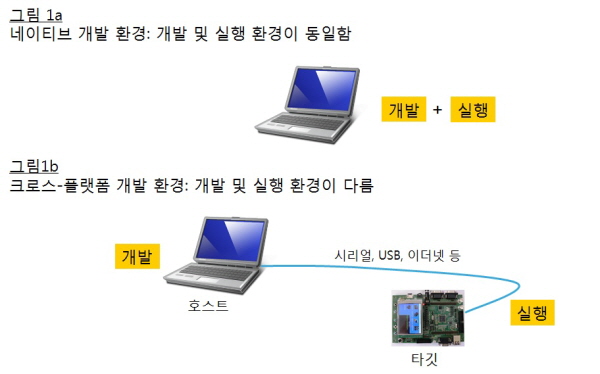
▲그림1 : 네이티브 개발과 크로스-플랫폼 개발
■ 통합 개발 환경(Integrated Development Environment)
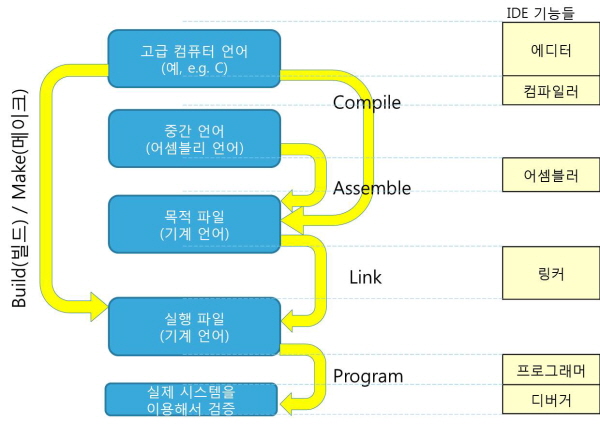
▲그림2 : 소프트웨어 개발 프로세스
그림2에서 소프트웨어 개발 프로세스를 확인할 수 있다. 통합 개발 환경(IDE)이란 소프트웨어 개발에 필요한 다양한 기능을 제공하는 PC용 애플리케이션 패키지를 말한다. 이러한 IDE에는 일반적으로 에디터, 컴파일러, 어셈블러, 링커, 프로그래머, 그리고 디버거가 함께 제공된다.
목적을 잘 수행하는 프로그램을 만들기 위해서는 위의 단계들(에디팅, 빌딩, 쓰기, 그리고 디버깅)이 반복적으로 수행되어야 한다.
에디터는 프로그램 코드를 에디팅하는데 사용된다. 일반적으로는 C와 같은 고급 프로그래밍 언어가 MCU 프로그래밍에 사용되지만 프로그램 크기 또는 프로세싱 시간에 제약이 있을 때에는 어셈블리 언어가 사용된다. 고급 프로그래밍 언어를 사용하면 사람이 이해하기 쉬운 방식으로 프로그램을 작성할 수 있으며 이러한 프로그램은 에디터를 사용해서 쓰여진다.
코드가 작성되면 컴파일러로 컴파일된다. 여기서 ‘컴파일’이란 단어는 고급 프로그래밍 언어를 목적 코드로 변환하는 것(예를 들어, MCU가 이해하는 언어)을 의미한다. 반면에 어셈블리 언어로 쓰여진 코드는 어셈블러를 써서 목적 코드로 변환된다. 이렇게 컴파일된 모든 목적 코드 파일들을 모아서 링커로 링크시키고 타겟 MCU에 적합한 실행 파일을 생성한다. 실행 파일은 인텔 포맷(.hex), 모토롤라 포맷(.s19), 또는 기타 다른 포맷 중 하나일 것이다. 실행 파일은 어떤 데이터들이 개별 주소로 쓰여져야 하는지에 대한 정보를 갖고 있다. 컴파일링, 어셈블링, 그리고 링킹 프로세스 전체를 설명하기 위해 ‘빌드 (build)’나 ‘메이크(make)’와 같은 표현을 쓰기도 한다.
실행 파일이 준비되면 프로그래머를 통해 MCU에 쓰여진다. 이렇게 하기 위해서 PC(개발 환경)는 디버그 케이블(그림 1b)을 통해서 타겟(실행 환경)에 연결되어야 한다. 쓰기 프로세스가 완료되면 그 프로그램을 실행하고 타겟이 의도하는대로 작동하는지 확인하기 위해서 디버거가 사용된다. 디버거는 프로그램의 전체적인 실행뿐만 아니라 코드를 한 줄씩 별도로 실행할 수 있으며(스테핑, stepping), 한 개의 기능을 실행해보고 멈추거나(스텝 오버, step over), 기능이 실행되는 중간에 코드의 첫번째 줄에서 중단하거나(스텝 인투, step into), 기능을 실행하고 나서 중단하거나(스텝 아웃, step out), 중단점(브레이크포인트, breakpoint)에 도달할 때까지 코드를 계속 실행할 수도 있다. 디버거는 또한 메모리, 레지스터, 그리고 다양한 모니터링 기능을 가지고 있다. 그렇기 때문에 특정 코드가 실행될 때 변수 또는 레지스터가 어떻게 바뀌는지를 확인할 수 있다. 어떤 IDE는 프로그램 실행 동안 어떻게 변수가 바뀌는지를 모니터링 할 수 있다.

Comments
Related news

[Series] ST Engineer Yuji Kawano ① - 'MCU', the Brain of Electronic Devices
ST Microelectronics' Yuji Kawano Manager provides expert commentary on MCUs through a series of contributions, explaining MCUs—semiconductors that are most commonly used but remain unfamiliar to the general public.
2021.09.02by 명세환 기자

[Serial] ST Yuji Kawano, Engineer ② - 'MCU', a CPU, memory, and auxiliary module that performs unique functions.
We have arranged a specialized session to understand MCU (Micro Controller Unit), a key semiconductor used to drive electronic products, through a series of contributions from Yuji Kawano, Manager at ST Microelectronics, an MCU semiconductor specialty company.
2021.09.14by 명세환 기자

[Serial] ST Yuji Kawano Engineer ③ - MCU Core 'CPU', Output of Operation Results
ST Microelectronics, a specialized MCU semiconductor company, provides easy-to-understand explanations through serialized contributions by Manager Yuki Kawano regarding MCUs (Micro Controller Units), which are essential semiconductors used to drive electronic products.
2021.10.01by 명세환 기자
Intel Unveils Next-Generation 'Core Ultra Series 3' and vPro Platform for Enterprise PCs
Intel has officially unveiled the "Intel Core Ultra Series 3" for next-generation enterprise PCs and the latest vPro platform, addressing a wide range of demands from enterprise notebooks to high-performance workstations.
2026.03.26by 배종인 기자
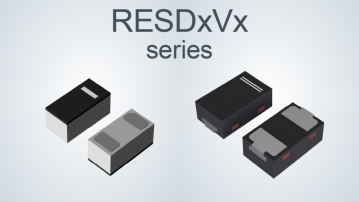
ROHM Launches ESD Protection Diode Compatible with High-Speed Interfaces of 10Gbps or Higher
Semiconductor specialist ROHM has developed the 'RESDxVx series' of ESD (electrostatic discharge) protection diodes capable of responding to next-generation high-speed data communication environments exceeding 10Gbps, simultaneously enhancing both signal quality maintenance required in high-speed interfaces and IC protection performance.
2026.03.26by 배종인 기자











