



Microchip, “Developing Prototypes Without PCB Design”
 Published2023.04.20 12:19
▲ Microchip New Era Manager
Detailed presentation on Curiosity development board features and development examples
With just the Curiosity Nano Development Platform, you can rapidly develop prototypes without PCB design.
Microchip will host Tech Insights Korea from April 25 to 27. On the first day, Shin Ki-won, Head of Microchip , is scheduled to give a presentation on the topic of '32-bit Microcontroller Solutions for Rapid Prototype Connected Applications '.
In his presentation that day, Senior Manager Shin Ki-won introduced the ability to easily and quickly develop IoT smart device control application prototypes without designing printed circuit boards (PCBs).
Shin Ki-won, the head, first cites demo boards such as the Curiosity Nano Development Platform, like the Curiosity development board, as examples in terms of hardware.
Despite its low price, it comes with built-in debugging and programming capabilities, and its functionality can be expanded using a Nano base board.
In particular, for the Curiosity Nano development kit, it can be added to the microelectric board connector and extension board.
By utilizing these features, you can extend the use to sensors, touch interfaces, displays, or other desired connect interfaces.
These nanokits are available in the same design form for 16-bit and 32-bit microcontroller families, and the microcontrollers can be flexibly applied to the application or plus type as needed.
In particular, using these boards allows you to develop all application prototypes.
The development process begins by selecting example code using MCC in the MPLAB XID development environment to start a new project. Create or configure, and set the clock and peripheral device pins.
When extending the functionality of existing example code, utilize the existing project rather than creating a new one.
The second step is to add application code. It is necessary to add code to the existing Electronic Clickboard to satisfy the functionalities required by the final application of the examples. After adding one feature to the application, you simply need to continue adding code to enable the application to operate according to the requirements.
Finally, you just need to run the application and check if the actual output works correctly.
If you would like to learn more about creating prototypes using these development boards, you can attend Microchip Tech Insights Korea. The event is free and will be held online.
Registration is available at https://www.eewebinar.com/microchip-tech-insights-korea/ .

Comments
Related news

Microchip, Azure RTOS, Secure Element Use Authentication Information Shared
Microchip will be hosting a webinar that introduces methods for establishing secure authentication using Azure RTOS and security solutions.
2023.04.17by 성유창 기자
Sharing Security Management Strategies for Microchips and IoT Devices
Kwak Sang-shin, director at Microchip, will present on "IoT Device Security Lifecycle Management" at the "Microchip Tech Insight Korea" webinar on April 26th. "Microchip Tech Insight Korea" is conducted as a series of six webinars where participants can gain insights and check the latest news on key technologies in the embedded field. The event will be held online over three days from April 25th to 27th.
2023.04.18by 김예지 기자
Microchip, “Edge ML Used in Predictive Maintenance”
Artificial intelligence (AI) and machine learning (ML) can collect large volumes of data at the edge. Using this data, predictive maintenance solutions can be implemented in embedded systems to address failure issues occurring in manufacturing facilities, enabling practical deployment in field operations.
2023.04.19by 명세환 기자

Intel Unveils Next-Generation 'Core Ultra Series 3' and vPro Platform for Enterprise PCs
Intel has officially unveiled the "Intel Core Ultra Series 3" for next-generation enterprise PCs and the latest vPro platform, addressing a wide range of demands from enterprise notebooks to high-performance workstations.
2026.03.26by 배종인 기자
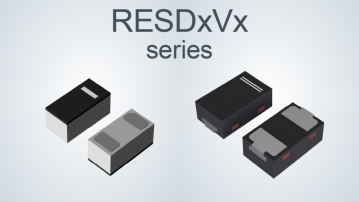
ROHM Launches ESD Protection Diode Compatible with High-Speed Interfaces of 10Gbps or Higher
Semiconductor specialist ROHM has developed the 'RESDxVx series' of ESD (electrostatic discharge) protection diodes capable of responding to next-generation high-speed data communication environments exceeding 10Gbps, simultaneously enhancing both signal quality maintenance required in high-speed interfaces and IC protection performance.
2026.03.26by 배종인 기자











