


[MCU Q&A] 1. What criteria should I apply when selecting an MCU?
 Published2016.01.18 14:28
Masaru Sugai
STMicroelectronics (www.st.com)
1. What criteria should I use when choosing an MCU?
2nd: How do I connect EEPROM to MCU?
3: What is the difference between MCU and DSP?
4th: MCU Peripheral Components Selection Guide Power

Q UESTION:
I need to use an MCU, but I'm not sure what criteria I should use to choose it. What information should I look for in catalogs and manuals?
A NSWER: First, when choosing an MCU, you need to check the specifications. Figure 1 shows the specifications listed on the cover page of the data sheet for the STM32F103, an MCU manufactured by STMicroelectronics. The main criteria to check are as follows:
(1) CPU performance: operation speed (MHz), number of operation numbers (bits)
(2) Memory size and type: ROM size and type (mask, flash EEPROM or EPROM), RAM size
(3) Electrical characteristics: Operating voltage, current consumption
(4) Built-in peripheral functions: timers (e.g., general purpose, clock, PWM output), communication protocols (e.g., USART, SPI, I2C, USB), special functions (e.g., LAN, encryption techniques, LCD control/drive and/or camera interface), analog circuits (e.g., AD converter or DA converter).
(5) Package: Package type (e.g. QFP, BGA, QFN), pin count (e.g. 20, 32, 64, 100)
(6) Price
The most important criterion in this list is item (1), which tells you whether the MCU's computational performance meets your needs. If you have determined your requirements in item (1), decide on the MCU product series and check items (2) to (6) for the selected series. Your requirements for item (2) are determined by the program size and data volume. On the other hand, your requirements for item (3) are determined by power. The user's choice for item (4) is determined by how the product will be used, and the choice for item (5) depends on the product format. For item (6), it is necessary to make a comprehensive decision based on the cost of the product to be developed. Since the price of the MCU is highly dependent on all items (1) to (5), it is necessary to find the optimal price that provides the best specifications.
CPU performance
The performance of an MCU is determined by how many bits the CPU can handle (e.g. 8, 16, 32 bits) and the speed of its operations. In the early days of CPU development, 4-bit CPUs were used, but most CPUs today are 8, 16, or 32 bits. The number of bits indicates how many numbers the CPU can process at one time. The higher the number, the better the performance.
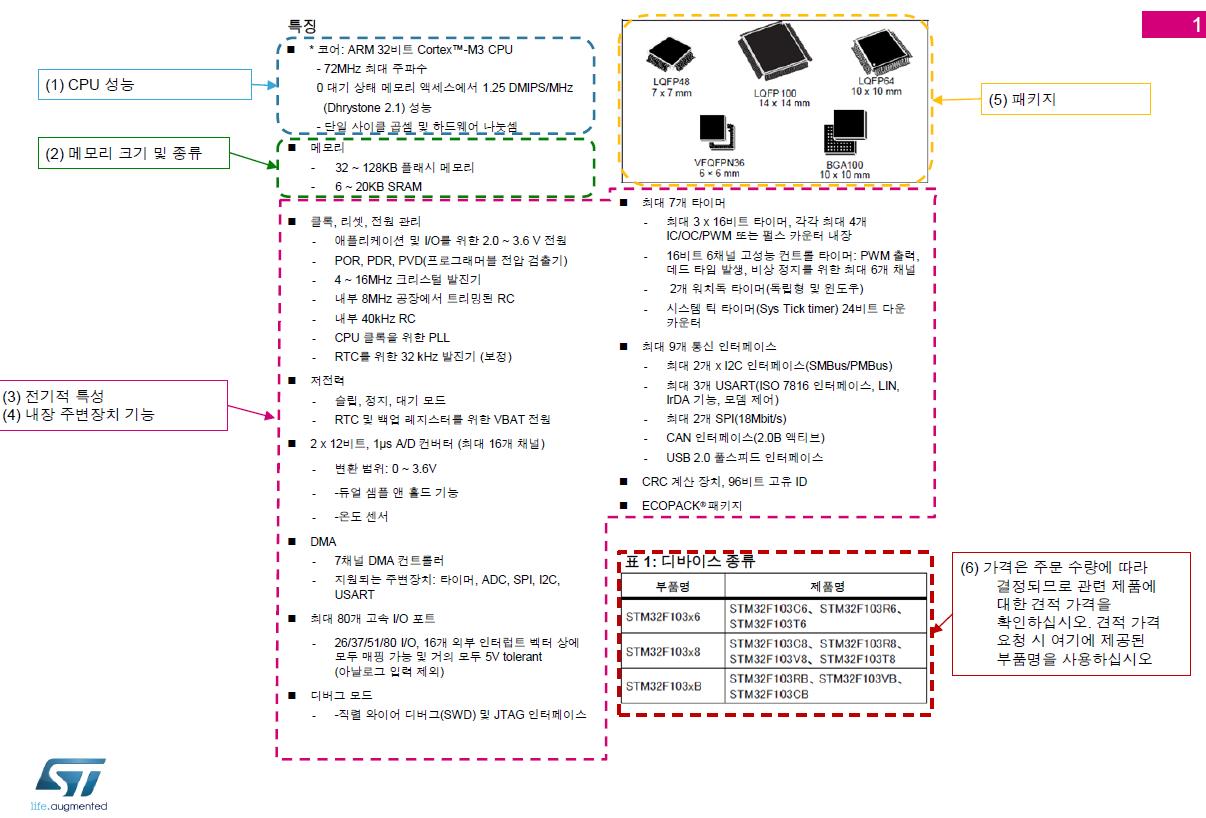
Figure 1. MCU specifications (e.g. STM32F103)
Note 1:
Some MCUs have 16-bit CPUs but use 8-bit internal buses. In these cases, they can only perform a fraction of the internal processing power possible with 16-bits. So make sure you don't miss any of the details listed in the specification.
CPU performance is usually expressed in frequency (MHz). The CPU shown in Figure 1 has a frequency of 72 MHz. Since MCUs perform operations synchronized to their internal clocks, if two or more MCUs share the same architecture, the one with a higher frequency (MHz) will provide higher performance.
Note 2:
Some MCUs have different core speeds than their internal bus speeds. In other words, they have high-speed cores and low-speed buses. In such cases, if bus access operations are included in the computation process, CPU performance can be reduced to very low speeds.
Also, keep in mind that if the MCUs you are considering have different architectures (internal designs), you cannot compare their performance based on MHz values alone.
The two most common MCU architectures are RISC and CISC?1, but regardless of architecture, all recent MCUs use the latest high-speed processing technology, so it is difficult to easily say that one product is faster than the other.
DMIPS (Dhrystone Million Instructions Per Second) and CoreMark?2 are the most widely used indicators of MCU performance. In these benchmarks, the MCU is asked to execute a specific process and then its performance is evaluated in the form of a score. While these scores are useful for providing a rough estimate, they cannot be relied on if your program code is significantly different from the one used in the test.
Memory size and type
The most commonly used type of memory for internal ROM in modern MCUs is flash. Other types of memory available include Mask, Electrically Erasable Programmable Read-Only Memory (EEPROM), and Erasable Programmable Read-Only Memory (EPROM). If you are storing your programs in ROM, you will need to estimate the size of your programs before choosing a particular type of ROM.
In addition, since the processing data is temporarily stored in RAM when the operation is performed, the amount of data to be processed by the program also needs to be estimated. Generally, large-scale programs process a large amount of data, so they usually use a combination of large-capacity ROM and large-capacity RAM. The MCU shown in Figure 1 has 32 to 128 KB of flash ROM and 6 to 20 KB of RAM.
However, the actual size of the program and the amount of data to be processed cannot be clearly known until the program is created. Therefore, first select the MCU with the largest memory size in the product series (128KB ROM and 20KB RAM in Figure 1), test the program, and then evaluate the test results before making a final decision on the MCU.
Electrical characteristics (operating voltage and current consumption)
The type of power source you will be using will determine the power supply voltage and current consumption. The most familiar power source type is the battery. If you are using a 3V power source consisting of two batteries, you should choose an MCU with a power supply voltage of about 3V. Also, since you want the battery to last as long as possible, choose an MCU with a low current consumption.
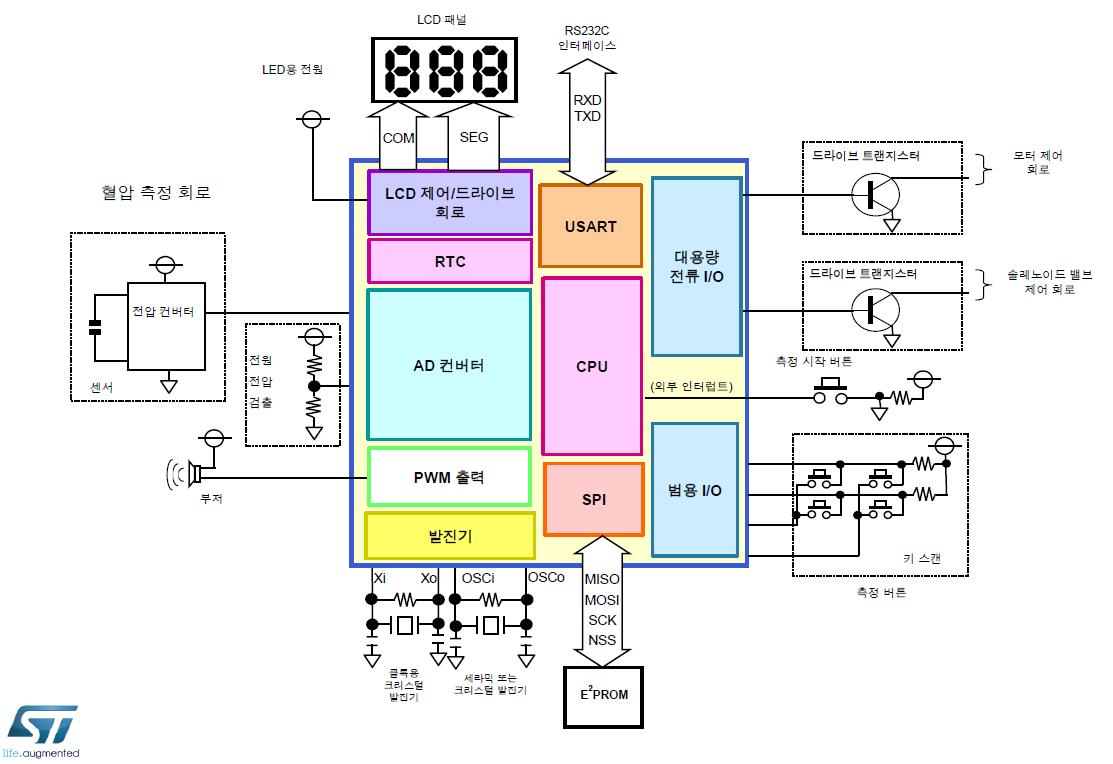
Figure 2. sphygmomanometer
If you are using a button battery with low voltage and current capacity, choose an MCU with low operating voltage and current consumption. Alternatively, if you want to use a different type of power source, such as generating DC power from a commercial power source or using a voltage regulator IC, you can design the MCU to have a voltage and current capacity of your choice. This method provides the flexibility to choose an MCU based on the power source or design the power source based on the MCU you choose.
Recently, contactless power supplies have been developed. Most contactless power supplies have only low power capacity, so they cannot supply enough power to MCUs that consume a lot of power. Therefore, before using these special power supplies, it is necessary to check the power consumption of the MCU you want to use.
Built-in peripheral features
For example, let's look at what peripheral functions the MCU should have when designing a portable blood pressure monitor. Figure 2 shows a simple block diagram of a blood pressure monitor. The analog values generated by the blood pressure sensor are converted to digital data using an ADC (analog-to-digital converter). The ADC is also used to check the battery level. If you want an alarm sound to be generated when the measurement is completed, you can generate a buzzer sound using the PWM (Pulse Width Modulation) function.
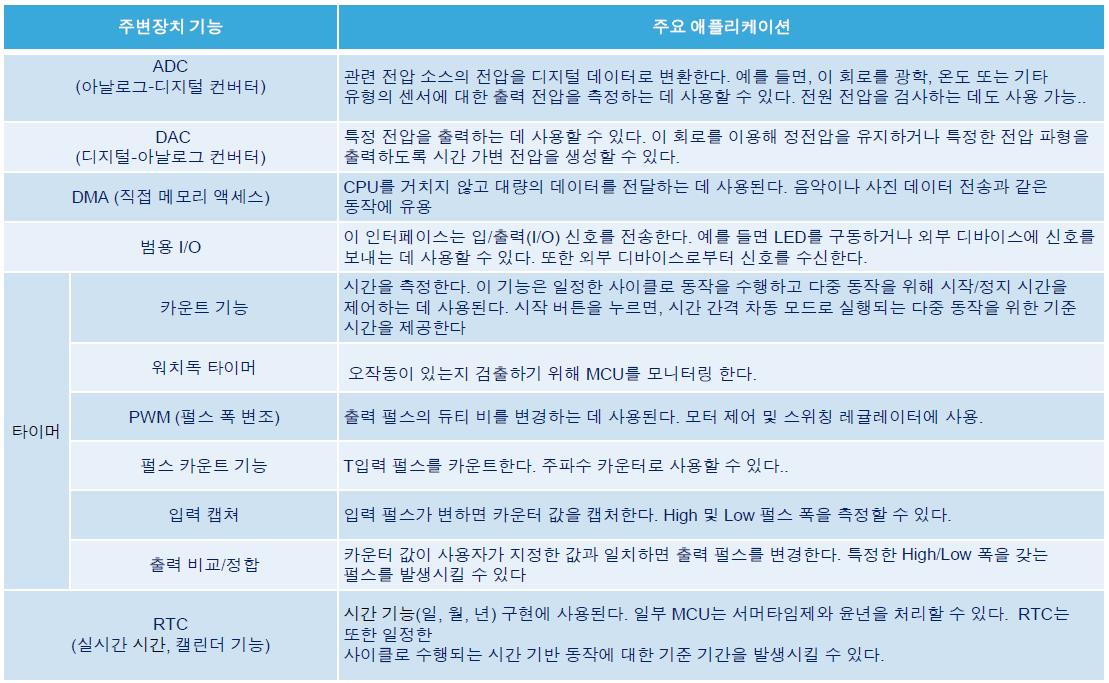
Table 1 : Peripheral Functions and Applications (1)
The measurement values are displayed on the LCD (Liquid Crystal Display) using the LCD function. These results are recorded in external memory (such as EEPROM) using a standard interface such as SPI (Serial Peripheral Interface) or I2C (Inter-Integrated Circuit). Inputs from the operation buttons are captured via general-purpose I/O or interrupt functions. Since the MCU cannot directly drive a motor or solenoid valve, an external driver transistor must be connected and controlled using general-purpose I/O capable of handling large currents. Communication protocols such as RS232C or USB can be used to transfer measurements to external devices.
USART(Universal Synchronous Asynchronous Receiver Transmitter) is used in RA232C. If USB function is installed, USB can be used as well. Also, if you want to display it at any time, not just when measuring blood pressure, select an MCU with a built-in RTC(Real Time Clock) calendar function. Since the MCU operates in synchronization with the clock, an oscillator circuit is essential. Also don't forget to include a 32.768kHz oscillator for the RTC.
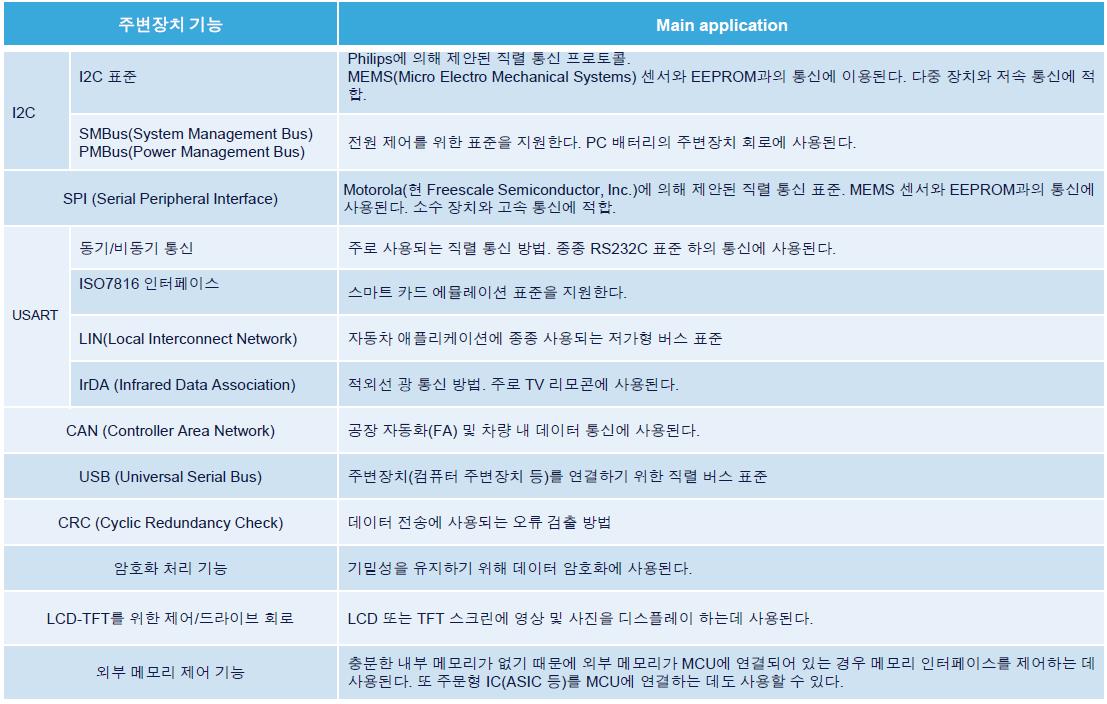
Table 2 : Peripheral Functions and Applications (2)
Based on these considerations, you should choose an MCU with the following peripheral features built in: LCD functionality, RTC and oscillator circuits, ADC, PWM, SPI (or I2C), high current general purpose I/O, and USART. You may not need all of these features, but having them built into the MCU can be more economical because you don't have to add additional accessory parts.
For reference, Tables 1 and 2 list the most common MCU peripheral functions and applications.
Package
The package you choose for your MCU will depend on the space available in the device where the electrical circuits will be housed.
The portable blood pressure monitor we looked at earlier is not very large because it can be held in the hand. In this case, the package used for the MCU needs to be sufficiently small. For the MCU used in the camera lens system, where there is little space for electrical components, an even smaller package is required. The MCU package for this type of application needs to be extremely small. On the other hand, industrial equipment and large home appliances have enough space to accommodate large packages, so they do not need such small MCU packages.
price
The price of an MCU varies greatly depending on the specifications described in this article. Large internal memory means a larger chip is required, which increases the cost. In addition, the more built-in peripherals you require, the higher the cost. The price also depends on the quantity you want to purchase. The more MCUs you purchase, the lower the price per chip, and the fewer chips you purchase, the higher the price per chip. MCU manufacturers often offer strategic MCUs (products intended for mass sales) at a lower price with higher performance.
Reference (URL):
1: http://ednjapan.com/edn/articles/1404/07/news001.html
2: http://www.eembc.org/coremark/
Comments
Related news
[Cafe E-People] Visiting the MCU Community ② Oroka, Reborn as a System Engineer through Robots
E4ds News meets with community operators who share information related to MCU (Micro Controller Unit). The second community in 'In Search of MCU Community' is the 'Open Robotics Community Oroca'. Robots, which are called the comprehensive art of science, require MCUs that implement various sensor detection and motion control. This community currently has 30,000 members and actively conducts practical information exchange through offline meetings based on projects. Park Hyung-il (photo), a sub-operator of this café who speaks with a smile about "sticking one's nose in," expressed, "It would be good if our café could play a more progressive role in this field," and also conveyed that "the true value of a community lies in sharing." In listening to the stories of Oroca's past and future told with laughter and sometimes complaints, it was a time where one could sense both affection and ambivalence toward the café.
2015.12.07by 명세환 기자
Shipped 1 billion STM32 MCUs and over 500 million ST33 security MCUs
ST announced the shipment of 1 billion units of STM32, a general-purpose microcontroller based on ARM® Cortex® cores, and the achievement of 500 million units shipped for ST33, a secure microcontroller featuring the ARM SecureCore® SC300 processor.
2015.12.16by
[Planning] MCU Company ⑤ STMicroelectronics: "Highly integrated, low-power MCUs are perfect for IoT products, and we plan to expand into the low-end market in the future."
"Visiting MCU Companies" has this time sought out ST Microelectronics (hereinafter ST), renowned for its broad range of MCU offerings. ST possesses over 600 products that can be applied to diverse applications suited to the IoT era. Since the launch of STM32 in 2007, the company has currently moved into mass production of the STM32 F7 based on Cortex-M7. Additionally, ST plans to provide development environments free of charge to developers and hold training sessions. We meet with Manager Choi Kyung-hwa (photo), who oversees MCU operations at ST Korea, to hear about the secrets to competitiveness.
2016.01.11by 신윤오 기자
.jpg)
SalePoint Signs Multi-Year Partnership Agreement with AWS… Promoting Identity Security that Integrates Even AI Agents
Sailpoint has entered into a multi-year strategic partnership agreement with AWS and is moving forward with establishing an integrated governance system that manages both human and non-human identities together. The plan is to consistently manage access permissions in an environment where AI agents are increasing as work execution entities, while applying the principle of least privilege and automated policy enforcement. The two companies plan to jointly expand capabilities to manage the identities of various entities, including AI agents, within a single layer in the AWS environment. This collaboration is interpreted as a move to design security and governance together in corporate environments where AI adoption is expanding.
2026.03.26by 배종인 기자
.png)
Databricks Unveils Open AI Security Monitoring 'Lakewatch'
Databricks entered the security market on March 24 by unveiling LakeWatch, an open-source agentic SIEM. The core functionality of this product is to integrate and analyze security, IT, and business data in a single environment to support AI-based threat detection and investigation. The company explained that it reduces the limitations of existing security operations centers, which have had to forgo some data due to high cost structures, and enables large-scale data analysis and automation based on open formats and ecosystems. LakeWatch is currently offered as a private preview, with Adobe and Dropbox mentioned as early customers. Databricks also announced an expanded partnership with Anthropic as well as the acquisition of Antimatter and SiftD.ai.
2026.03.26by 배종인 기자











