



Autodesk Launches AutoCAD 2017 with Enhanced 3D Graphics Performance
 Published2016.03.29 16:31
Autodesk has released AutoCAD 2017, the latest version of AutoCAD, one of the world's leading computer-aided design (CAD) programs, to enable users to work in the latest design environment.
AutoCAD 2017 users can now work faster and smarter than ever before through interconnected desktop and mobile solutions. In addition, they can collaborate more easily with team members, design custom designs, and utilize the latest technologies, including new features and product updates.
In this 2017 version, the 'PDF import' feature, which was the most requested by users, has been added. This allows you to import shapes, TrueType text, raster images, etc. from PDF files into AutoCAD for work.
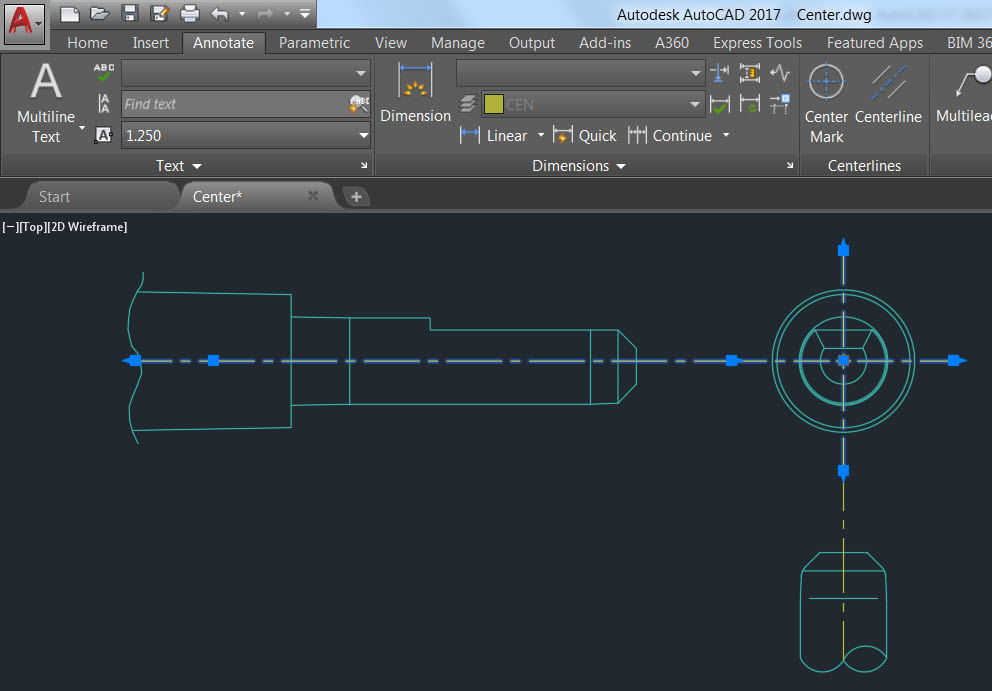
AutoCAD 2017 provides the creation and editing of simplified center lines and center marks.
Autodesk Desktop Apps is a replacement for Autodesk Application Manager that seamlessly delivers product updates and learning content, helping users take advantage of the new features of AutoCAD 2017.
In addition, you can receive the latest security patches and updates for the 2015, 2016, and 2017 versions of Microsoft Windows-based Autodesk products without disrupting your workflow. Furthermore, this version will provide product-related learning content, as well as updates for subscription customers.
AutoCAD LT 2017 users can securely create and share their work thanks to TrustedDWG™ technology, which is the most accurate and unique way to save and transfer design data in DWG format.
Creating and editing centerlines and center marks can now be done more quickly and intuitively. When the shape of the object selected by the user is moved, the center line and center mark are also updated along with it.
AutoCAD LT® 2017 accelerates document work by providing smart 2D drafting tools. AutoCAD LT subscription customers can download the AutoCAD 360 mobile app to view, create, and edit drawings on their mobile phones or tablet PCs.
In addition, users can add and mark up text and modify drawings in real time, and share designs and modifications directly from mobile devices. Furthermore, these customers can receive Autodesk's enhanced support benefits at no extra cost, including 1:1 global phone support, chat support, and faster responses.

Comments
Related news

Autodesk Korea Appoints New Head of Manufacturing Industry
Autodesk Korea announced the appointment of Brian Sung, 46, an industry veteran in sales and engineering management at advanced technology companies, as head of the manufacturing sector. In response, newly appointed CEO Brian Sung stated, "Autodesk is an innovative company transforming the future of design and manufacturing methods across all industries. I am very pleased to join such a company, and I will do my best to contribute to Autodesk's future growth, innovation, and customer acquisition."
2015.10.07by 명세환 기자

Autodesk Strengthens IoT Services and 3D Printing Technology
Strengthening enterprise Internet of Things (IoT) cloud services through acquisition of 'C-Control', and enhancing 3D printing technology through acquisition of 'NetFabb'
2015.10.12by
Autodesk and Siemens Sign Agreement to Strengthen Support for Multi-CAD Environments
Autodesk and Siemens announced that they have entered into an interoperability agreement to enable manufacturing companies to reduce costs incurred by incompatibility between product development software applications and to prevent potential data integrity issues proactively.
2016.03.03by 명세환 기자
.jpg)
SalePoint Signs Multi-Year Partnership Agreement with AWS… Promoting Identity Security that Integrates Even AI Agents
Sailpoint has entered into a multi-year strategic partnership agreement with AWS and is moving forward with establishing an integrated governance system that manages both human and non-human identities together. The plan is to consistently manage access permissions in an environment where AI agents are increasing as work execution entities, while applying the principle of least privilege and automated policy enforcement. The two companies plan to jointly expand capabilities to manage the identities of various entities, including AI agents, within a single layer in the AWS environment. This collaboration is interpreted as a move to design security and governance together in corporate environments where AI adoption is expanding.
2026.03.26by 배종인 기자
.png)
Databricks Unveils Open AI Security Monitoring 'Lakewatch'
Databricks entered the security market on March 24 by unveiling LakeWatch, an open-source agentic SIEM. The core functionality of this product is to integrate and analyze security, IT, and business data in a single environment to support AI-based threat detection and investigation. The company explained that it reduces the limitations of existing security operations centers, which have had to forgo some data due to high cost structures, and enables large-scale data analysis and automation based on open formats and ecosystems. LakeWatch is currently offered as a private preview, with Adobe and Dropbox mentioned as early customers. Databricks also announced an expanded partnership with Anthropic as well as the acquisition of Antimatter and SiftD.ai.
2026.03.26by 배종인 기자











