



Bringing Your Imagination to Life! STM32 Open Development Environment Seminar Review!
 Published2016.08.26 11:56
레고 블록처럼 보드를 쌓다 보면 프로토타입 개발 제품이 ‘뚝딱’
지난7월7일, ST마이크로일릭트로닉스는 E4ds.com과의 온라인세미나에서ST의 시제품 개발 환경인 ‘STM32 오픈 개발환경(STM32 ODE)’에 관한 웹세미나를1시간20여 분 간 진행했다.
총200여 명이 넘는 참가자와300회 이상의 질문을 통해, 국내 엔지니어들의 실질적인 오픈 하드웨어에 관한 관심과 갈증이 확인되었다. 행사 당일 질문과 답변을 맡은 윤기석 차장을 따로 만나 인터뷰를 진행하였다.
Q. 오늘 상당히 많은 개발자들이 웹세미나에 참가하였는데요. 간단히STM32 오픈 개발 환경에 대한 소개를 부탁드립니다.
요즘은 사실 하드웨어 엔지니어와 소프트웨어 엔지니어 사이의 경계가 모호합니다. 그러다 보니, 기존의 하드웨어 혹은 소프트웨어 엔지니어들이 그들만의 고유 분야를 벗어나, 복합적인 개발을 하고자 하는데요. 이때 가장 큰 난관이 생소한 개별 분야간의 노하우와 지식이라고 볼 수 있지요. STM32 ODE는 이러한 개발자들에게 좀더 저렴하고 손쉬운 프로토 타입의 개발을 돕는 개발환경이라고 볼 수 있습니다.
STM32 마이크로컨트롤러 보드인Nucleo개발 보드와 다양한 기능으로 확장할 수 있는 확장보드(X-Nucleo)를 레고 블럭처럼 겹쳐 쌓고 드라이버에서 애플리케이션까지 전 단계에 걸쳐 모듈형 소프트웨어를 적용하는 방식으로, 주요 기능 블록은 오픈 소스형태로 제공되기 때문에 좀더 빠르고 손쉽게 임베디드 설계 구현을 할 수 있습니다.
STM32 오픈개발환경소개영상
Q. STM32 오픈 개발환경, 어디서부터 시작하면 될까요?
먼저 적합한 STM32 Nucleo 개발 보드(MCU)와 필요로 하는 기능의 X-Nucleo 확장보드를 선택합니다. 확장 보드는 현재까지 센서, 커넥티비티, 오디오, 모터 제어 등 26종이 준비되어 있습니다. 다음으로 각 개발자에게 가장 익숙한 개발 환경을 선택하고(IAR EWARM, Keil MDK, GCC 기반 IDE),
ST에서 무료로 제공되는 STM32Cube 툴과 소프트웨어를 설치합니다. 그리고 선택한 X-Nucleo 확장 보드의 기능을 실행하는데 필요한 소프트웨어를 다운로드하면 됩니다.
이러한 기본적인 환경이 구축되면, 개발자의 아이디어가 담긴 설계를 컴파일하여 STM32 Nucleo 개발 메인 보드로 업로드합니다.이러한 방식으로 원하는 애플리케이션을 단일 혹은 멀티보드의 구성으로 개발하고 테스트할 수 있습니다. 많은 분들이 아시고 계시겠지만, STM32 오픈 개발 환경 하드웨어 상에서 개발된 소프트웨어는 동일한 ST 제품이나, STM32 Nucleo 보드로의 마이그레이션을 통해 최종 개발 제품에 바로 사용을 할 수 있습니다.
Q. 개발자라면 하드웨어 구성 요소에 관심이 많을 텐데요, STM32 오픈 개발환경의 구성 요소에 대한 소개 부탁드립니다.
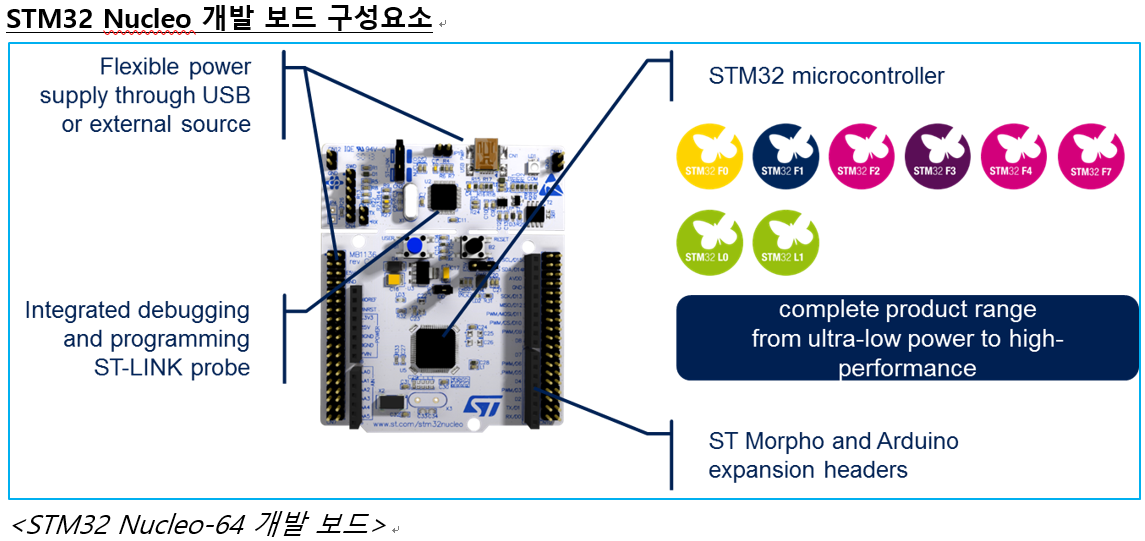
STM32 ODE의 베이스가 되는 제품으로, ARM® Cortex®-M 32비트 마이크로컨트롤러 코어(M0, M0+, M3, M4, M7)를 적용한 STM32 마이크로컨트롤러가 탑재되어 있습니다. STM32 제품군은 방대한 양의 제품을 갖추고 있어서 개발 시 프로젝트에 가장 적절한 MCU를 선택할 수 있고, MCU를 바꾸더라도 애플리케이션 포팅을 손쉽게 진행할 수 있다는 장점이 있습니다. 기능 확장을 위한 확장 보드를 커넥터로는 두가지 종류가 있는데요. 아두이노 커넥터(아두이노 UNO3 혹은 NANO표준과 호환)와 총 76핀 모르포 커넥터(STM32 MCU의 모든 핀에 엑세스 가능) 입니다
현재 ST 웹사이트(www.st.com/stm32nucleo)를 방문하시면 26여종의 STM32 Nucleo 보드를 모두 보시고 선택할 수 있습니다. STM32 Nucleo 확장 보드는 앞에서 말씀 드린 것처럼 레고 쌓기와 같이 다양한 기능을 위아래로 Pin to Pin 연결하여 시스템간의 안정적인 연결을 완성할 수 있습니다.
STM32 X-Nucelo (확장 보드: 센서, 커넥티비티, 오디오, 모터 제어 등)
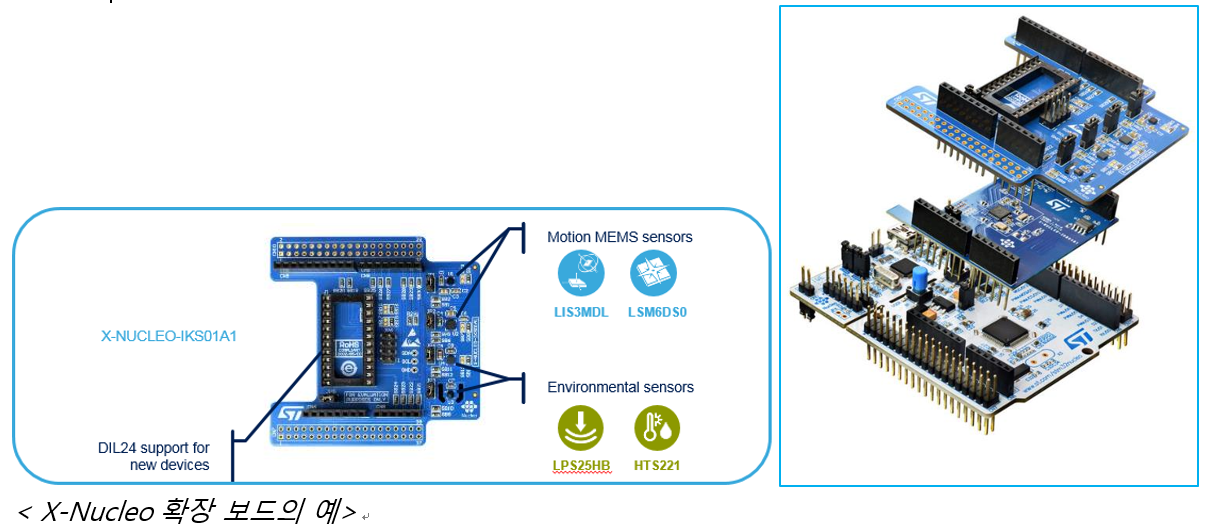
- 현재 사용 가능한 다양한 보드5가지 종류.ST 웹사이트(www.st.com/x-nucleo)발췌-
- 감지(sense): MEMS모션 9축, 압력/주변환경센서/근접 센서, MEMS 마이크
- 커넥티비티: 블루투스LE, 와이파이, NFC 태그, Sub-GHz RF 무선
- 움직임/작동: DC, 스테퍼, 3상 DC 브러시리스 모터 드라이버
- 입/출력: I/O 모듈(공장 자동화 및 산업용 용도)
- 신호 컨디셔닝: 연산 증폭기, 사운드 터미널
Q. 개발자라면 소프트웨어나 그 외의 기술적 지원 부분이 궁금할 것 같은데요. 프로그래밍/디버깅 툴은 별도로 구매해야 하나요.
ST에서는 더욱 안정적이고, 쉽고 빠른 개발을 통해 개발자가 타임투마켓(Time to Market)에 빠르게 대처할 수 있도록 여러 가지의 지원 프로그램을 운영하고 있는데요. 먼저 20개 이상의 다양한 STM32 Nucleo 보드 간의 소프트웨어 포팅이 필요하다면 STM32Cube HAL API(하드웨어 추상화 계층) 기반의 STM32Cube 라이브러리를 활용하여 간단한 코딩만으로도 충분한 작업이 가능합니다. 또한 온보드 형태로 프로그래밍/디버깅 툴이 있어, 비싼 툴을 별도로 구매할 필요가 없습니다.
STM32CubeMX(www.st.com/stm32cubemx)는 소프트웨어 라이브러리 컨피규레이터입니다. 이를 개발에 적용하여 몇 단계만 거치면 STM32 주변장치 구성을 바로 끝낼 수 있고, 원하는 툴 체인(IAR, Keil, Eclipse등)과 호환되는 소프트웨어 프로젝트를 완벽하게 생성할 수 있습니다.
Q. 함께 제공된다고 하는 확장 소프트웨어 패키지에는 어떤 것들이 지원됩니까
또한 소프트웨어는 설계시간의 70-80%를 차지할 정도로 많은 시간이 소요되는데요, STM32Cube는 소프트웨어 레벨도 하드웨어와 같은 레고 방식을 적용하여 하드웨어와 일관성을 유지함으로써 개발구조의 복잡성을 최소화 하도록 하였습니다. 또한 각 STM32Cube 확장 소프트웨어 패키지에는 사용자를 위한 구현 예제가 제공되며, 확장 소프트웨어 패키지는 모터 제어, 블루투스LE, NFC 무선 처리 기능과 같은 다양한 라이브러리를 포함하며 오픈 소스 형식에서 이용할 수 있습니다.
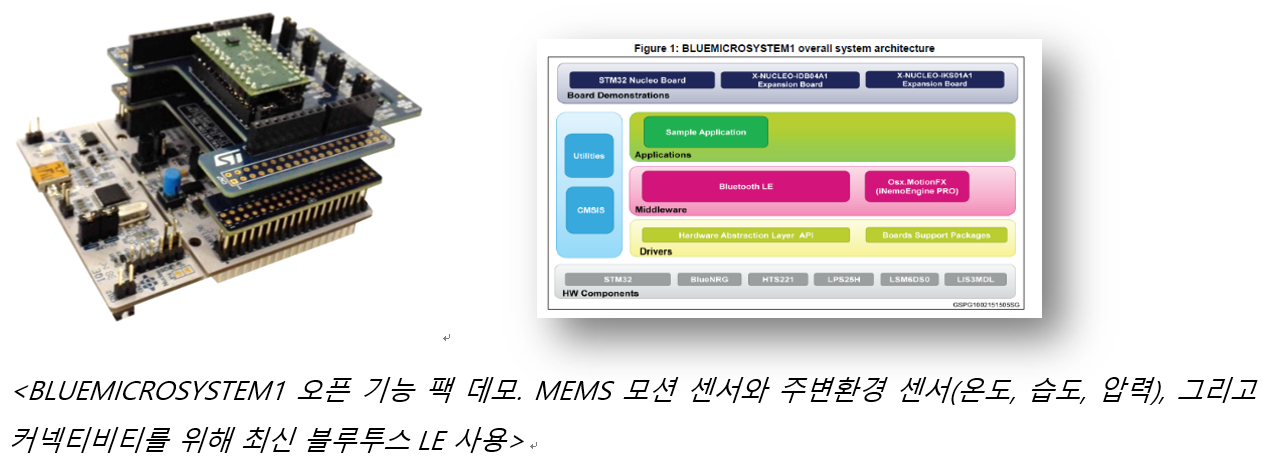
하나 이상의 기능 블럭이 필요한 경우, 팁을 드리자면 기능 팩 SW 소스 코드 가 매우 유용합니다. 이 기능 팩에는 다양한 X-Nucleo 디바이스의 SW 라이브러리를 바로 사용할 수 있도록 완벽한 프로젝트로 단위로 통합돼 있기 때문이지요. 예를 들면 STM32 Nucleo 개발 보드에 연결된 NFC 및 블루투스LEX-Nucleo보드를 사용하여 NFC와 BLE 페어링을 위한 기능 팩을 다운로드할 수 있습니다.
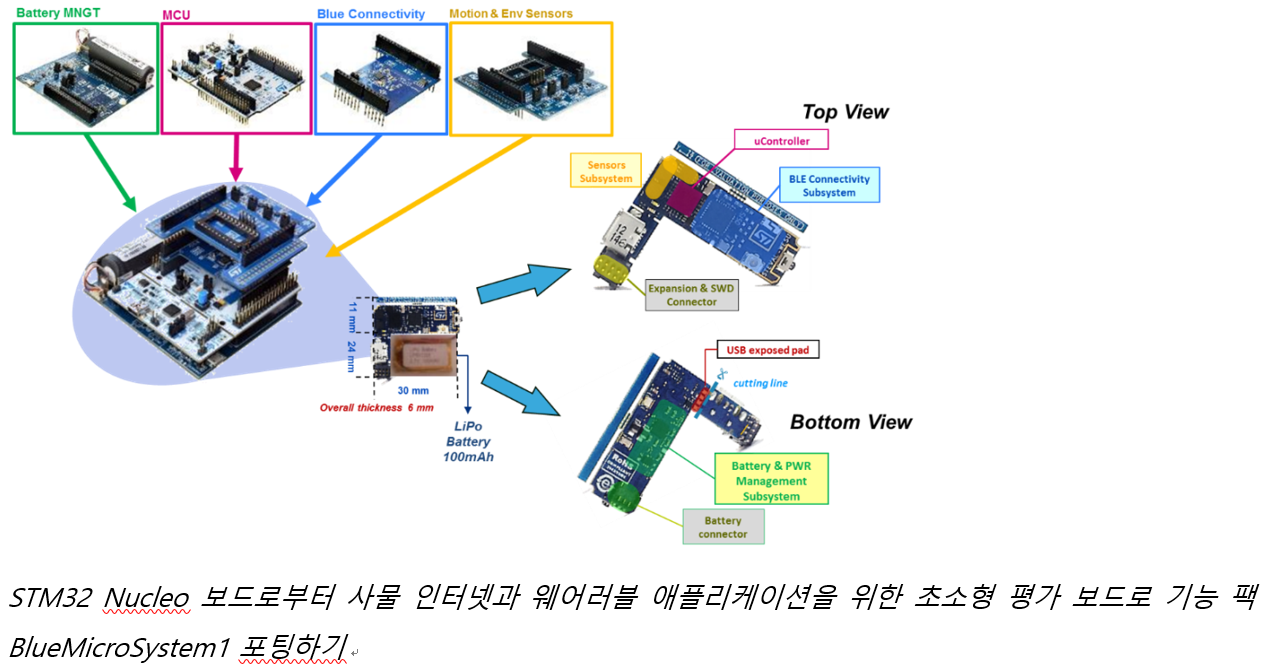
웨어러블이나 사물 인터넷 애플리케이션의 경우 평가 보드 자체의 크기가 문제가 될 수 있습니다. ST는 STM32 Nucleo 보드와 동일한 디바이스를 사용하는 초소형 데모 보드를 통해 포트폴리오를 확대해 나가고 있습니다. 물론, STM32 오픈 개발 환경 툴에서 개발한 SW 프로젝트를 100% 동일하게 포팅 가능합니다.
Q. 마지막으로STM32 개발 환경의 장점을 간략하게 소개 부탁드립니다.
개발자에게 있어 가장 중요한 것은 오랜 제품에 관한 노하우와 시장내의 신뢰도라고 생각합니다. 개발하고 있는 임베디드 애플리케이션에 ST 마이크로컨트롤러를 사용하면, ST의 MCU 아키텍처, 기술력, 멀티 소스 제조, 장기적 공급 등의 오랜 기간 축적되어온 ST의 노하우와 신뢰를 통해 더욱 안정적인 개발이 가능할 것으로 생각됩니다.
무엇보다도, STM32 오픈 개발 환경은 개발 작업을 한층 더 쉽게 만들도록 고안되었기 때문에 기초적이면서도 복잡한 HW 및 SW 기능 블럭들을 맞춤화하기 쉽습니다. 예를 들어 복잡한 RF 지식 없이도 RF 연결이 필요하다면 X-Nucleo 보드를 시스템에 연결하고 사용 가능한SW 프로젝트를 맞춤화 할 수 있기 때문입니다. 마지막으로STM32 오픈 개발 환경은 제품 프로토타입 설계 시 드라이버에서 애플리케이션 레벨까지 개발 엔지니어의 아이디어를 가장 빠르게, 매끄럽게 이끌어낼 수 있도록 돕는 최상의 개발 환경입니다.
Comments
Related news
STMicroelectronics Supports All STM32 MCUs with Software Platform STMcube
2015.02.25by 명세환 기자
ST Releases Additional STM32 'Nucleo' Development Board
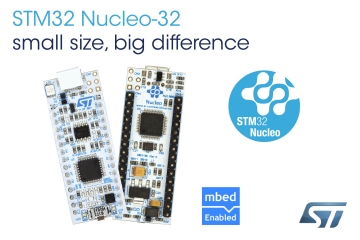
STMicroelectronics has launched an additional compact form factor STM32 Nucleo development board for small 32-pin products in the STM32 microcontroller product family with an expandable design. The new STM32 Nucleo-32 board offers direct support for various IDEs and direct access to embedded online resources.
2015.10.30by
ST begins STM32F4 mass production and supports new Nucleo development boards.
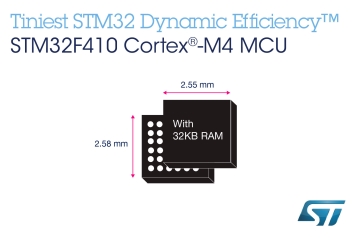
ST announced the start of mass production of the STM32F410 microcontroller, an STM32F4 Access Line device, along with support for the new NUCLEO-F410RB development board. This provides a foundation for utilizing the high-performance STM32 F4 series in a smaller form factor, with lower power consumption and at a lower cost.
2015.12.09by
ST Enhances 32-bit MCU Support with New STM32 Nucleo Boards
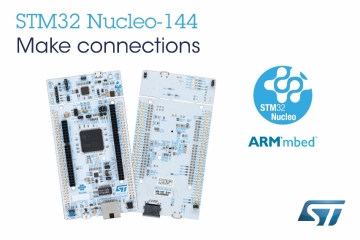
STMicroelectronics (hereafter ST) has launched the STM32 Nucleo-144 series, an affordable small-form-factor development board, further expanding support for the industry-leading STM32 family of 32-bit flash microcontrollers. This new 144-pin board enhances connectivity within the existing STM32 development ecosystem, enabling rapid application development with any STM32 microcontroller, from the most power-efficient devices to the highest-performance ones.
2016.02.05by
Intel Unveils Next-Generation 'Core Ultra Series 3' and vPro Platform for Enterprise PCs
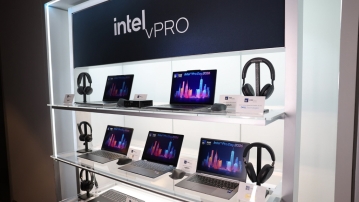
Intel has officially unveiled the "Intel Core Ultra Series 3" for next-generation enterprise PCs and the latest vPro platform, addressing a wide range of demands from enterprise notebooks to high-performance workstations.
2026.03.26by 배종인 기자











